
The Information and Communications Technology (ICT) option explores how computer systems store, process, transmit, and present information. At Leaving Certificate Higher Level, the syllabus requires an analytical understanding across four central strands: Computer Architecture (internal memory, binary measurement, bus systems, hardware compatibility, and ports), Data Communications and Networks (transmission standards, ASCII and Unicode encoding, and Local Area Network administration), The Internet (protocols, search engine mechanics, video conferencing, cybersecurity, and data protection legislation), and Multimedia Design (manipulating digital image and audio formats, along with interactive authoring and legal media use). Under the 2027 examination arrangements, Section C of the written paper presents five option questions—one for each syllabus option—and candidates answer one of them (previously two). Take the mark value and timing from the marks printed on the paper on the day. This note works through the four strands of the ICT option, with the calculations and step-by-step procedures the paper asks for, and highlights direct applications to your coursework folio and artefact.
Computer Architecture: Memory, Units, and Bus Systems
A computer system executes programs by coordinating its central processing unit (CPU), primary internal memory, and interconnected communication pathways known as buses.
Primary Memory: RAM vs ROM
A computer relies on two distinct classes of internal semiconductor memory:
| Feature | RAM (Random Access Memory) | ROM (Read-Only Memory) |
|---|---|---|
| Volatility | Volatile: Contents are erased instantly when power is cut. | Non-volatile: Retains data permanently without electrical power. |
| Access Mode | Read and write: The CPU reads instructions and overwrites data freely. | Read-only: Contents are written during manufacture and read during operation. |
| Core Function | Temporary working space holding open applications, operating system processes, and active data. | Permanent storage for start-up routines (BIOS/UEFI firmware) to initialise hardware at boot. |
| Typical Size | Gigabytes (e.g. 8 GB, 16 GB, 32 GB). | Megabytes (e.g. 16 MB to 64 MB). |
Digital Memory Units and the Kilobyte
Because digital circuitry uses binary logic (base 2), computer memory scales in powers of two rather than powers of ten. In Leaving Certificate Technology, you must use the binary prefix convention:
- 1 Bit (b): A single binary digit ( or ).
- 1 Byte (B): A collection of 8 bits.
- 1 Kilobyte (KB): (never 1000 bytes).
- 1 Megabyte (MB): .
- 1 Gigabyte (GB): .
The System Bus
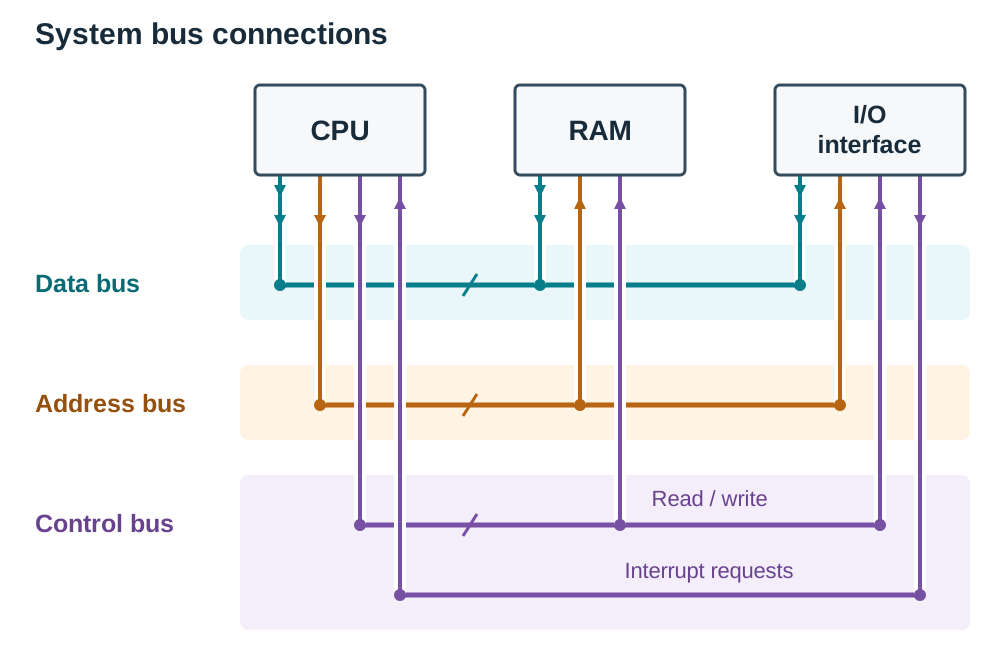
A bus is a set of parallel physical conductors (copper tracks on the motherboard) that transmits binary electrical signals between the CPU, system memory, and input/output interfaces. The system bus comprises three functional lines:
- Data Bus: A bidirectional pathway that transports the actual raw data and program instructions between the processor, RAM, and peripheral controllers.
- Address Bus: A unidirectional pathway originating strictly from the CPU. It carries the physical memory address indicating where data must be fetched from or written to.
- Control Bus: A set of signal lines transmitting command and synchronisation pulses across the system (such as memory read, memory write, clock ticks, and interrupt requests).
Bus Width, Speed, and Addressing Capacity
System bus performance depends on two factors:
- Bus Width: The number of parallel conductive lines, which determines how many bits can travel simultaneously in one transfer (e.g. 32-bit or 64-bit).
- Bus Clock Frequency: The operating speed of the bus, measured in megahertz (MHz) or gigahertz (GHz), defining how many transmission cycles happen each second.
Assuming one transfer per clock cycle, the maximum transfer rate is calculated as:
The width of the address bus determines the processor's maximum addressable memory. An address bus of width bits can access unique memory locations. For a 32-bit address bus:
This mathematical constraint explains why older 32-bit architectures cannot access more than 4 GB of RAM. This is why a computer that has to hold large CAD assemblies in memory needs a 64-bit processor and operating system.
Bus Expansion and Standards
Expansion buses allow computers to be upgraded with compatible add-on cards rather than replaced. Inside a desktop computer, PCI Express (PCIe) serves as the high-speed expansion standard for graphics cards, sound cards, and network interface cards. Externally, Universal Serial Bus (USB) standards provide hot-swappable expansion for peripherals.
System Compatibility, File Interchange, and Communications Ports
Selecting suitable computer hardware requires matching technical specifications to the physical and computational demands of specific tasks, such as Computer-Aided Design (CAD) and Computer-Aided Manufacture (CAM).
Hardware and Software Compatibility
Software applications require specific operating system environments and underlying processing capabilities to execute without failure:
- Processor Architecture: A 64-bit operating system and software package cannot execute natively on a 32-bit processor. For 3D CAD modelling, a multi-core 64-bit CPU operating at 3.0 GHz or higher is needed to compute complex geometry.
- System RAM: Insufficient RAM forces the operating system to swap data out to slower secondary storage (paging), causing severe operational lag. A CAD workstation requires a minimum of 16 GB RAM.
- Graphics Processing Unit (GPU): Rendering complex 3D assemblies requires a dedicated graphics card with its own Video RAM (VRAM), offloading polygon rendering from the CPU.
- Secondary Storage: Solid-State Drives (SSDs) provide read/write speeds exceeding 500 MB/s, drastically reducing boot and file-loading times compared to mechanical Hard Disk Drives (HDDs).
- Device Drivers: A driver is a dedicated software program that allows the operating system to recognise and communicate with a specific hardware peripheral. Peripherals like 3D printers and laser cutters cannot function without an authentic, compatible driver.
Managing Your Files and Working Safely (Core ICT Prerequisites)
Before working on advanced option topics, you must apply the core ICT principles required throughout the syllabus and folio:
- Folder structure: Build a logical tree for the folio, such as
Technology/Folio/01_Research,02_Design_Ideas, and03_Manufacture_Photos. - File naming: Use meaningful names with version numbers and dates, such as
dispenser_assembly_v3_2026-11-14.dwg, so the current file is clear. - Backup: Maintain at least two copies on separate media (school network drive plus an external drive or school cloud account); a single USB stick is never an adequate backup.
- Virus protection: Keep antivirus definitions updated, scan any external drive brought into the workshop, and install security patches promptly.
- Safe working posture: Adjust chairs and monitors so the display sits at eye level to prevent neck and back strain, take regular breaks to avoid eye fatigue and repetitive strain injury, and keep power cables clear of workshop floors.
File Formats and Interchange
Moving digital models between different design, simulation, and manufacturing environments requires exporting to standard intermediary file formats:
- 2D Vector Drafting:
.dxf(Drawing Exchange Format) transfers 2D outlines directly to laser cutters and vinyl plotters. - 3D Solid Models:
.step(Standard for the Exchange of Product model data) or.stl(Stereolithography) transfers solid 3D geometry to slicers for 3D printing. - Tabular Data:
.csv(Comma-Separated Values) transfers structured text and numerical records between databases, spreadsheets, and control programs. - Document Viewing:
.pdf(Portable Document Format) preserves layout, typography, and vectors identically across all operating platforms.
Simply renaming a file's three-letter extension does not alter its underlying binary structure. The file must be translated using an export or save-as routine in the software.
Communications Ports and Transmission Modes
A port is the physical socket on the computer chassis; a connector is the matching plug on the cable. Data moves through these interfaces via one of two fundamental transmission modes:
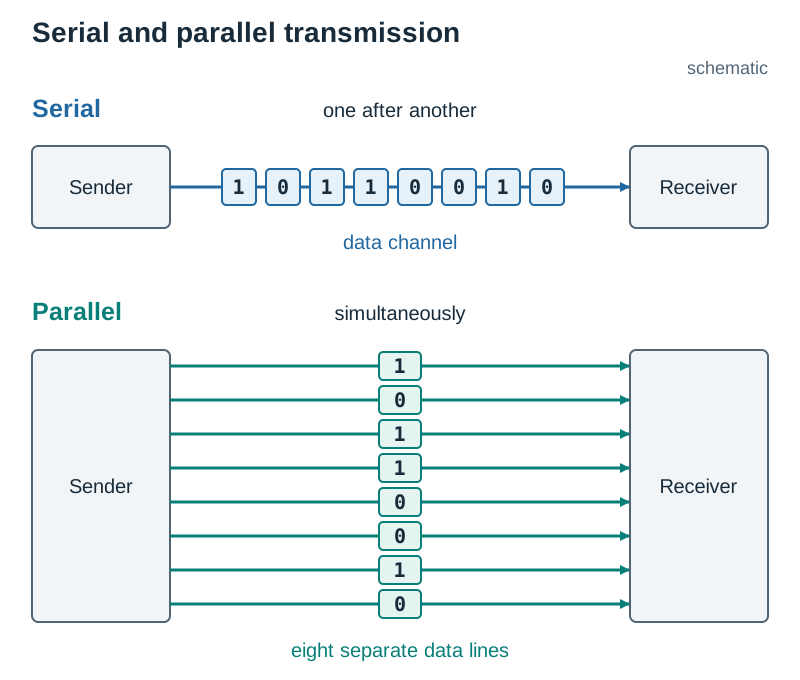
- Serial Transmission: Bits travel sequentially, one after another down a single physical conductor. Modern serial connections (like USB and PCIe) operate at far higher speeds than older parallel links because they eliminate electrical crosstalk and clock skew.
- Parallel Transmission: Multiple bits travel simultaneously across multiple side-by-side conductors (such as 8 bits across 8 separate lines). Over longer distances or high frequencies, slight differences in wire resistance and capacitance cause bits to arrive out of sync (clock skew), limiting practical cable length.
| Port Interface | Transmission Mode | Typical Application | Distinct Features |
|---|---|---|---|
| USB (Universal Serial Bus) | High-speed serial | Keyboards, mice, flash storage, CNC machine links. | Can be plugged in and unplugged while the computer is running (hot-swappable), and supplies low-voltage DC power as well as data. |
| HDMI | High-speed serial | Monitors, TVs, digital projectors. | Carries uncompressed digital video and multi-channel audio in a single cable. |
| Ethernet (RJ-45) | Serial, over twisted-pair cable | Local Area Network (LAN) wired connections. | High noise immunity; reliable and low-latency up to 100 metres. |
| 3.5 mm Audio Jack | Analogue transmission | Microphones, external speakers, headsets. | Transmits analogue audio signals directly to audio circuitry. |
| Legacy Parallel Port | Parallel | Obsolete printers and early CNC interfaces. | Bulky 25-pin connector; highly susceptible to crosstalk and clock skew over distance. |
Data Representation: Standard Character Codes (ASCII & Unicode)
Computers do not store alphabetical letters, punctuation marks, or control actions directly; they store binary numbers. Standard character codes establish an agreed lookup table between characters and numerical values, ensuring that text authored on one computer appears correctly when read on another.
Standard ASCII
ASCII (American Standard Code for Information Interchange) is a 7-bit character encoding system:
- A 7-bit code yields unique codes, numbered decimal 0 to 127.
- Control Characters (0–31): Non-printing codes governing machine actions (e.g. code 10 represents Line Feed, code 13 represents Carriage Return, code 9 represents Horizontal Tab).
- Printable Characters (32–126): Punctuation, decimal digits, and the Latin alphabet.
- Space character = decimal 32.
- Numerals
'0'to'9'run consecutively from decimal 48 to 57. Character'5'(ASCII code 53) represents a textual character, not the mathematical quantity five. - Uppercase letters
'A'to'Z'run consecutively from decimal 65 (01000001in binary) to decimal 90. - Lowercase letters
'a'to'z'run consecutively from decimal 97 (01100001in binary) to decimal 122. - In binary, changing the single bit with place value 32 switches between upper and lower case:
'A'is01000001(65) and'a'is01100001(97).
ASCII Encoding Example
If the word Dog is stored in ASCII:
'D'= decimal 68 (since'A'is 65,'D'is ).'o'= decimal 111 (since'O'is 79, and lowercase is 32 higher: ).'g'= decimal 103 (since'G'is 71, ).- Total storage in pure 7-bit ASCII = . When stored in standard 8-bit bytes (one byte per character), it occupies 3 bytes.
Limitations of ASCII and the Rise of Unicode
Basic 7-bit ASCII was created solely for unaccented American English. It cannot represent the Irish language's accented vowels (fadas: á, é, í, ó, ú), nor can it represent non-Latin alphabets or Asian script characters.
- Extended ASCII: Uses an 8-bit byte ( codes). Codes 128 to 255 add regional Western European symbols, but conflicting international regional code pages cause text corruption when files are shared across borders.
- Unicode: A modern universal standard allocating unique binary codes to over 140,000 characters across all world writing systems, technical symbols, and emoji. Its most common implementation, UTF-8, uses a variable-width system (1 to 4 bytes per character). UTF-8 remains completely backward-compatible with 7-bit ASCII while allowing Irish fadas and international scripts to be encoded seamlessly.
Local Area Networks (LANs): Architecture, Topologies, and Administration
A Local Area Network (LAN) links computers, peripherals, and storage devices across a confined geographical area, such as a school workshop, computer laboratory, or commercial office.
Network Types and Architecture
| Network Type | Geographical Scope | Ownership and Infrastructure | Typical Setup |
|---|---|---|---|
| LAN (Local Area Network) | Single room, building, or school site. | Owned, installed, and managed by the organisation. | Workstations, network switch, file server, and shared CNC machinery. |
| WAN (Wide Area Network) | Across towns, countries, or globally. | Uses leased telecommunications infrastructure (fibre, satellite). | The internet; multi-campus corporate networks. |
| WLAN (Wireless LAN) | Confined local area with wireless coverage. | Wi-Fi access points connected back to the wired LAN switch. | Laptops and mobile devices connecting without trailing leads across floors. |
Client–Server vs Peer-to-Peer
- Client–Server: A dedicated server hosts files, manages security credentials, handles print queues, and centralises backups. Workstations (clients) request resources from the server. This model provides centralised administration and strong data control, but if the central server fails, access stops.
- Peer-to-Peer: All computers have equal status and share their local drives directly with one another without a central coordinator. This is inexpensive and simple to set up for two or three machines, but running backups, maintaining security, and managing user access become chaotic as the network grows.
Star Topology
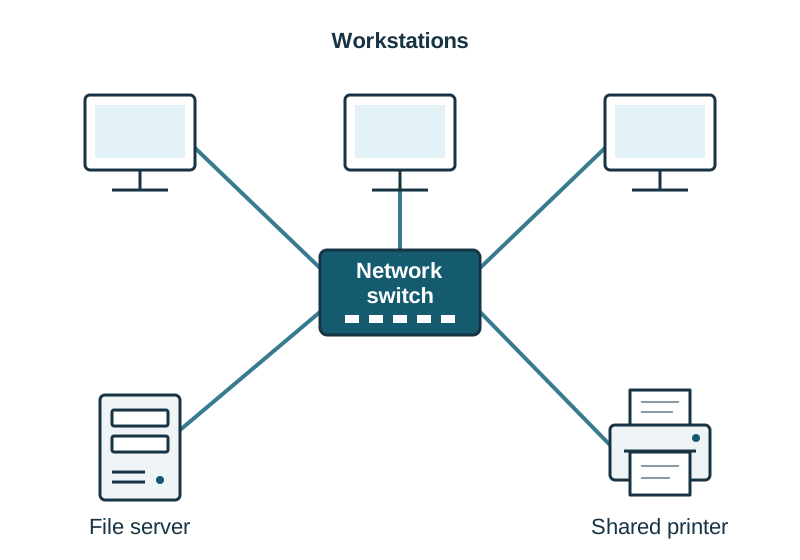
Most modern wired LANs use a star topology, where every individual workstation and peripheral connects through its own dedicated cable directly to a central network switch.
- Advantage: A break or fault in one network cable affects only that specific workstation; all other machines continue operating normally. Extra devices can be added without disrupting the network.
- Disadvantage: It requires significantly more physical cabling than a bus topology, and if the central switch fails, the entire network loses connectivity.
Functions and Drawbacks of a LAN
- Key Functions:
- Resource sharing: Centralises access to expensive hardware (network laser cutters, 3D printers, colour plotters).
- Central file storage: Stores project files on a central server, ensuring reliable automated backups.
- Shared internet: Distributes a single broadband link via a managed router and firewall.
- Communication: Supports internal messaging, collaborative group folders, and user tracking.
- Drawbacks and Limitations:
- High setup cost: Network switches, cabling, servers, and software licences represent a substantial capital cost.
- Specialist management: Requires a system administrator to manage accounts, access rights, and security patches.
- Single point of failure: Failure of the central switch or primary file server halts work for all connected users.
- Malware transmission: An infected USB drive plugged into one client workstation can spread malware across shared network drives.
Network Administration and Access Rights
Operating a secure LAN requires managing user identities and setting precise access permissions:
- User Authentication: Every user enters a unique username and private password. This confirms the user's identity and loads their personal desktop profile and file mappings.
- Access Rights (Permissions):
- No Access: The folder or file is hidden or completely blocked.
- Read-Only: The user can open and view the document, but cannot edit, overwrite, or delete it (used for teacher project briefs and shared CAD templates).
- Read/Write: The user can open, edit, modify, and save changes to files (appropriate for individual student project folders).
- Full Control: Grants complete administrative authority to delete folders and modify rights for other users.
- Password-Protected Folders: Provides a second tier of protection on top of network login credentials for sensitive records, such as marking folders or survey data.
Cybersecurity, Remote Access, and Data Protection Legislation
Transferring project files remotely and maintaining networked systems requires robust cybersecurity safeguards and adherence to legal frameworks.
Cybersecurity Threats
- Malware: Malicious software designed to disrupt, damage, or gain unauthorised access to a computer system. Includes viruses (which attach to host executable files and replicate when run), worms (which replicate across networks independently without human intervention), and trojans (malware disguised as legitimate software).
- Ransomware: Malicious software that silently encrypts files or locks an operating system, displaying an extortion screen demanding payment for the decryption key.
- Phishing: Deceptive, mass-emailed communications masquerading as authentic organisations (banks, parcel carriers) to trick individuals into disclosing account passwords or financial details.
- Spear Phishing: A targeted cyberattack tailored specifically to an individual or small organisation, using researched personal background details to appear legitimate.
- Whaling: A high-level category of spear phishing directed specifically at senior executives, directors, or administrators to authorise large financial transfers or access restricted institutional databases.
Defensive Countermeasures for Remote Transfers
- Antivirus software: Scans incoming download streams and file attachments, cross-referencing known virus definitions to quarantine malicious files.
- Software patching: Installing operating system and software security updates immediately to seal known security vulnerabilities and exploits.
- Multi-Factor Authentication (MFA): Demands two or more independent authentication factors before granting access: something you know (password), something you have (an authenticator app code on a smartphone), or something you are (biometrics). Two different passwords do not constitute multi-factor authentication.
- Encrypted file sharing: Encrypting files end-to-end so that intercepted packets appear as unreadable ciphertext to third parties.
Data Protection Legislation (GDPR & Data Protection Act 2018)
Personal data is any information relating to an identified or identifiable living person. In Ireland, personal privacy is protected under the General Data Protection Regulation (GDPR) and the Irish Data Protection Act 2018, regulated by the Data Protection Commission (DPC).
Anyone collecting or storing personal data must adhere to six statutory principles:
- Lawfulness, Fairness, and Transparency: Data must be gathered lawfully with clear, informed consent from the subject.
- Purpose Limitation: Data must be collected only for an explicit, legitimate stated purpose, and not processed for any other reason.
- Data Minimisation: Only the strict minimum amount of personal data necessary for the stated purpose may be requested.
- Accuracy: Reasonable steps must be taken to ensure records are accurate and kept up to date.
- Storage Limitation: Personal data must be retained only for as long as necessary, and permanently deleted or anonymised thereafter.
- Integrity and Confidentiality: Data controllers must implement appropriate technical security measures (passwords, role-based access, encryption) to protect data from breach, theft, or unauthorised access.
Intellectual Property, Copyright, and Coursework Ethics
Under the Copyright and Related Rights Act 2000, original creative works (drawings, photographs, software, music, literature) receive automatic legal copyright protection upon creation. Content found online is not in the public domain simply because it is accessible without a paywall.
In Leaving Certificate Technology coursework, material copied directly from the internet or other sources and presented as your own work receives no marks. Every research source must be referenced and acknowledged—publications, online sources, specialist organisations, and any material generated using AI software. Copying or reproducing material from such sources may itself be treated as plagiarism.
Multimedia and Design: Image Processing, Audio, and Project Authoring
Multimedia combines text, graphic images, digital audio, and video into an interactive project where the user actively directs their experience.
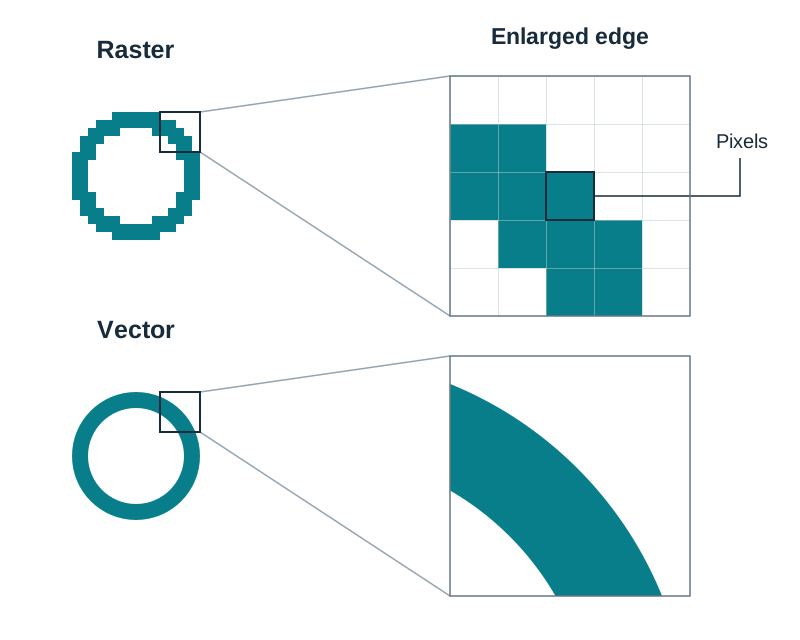
Two Families of Image File: Raster vs Vector
- Bitmap (Raster) Graphics: Formats such as
.jpg,.png,.gif, and.bmpstore images as a grid of coloured pixels. File size depends on pixel dimensions and colour depth. If an image is scaled beyond its original resolution, the individual pixels become visible and the edges appear jagged and blocky. - Vector Graphics: Formats such as
.dxf,.svg, and CAD drawings store shapes as mathematical coordinate equations (lines, curves, arcs, and colour fills). Vector graphics can be scaled to any size with no loss of quality, making them essential for technical line drawings, logos, and CNC machining profiles. - Exporting a vector drawing to
.jpgor.pngrasterises it—it permanently fixes the vectors onto a pixel grid at one resolution, and enlarging it afterwards will not restore crisp lines. Always keep the vector master and export raster copies only for display.
Getting Images into the Computer
- Scanning a Sketch or Drawing:
- Clean the flatbed scanner glass and place the sketch face down, aligned square with the guide edges.
- Select the capture mode: 24-bit colour for rendered presentations or photographs; 8-bit greyscale for pencil sketches and technical orthographic projections. A greyscale file is roughly one-third the size of the equivalent 24-bit colour file.
- Set the resolution in dpi (dots per inch—the sampling density). Use 300 dpi for images intended for printed folio pages; 72 dpi to 150 dpi is sufficient for on-screen digital presentations. Doubling the dpi roughly quadruples the raw file size.
- Run a preview scan and crop tightly around the sketch to discard empty margins before final capture.
- Scan and save into your project directory as uncompressed
.pngor.tifffor further editing, or.jpgfor direct inclusion in a presentation.
- Transferring from a Digital Camera:
- Capture the artefact at a suitable resolution with good lighting to eliminate harsh shadows.
- Connect the camera via USB cable or insert its memory card into a card reader; it mounts as a removable storage volume.
- Copy (do not cut or move) the image files directly into your project media folder (
Technology/Folio/Images). - Rename the files immediately using descriptive names (e.g.
chassis_drilling_stage1.jpg) so they can be identified quickly during folio compilation.
Digital Image Formats and Compression
- JPEG (
.jpg): Employs lossy compression. It permanently discards subtle colour differences that the human eye cannot easily distinguish. Ideal for photographic evidence in folios; does not support transparency. - PNG (
.png): Employs lossless compression. Retains crisp line edges, supports transparency (including an alpha channel for soft blended edges), and is ideal for logos, flowchart diagrams, and CAD renders. - GIF (
.gif): Limited strictly to an 8-bit palette ( colours). Supports simple frame animation and single-colour binary transparency. - BMP (
.bmp): Raw, uncompressed raster bitmap graphic. Maintains exact original quality with zero compression artefacts, producing very large files unsuited for network transmission.
Image Sizing and Property Adjustments
Image file size depends on pixel resolution and colour depth:
- Brightness and Contrast: Brightness shifts the overall luminance level. Contrast expands or compresses the tonal difference between shadows and highlights.
- Gamma: Adjusts the luminance curve of the midtones without clipping pure black shadows or blowing out pure white highlights, which helps rescue underexposed workshop photographs.
- Cropping: Trims away background clutter (such as tools on a workbench) to focus attention on the artefact detail.
Digital Sound Formats and Processing
Audio waveforms are converted into digital data by sampling analogue voltage levels:
- WAV (
.wav): Uncompressed Pulse Code Modulation (PCM). Preserves complete acoustic frequency response and dynamic range. Essential for master audio recording; consumes roughly 10 MB per minute of stereo audio. - MP3 (
.mp3): Uses lossy compression. It permanently deletes sounds the human ear is unlikely to notice—frequencies beyond human hearing range and quiet sounds masked by louder ones at the same moment. This reduces file size by roughly 90% (a 10:1 ratio) with little noticeable loss in speech clarity. - Sound Editing Operations: Trimming lead-in silence, normalising peak amplitude to achieve clear volume without clipping distortion, and applying volume fades at track boundaries to prevent audible clicks.
Interactive Multimedia Authoring and Coursework Regulations
An interactive multimedia project combines text, images, sound, and user-driven navigation:
- Open existing multimedia applications, navigate through their menus, and use their content (images, audio clips, charts) in presentations of your own, acknowledging all sources used.
- Construct a structure diagram (flowchart) mapping all screens, buttons, and branching hyperlinks before opening the authoring software.
- Design consistent navigation buttons (Home, Back, Next) placed in identical screen locations across all pages.
- SEC Coursework Regulation (2027): If an optional multimedia presentation is submitted to enhance your Higher Level coursework display, it must have a maximum duration of 3 minutes, be set up by you, and be provided in a digital format (such as
.mp4using H.264 video compression) ready for viewing on a standard school PC or laptop.
Key terms
- RAM (Random Access Memory)
- Volatile internal working memory used by the processor to read and execute active programs and current data, which erases when power is lost.
- ROM (Read-Only Memory)
- Non-volatile permanent memory containing fixed start-up instructions (firmware/BIOS) that persists when power is removed.
- Kilobyte (KB)
- A standard binary unit of memory capacity equal to exactly 2^10 or 1024 bytes.
- Data Bus
- A bidirectional bus pathway that carries actual data words between the CPU, memory, and peripheral controllers.
- Address Bus
- A unidirectional bus pathway carrying physical memory addresses from the processor to locate data in system memory.
- Control Bus
- A set of signal tracks transmitting command, clock, and timing pulses to synchronise operations across computer components.
- Driver
- A dedicated software program that allows the operating system to recognise and communicate with a specific hardware peripheral.
- Serial Transmission
- A communication method where data bits travel sequentially, one behind another, along a single conductive channel.
- Parallel Transmission
- A communication method where multiple data bits travel simultaneously along multiple parallel conductors.
- ASCII
- American Standard Code for Information Interchange; a 7-bit character encoding system providing 128 unique character codes.
- Unicode
- A universal character encoding standard capable of representing over 140,000 characters across all global languages and symbol sets.
- Local Area Network (LAN)
- A network linking computers, servers, and shared peripherals within a confined geographical area, such as a school or building.
- Switch
- A networking device that connects hardware on a LAN and intelligently directs data packets directly to their destination device using MAC addresses.
- Router
- A networking hardware device that directs data packets between different networks, such as linking a LAN to the internet.
- Protocol
- An agreed set of standardised rules governing the format, transmission, and error checking of data communication across networks.
- TCP/IP
- The core suite of internet protocols; TCP manages packet division and error checking, while IP handles addressing and routing.
- Multi-Factor Authentication (MFA)
- A security mechanism requiring two or more independent authentication credentials (knowledge, possession, inherence) before granting system access.
- Ransomware
- Malicious software that encrypts user files and locks system access, demanding an extortion fee for the decryption key.
- Phishing
- A fraudulent social engineering attack using deceptive communications to trick users into disclosing passwords or personal data.
- Personal Data
- Any information relating to an identified or identifiable living person, protected legally by GDPR and the Data Protection Act 2018.
- Lossy Compression
- A data reduction process (used in JPEG and MP3) that permanently discards less perceptible data to achieve substantially smaller file sizes.
- Lossless Compression
- A data compression process (used in PNG) that reduces file size without discarding any original image data.
- Gamma
- A digital image adjustment that modifies the luminance values of midtones without shifting the darkest black or lightest white points.
- Interactivity
- Features in a digital system that allow users to actively direct, navigate, and control their path through content.
Check yourself
What is the primary operational difference between volatile and non-volatile memory?
Volatile memory (like RAM) loses all stored data immediately when power is turned off, whereas non-volatile memory (like ROM or flash storage) retains its data permanently without electrical power.
How many bytes are contained in 16 Kilobytes (KB) of memory?
Since 1 KB = 1024 bytes, 16 KB = 16 × 1024 = 16,384 bytes.
Identify the three distinct buses that make up the system bus and state the function of each.
The data bus carries the actual data between components; the address bus carries memory addresses from the CPU to identify locations; the control bus transmits timing, clock, and command signals to synchronise operations.
State one advantage and one disadvantage of a star topology LAN.
Advantage: a damaged cable affects only that one machine, and extra devices are easy to add. Disadvantage: more cabling is required, and if the central switch fails, the entire network loses connectivity.
In ASCII, the decimal code for uppercase 'A' is 65. What are the decimal codes for uppercase 'D' and lowercase 'd'?
Uppercase 'D' is 68 (65 + 3). Lowercase letters are 32 higher than uppercase, so lowercase 'd' is 100 (68 + 32).
You need to email a 40 MB folio PDF to your teacher. State the problem and one practical solution.
Most mail servers reject message attachments larger than roughly 20 MB to 25 MB. Solution: compress (zip) the file, split the document, or upload it to school cloud storage and email a secure download link.
Which image format should be chosen for a web logo requiring a transparent background: JPEG or PNG? Explain why.
PNG, because it supports alpha-channel transparency and uses lossless compression to preserve crisp lines and text. JPEG does not support transparency and would convert the background to a solid colour.
What is the maximum running duration permitted for an optional multimedia presentation submitted for Leaving Certificate Technology coursework assessment?
A maximum duration of 3 minutes, set up by the candidate and ready for viewing on a school laptop or PC.