
Information and Communications Technology (ICT) in Leaving Certificate Technology spans both the compulsory Core (Section 14) and the dedicated Option (Section 20). At Higher Level you go deeper: inside the machine (buses, clock speed, and the fact that a kilobyte is 1024 bytes, not 1000), then outwards to local area networks, internet protocols, and cybersecurity. The syllabus also requires practical mastery of productivity tools (word processing, desktop publishing, spreadsheets), digital media manipulation (adjusting image brightness, contrast, tone, and gamma), and awareness of Irish and EU Data Protection legislation. For the 2027 examination, Section C requires candidates to answer one of five option questions, while Section A and Section B test core concepts across short and structured questions.
Course Context and 2027 Assessment Structure
ICT appears in two distinct syllabus areas. The Core is mandatory for all candidates, covering basic computer components, safe system management, data security, spreadsheets, and design research. The Option provides an in-depth study of computer architecture, communications ports, network administration, internet protocols, data protection law, and interactive multimedia design.
The Higher Level Written Examination
In Section A short questions, marks come from two crisp, separate points per part. In Section C option sub-parts, command words such as explain, outline, distinguish between, and describe require a dedicated explanation for every item named in the question stem. Under the Department of Education's 2027 Assessment Arrangements, the paper structure is:
- Section A (core, compulsory): answer 12 of 15 short questions. This compulsory section accounts for about 36% of the written paper.
- Section B (core, compulsory): answer 2 long core questions. This section accounts for about 24% of the written paper.
- Section C (options): answer one of five long option questions, instead of two as in earlier years. The options section carried 40% of the paper when two questions were answered. The marks printed on the 2027 paper are what count, so check the front cover and the marks beside each question on the day.
The 2027 Coursework Project
Coursework carries 50% of the subject marks and consists of two parts: an artefact (100 marks) and a design folio (100 marks), completed in school by Friday 19 March 2027. The Higher Level brief requires designing and making a working model of a device, system, or technical aid to support independent living, wellbeing, or social participation in an ageing society, within a maximum dimension of 500 mm.
Key coursework rules for ICT:
- Your artefact must include an electro-mechanical element. Software, CAD models, or screen presentations on their own do not satisfy the brief.
- Write the two options you are studying clearly on your folio cover.
- The folio must record all stages of your work, including a photographic record of manufacture and testing against the brief.
- If computer-aided manufacture (such as 3D printing or laser cutting) is used, supporting hardcopy CAD drawings must be included in your folio to authenticate individual work.
- A multimedia presentation is optional. If submitted to enhance your display, it must have a maximum duration of 3 minutes and be set up ready to view on a school PC.
- You must reference all research sources, including websites and any tools using artificial intelligence. Uncredited copying is treated as plagiarism.
Computer Architecture, System Buses, and Workstation Safety
A computer system combines hardware and software to execute four fundamental operations: input, processing, output, and storage.
Core System Components
- Input: Captures data and commands (keyboard, mouse, scanner, digital camera, microphone).
- Processing: Executes instructions and logic via the Central Processing Unit (CPU).
- Output: Conveys processed data (monitor, printer, audio speakers).
- Storage: Retains files permanently on non-volatile media (SSD, HDD, USB storage).
Hardware is the physical parts you can touch (case, monitor, keyboard, CPU, drives); software is the coded programs the hardware follows. System software runs and controls the machine—chiefly the operating system (Windows, macOS, Linux), which manages files, hardware, and the user interface, together with device drivers. Application software does the user's job—word processor, spreadsheet, CAD, graphics package. Neither works without the other, which is why a driver must be installed before a peripheral will run.
Memory Hierarchy: RAM, ROM, and Storage
- RAM (Random Access Memory) is volatile, high-speed read/write working memory. It holds the active operating system modules, open software, and current data. When electrical power cuts out, RAM loses all stored content.
Memory analogy: RAM is your active desk surface—fast to reach, but cleared off every evening.
- ROM (Read-Only Memory) is non-volatile permanent memory containing fixed startup firmware routines, such as the BIOS or UEFI, required to initialise hardware and boot the computer. ROM is like the printed machine manual bolted permanently inside your desk drawer.
- Secondary storage (solid-state drives and hard drives) provides high-capacity, permanent file storage, functioning like the metal filing cabinet in the corner.
Processor Performance and System Buses
The processor clock speed is the frequency of timing pulses produced by an internal crystal oscillator, measured in gigahertz (GHz), where . Performance also depends on architecture, cache size, and the number of cores.
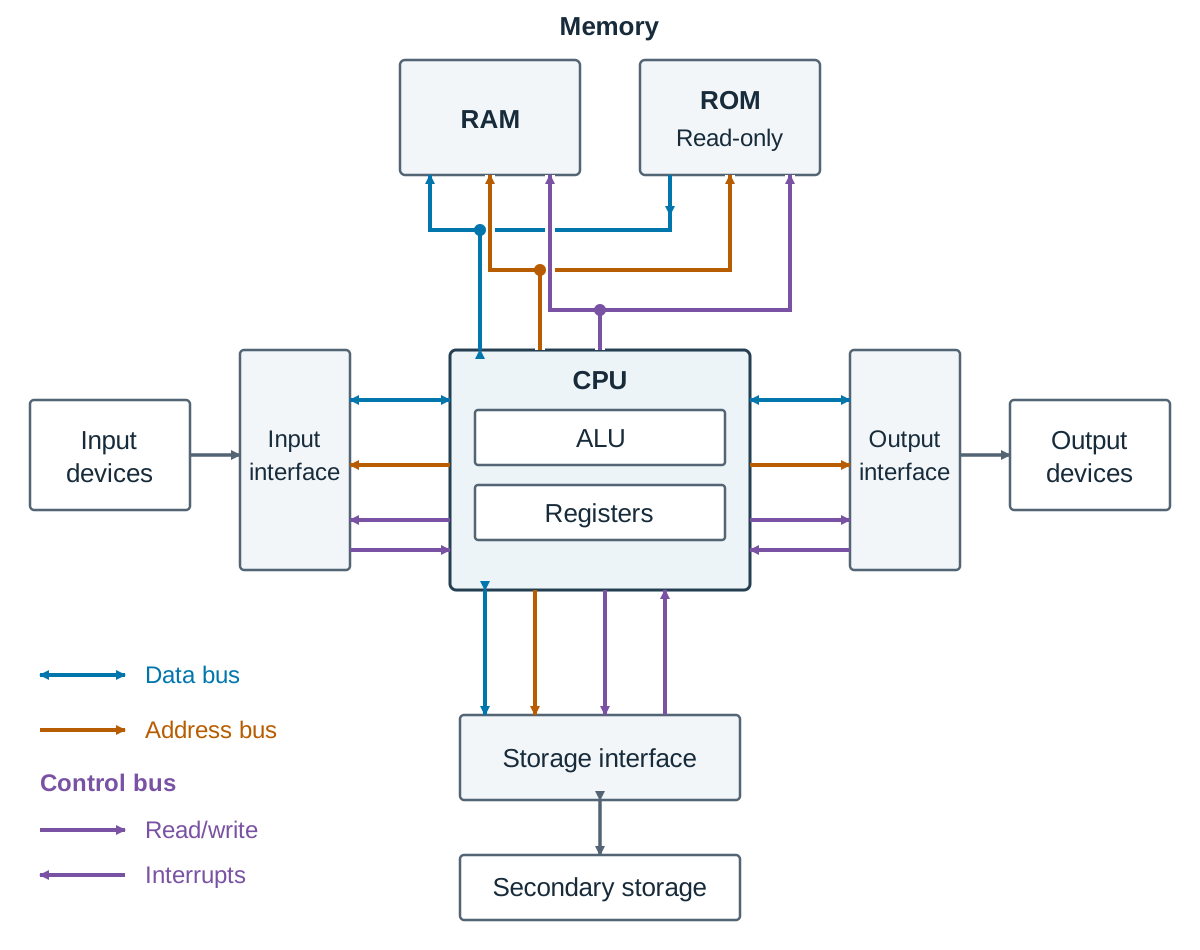
To sketch the system architecture block diagram: draw three boxes in a row—Input devices, CPU (with an internal box for the Arithmetic Logic Unit and Registers), and Output devices. Place Memory (RAM/ROM) above the CPU and Secondary Storage below it. Connect CPU, memory, and input/output interfaces with three bus pathways:
- Data bus: Bidirectional pathway carrying data words between the CPU, memory, and peripherals. Its bit width (such as 32-bit or 64-bit) determines how much data transfers per cycle.
- Address bus: Unidirectional pathway driven by the CPU to point to the physical memory location being accessed. An address bus with lines can address unique memory locations.
- Control bus: Bidirectional and unidirectional control lines carrying clock pulses, read/write commands, and interrupt requests.
Expansion: the motherboard also carries expansion slots on the internal bus (such as PCIe) so extra cards—a dedicated graphics card, a faster network card, or an additional storage controller—can be fitted later; the number of free slots and the bus standard supported set the limit on how far a system can be upgraded.
Hardware and Software Compatibility
A peripheral only works if three things line up: the physical connector fits the port, the operating system supports the device, and the correct device driver is installed. For example, a USB 3.0 drive functions in a USB 2.0 port, but data transfer will drop to the slower speed.
Communications Ports
A port is an external interface through which peripherals exchange data with the computer:
| Port | Signal type | Typical peripherals | Notes |
|---|---|---|---|
| USB | Serial, digital, carries power | Mouse, keyboard, printer, 3D printer, memory drive | Hot-swappable; supports multiple devices via hubs |
| HDMI | Digital video and audio | Monitor, data projector, television | Single cable carrying high-definition picture and sound |
| Ethernet (RJ45) | Digital, wired network | Network switch, broadband router | Faster and more secure than wireless connections |
| 3.5 mm jack | Analogue audio | Headphones, external microphone | Useful for recording interview audio for coursework |
| Bluetooth | Short-range radio | Wireless mouse, keyboard, headset | Wireless convenience; requires device pairing |
Working Safely at a Computer
Personal workstation safety (ergonomics):
- Adjust chair height so your feet rest flat on the floor with forearms horizontal to prevent back and wrist strain.
- Position the top of your screen at eye level, roughly an arm's length away, avoiding neck strain.
- Position displays away from window glare and harsh lighting to prevent eye fatigue.
- Take a short break away from the display every 30 to 40 minutes to reduce the risk of repetitive strain injury (RSI).
Safe operation of equipment:
- Keep drinks and food away from keyboards and system units.
- Route mains cables through protective trunking to avoid trip hazards and never overload electrical sockets.
- Report frayed cables or cracked casings immediately; never open internal power supply enclosures.
- Close open applications and shut down the operating system through software before switching off power, preventing file corruption.
Data Representation, Capacity Units, and Standard Interchange Codes
Digital computers represent information using binary digits (bits: 0 or 1). Eight bits form one byte, representing a single alphanumeric character.
Capacity Units and the Binary Kilobyte Standard ()
When calculating memory and file capacity in Leaving Certificate Technology, use binary powers of two as specified in the syllabus:
Transfer rates (such as MB/s) and commercial storage drive packaging use decimal units (), which explains why an advertised 500 GB drive displays as roughly 465 GB in system software.
ASCII (American Standard Code for Information Interchange)
Standard ASCII uses a 7-bit binary code to represent 128 characters (decimal codes 0 to 127):
- Codes 0 to 31 are non-printing control characters (e.g. carriage return, line feed).
- Code 32 represents a space.
- Digits '0' to '9' occupy decimal codes 48 to 57.
- Uppercase letters 'A' to 'Z' occupy decimal codes 65 to 90.
- Lowercase letters 'a' to 'z' occupy decimal codes 97 to 122.
The case rule: in ASCII, lowercase letters are exactly 32 greater than their uppercase equivalent. In binary, adding 32 switches on the 32-value bit (): 'A' = 65 (1000001), while 'a' = 97 (1100001). The remaining bits are identical.
Extended ASCII uses 8 bits (256 codes) to support regional symbols such as the Irish fada (á, é, í, ó, ú). Unicode uses multi-byte encoding (such as UTF-8) to represent symbols across all global languages.
Cross-Platform File Interchange
When transferring technical work between different computer platforms, standard interchange formats prevent data loss:
- Documents: PDF preserves layout, fonts, and vector illustrations across devices.
- Tabular Data: CSV (Comma-Separated Values) transfers plain text spreadsheet data.
- CAD/CAM Geometry: DXF and SVG export 2D profiles for laser cutting; STL and STEP export 3D geometry for 3D printing and CNC machining.
Local Area Networks, Internet Protocols, and Remote Access
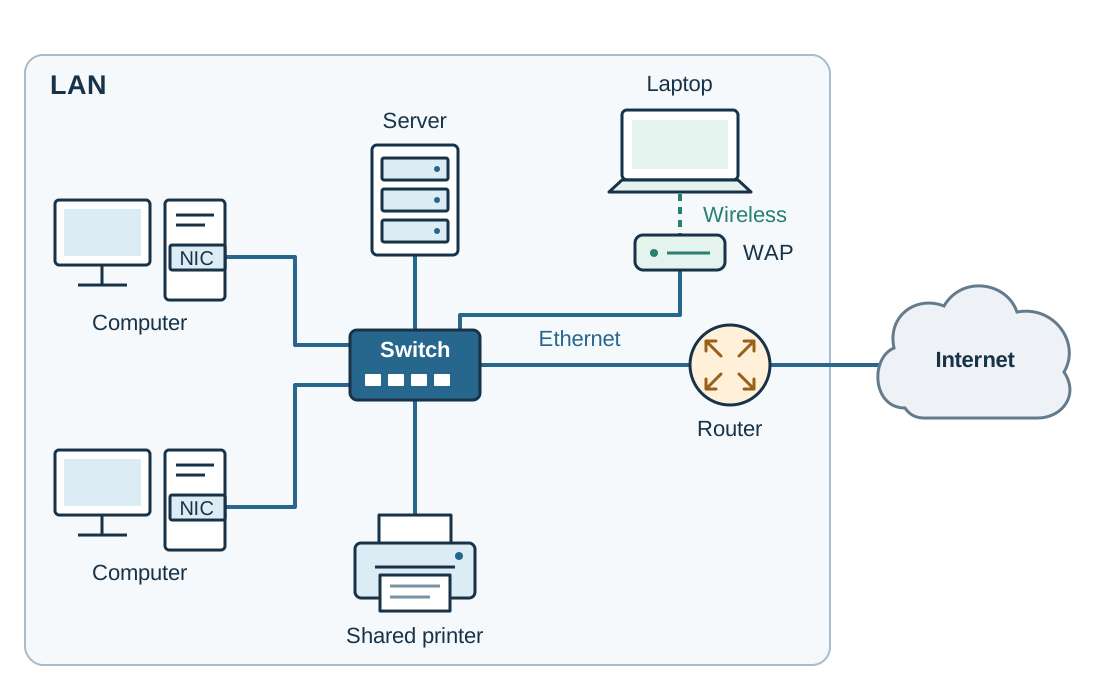
A Local Area Network (LAN) connects computers and peripherals within a single room, workshop, or building. A LAN lets one expensive resource serve the whole room: a single 3D printer or laser cutter can be shared, files can be stored centrally on a server and reached from any machine, and one internet connection serves every workstation.
LAN hardware includes:
- Network Interface Card (NIC): Gives each computer a physical network connection.
- Switch: Connects client devices via Ethernet cables and directs data traffic using physical MAC addresses.
- Wireless Access Point (WAP): Connects wireless devices into the wired network.
- Router: Directs data packets between the internal local network and external networks, such as the internet.
- Server: A dedicated machine providing centralised authentication, file storage, and shared print management.
User Management and File Permissions
Network access control follows three sequential stages:
- Log-on (Authentication): The user enters an assigned username and password to verify their identity to the network domain controller.
- Access Rights (Authorisation): The administrator applies permissions to user profiles or groups:
- No Access: Directory hidden or blocked.
- Read-Only: Files can be opened and viewed, but cannot be modified, overwritten, or deleted.
- Read/Write (Modify): Files can be opened, edited, created, and deleted.
- Full Control: Grants read/write access plus permission to alter directory security settings.
- Log-off: Closes the authenticated session, preventing unauthorised access by the next person at the terminal.
The Internet and Internet Protocols
The Internet is the physical global network of linked cables, routers, and servers. The World Wide Web is an information service operating over the internet, using web browsers to view linked multimedia pages.
A network protocol is an agreed standard set of rules governing data transmission:
- TCP/IP (Transmission Control Protocol / Internet Protocol): Core internet suite. TCP divides data into numbered packets and handles verification and reassembly; IP handles addressing and routing across gateways.
- HTTP / HTTPS: Transmits web documents. HTTPS adds SSL/TLS encryption for private communications.
- FTP / SFTP: File Transfer Protocol and Secure FTP for uploading and downloading bulk files.
- SMTP / IMAP / POP3: Protocols for email. SMTP sends outgoing messages; IMAP synchronises mail folders across multiple client devices; POP3 downloads messages locally to a single client.
Comparing Two Search Engines
A search engine indexes web content and returns ranked listings for user search terms. Comparing Google and DuckDuckGo:
- Ranking: Google customises results based on location and search history. DuckDuckGo does not personalise results, so all users see identical rankings.
- Privacy: Google records search logs and tracking cookies to target advertising. DuckDuckGo does not store personal search histories.
- Index Scope: Google provides a larger index with integrated academic and image tools; DuckDuckGo returns a smaller result set without cross-site tracking.
- Research impact: Running project queries across both engines often exposes technical sources hidden by personalised ranking systems.
Secure Remote Upload and Download — Ordered Steps
When uploading or downloading files across remote connections:
- Connect using a secure protocol such as SFTP or HTTPS so that login credentials and file contents travel as ciphertext.
- Inspect the digital security certificate by checking the padlock icon and domain address in your browser.
- Authenticate with a strong password and multi-factor authentication.
- Avoid unsecured public Wi-Fi networks, or route through a Virtual Private Network (VPN).
- Configure file permissions immediately after uploading to limit access to read-only for general users.
- Scan all downloaded files with updated anti-virus software before opening.
- Log off and close the active browser session when finished.
Email and File Compression
- Addressing: Use To for primary recipients, Cc (carbon copy) for visible secondary recipients, and Bcc (blind carbon copy) to hide recipient addresses, protecting personal data during project surveys.
- Attachments and Compression: Mail servers typically reject attachments exceeding 20 MB. A ZIP archive bundles multiple files into a single, smaller archive using lossless compression. Original files are restored with zero quality loss.
- Never open email attachments containing executable code (.exe) or unfamiliar macro files.
Cybersecurity Defences and Data Protection Law
Protecting systems requires defending against software threats, technical vulnerabilities, and social engineering.
Malware Classifications
- Virus: Malicious code that infects host executable files and runs when the host program is launched.
- Worm: Standalone malicious software that replicates automatically across computer networks without user interaction.
- Trojan: Malware disguised as a legitimate tool that opens an unauthorised backdoor into the host system.
- Ransomware: Malware that uses strong encryption to lock storage files, demanding a ransom payment to receive the decryption key.
- Spyware: Unauthorised software that records keystrokes and monitors activity to extract passwords.
Social Engineering Cybercrimes
- Phishing: Untargeted deceptive emails sent to mass mailing lists, mimicking reputable companies to trick individuals into disclosing passwords.
- Spear phishing: A targeted attack directed at a chosen person or organisation, using researched background details to appear authentic.
- Whaling: A specialised category of spear phishing aimed specifically at senior executives or managers to authorise high-value financial transfers.
Technical Defences
- Anti-virus software: Scans files against known signature libraries and monitors heuristics to quarantine malware. It must receive regular updates to recognise newly developed threats.
- Patches: Updates released by software and operating system developers to fix security vulnerabilities.
- Multi-factor authentication (MFA): Requires two or more independent factors: knowledge (password), possession (phone security app), or biometrics (fingerprint).
- The 3-2-1 Backup Strategy: Keep 3 copies of critical project data, on 2 separate storage media types, with 1 copy stored securely off-site.
Data Protection and GDPR
Under the General Data Protection Regulation (GDPR) and the Irish Data Protection Act 2018, anyone collecting personal information must follow core principles:
- Lawfulness, Fairness, and Transparency: Obtain explicit consent, explaining clearly why data is gathered.
- Purpose Limitation: Collect data only for a defined, legitimate design purpose and never repurpose it.
- Data Minimisation: Restrict collected details to what is strictly necessary.
- Security and Retention: Store information in password-protected directories and delete it when no longer needed.
Individuals maintain legal rights to access, rectify, or erase their personal records.
Coursework application: When surveying users for the 2027 ageing society brief, state the project aims, avoid recording names unnecessarily, store answers securely, and destroy survey data after project completion.
Productivity Applications: Spreadsheets and Folio Production
Word Processing versus Desktop Publishing (DTP)
- Word processing (such as Microsoft Word or Google Docs) is designed for continuous, linear text. It provides automated paragraph formatting, styles, tables, and spellchecking, making it ideal for project reports, technical notes, and evaluations.
- Desktop publishing (such as Adobe InDesign or Microsoft Publisher) is frame-based software where text boxes and graphics can be placed with pixel-level precision. It is best suited for promotional leaflets, posters, and display sheets.
Spreadsheets in Project Costing and Data Management
A spreadsheet arranges data in lettered columns and numbered rows, forming individual cells (e.g. B3).
- Formulas start with an equals sign (
=). Always use cell references so that totals update automatically when values change. - Common functions include
=SUM(start:end)to add ranges,=AVERAGE(start:end)to calculate means, and=MAX()and=MIN()to extract limits.
Worked Example — Artefact Costing Sheet
| A | B | C | D | |
|---|---|---|---|---|
| 1 | Component | Qty | Unit cost (€) | Total (€) |
| 2 | PIR sensor | 2 | 4.50 | =B2*C2 |
| 3 | Microcontroller | 1 | 18.00 | =B3*C3 |
| 4 | Gear motor | 1 | 9.75 | =B4*C4 |
| 5 | Subtotal | =SUM(D2:D4) |
Formula outputs calculate as: D2 = 9.00, D3 = 18.00, D4 = 9.75, and D5 = 36.75. Updating cell C4 to 11.50 recalculates D4 and the subtotal instantly.
Managing data:
- Sort: Arrange rows by Total cost to see the highest budget expenses.
- Filter: Display only electronic items to isolate subsystem costs.
- Charts: Bar charts compare category costs, while pie charts show proportional expense shares.
Online Research and Boolean Search Operators
Use Boolean operators in search engines to target technical research:
AND: Narrows searches by requiring all terms (e.g.mobility AND sensor).OR: Broadens searches by including synonyms (e.g.elderly OR senior).NOT(or-): Excludes unwanted topics (e.g.hoist NOT hydraulic).- Quotation marks (
" "): Finds exact phrases (e.g."stair lift mechanism").
Multimedia Design: Image Properties, Audio Capture, and Authoring
Bitmap versus Vector Graphics
- Raster (Bitmap) Graphics: Images built from a grid of pixels, where each pixel holds colour values. Enlarging stretches pixels, creating blur and jagged edges. Formats include JPEG (lossy, continuous-tone photography) and PNG (lossless, supporting transparency).
- Vector Graphics: Images generated from mathematical definitions of lines, curves, and coordinates. Vectors scale infinitely without distortion. DXF and SVG formats provide the toolpaths required by CNC laser cutters and vinyl cutters. A bitmap photograph cannot drive a laser cutter directly without vector conversion.
Digital Image Parameter Adjustments
- Size and Scale: Resizing pixel dimensions while locking aspect ratio to stop distortion.
- Brightness: Shifts luminance uniformly lighter or darker across all pixels.
- Contrast: Increases or decreases the separation between the darkest shadows and brightest highlights.
- Gamma: Selectively adjusts mid-tone luminance without moving the pure black (0) or pure white (255) reference points, recovering dark shadow detail on prototype photographs.
- Tone: Adjusts colour balance, hue, or converts colour photographs into greyscale.
Importing and Converting Images
Scanning a design sketch for the folio:
- Place the sketch face down square against the scanner guide and close the lid flat.
- Choose input colour mode: greyscale for pencil line sketches or colour for rendered presentation drawings.
- Set scanning resolution: 300 dpi (dots per inch) for folio printing, or 150 dpi for on-screen viewing. Scanning at 1200 dpi creates oversized files without improving print clarity.
- Preview the scan and crop borders to remove empty margins.
- Save as PNG to preserve sharp linework, or JPEG for rendered photographs.
- Format conversion: Open the image in graphics software, select Export or Save As, pick the target format, configure compression, and verify image clarity.
Image File Size Formula (Uncompressed)
For example, an uncompressed 2000 × 1500 pixel image with 24-bit colour requires:
Exporting this file as a compressed JPEG typically cuts storage below 800 KB.
Digital Audio Capture and Editing
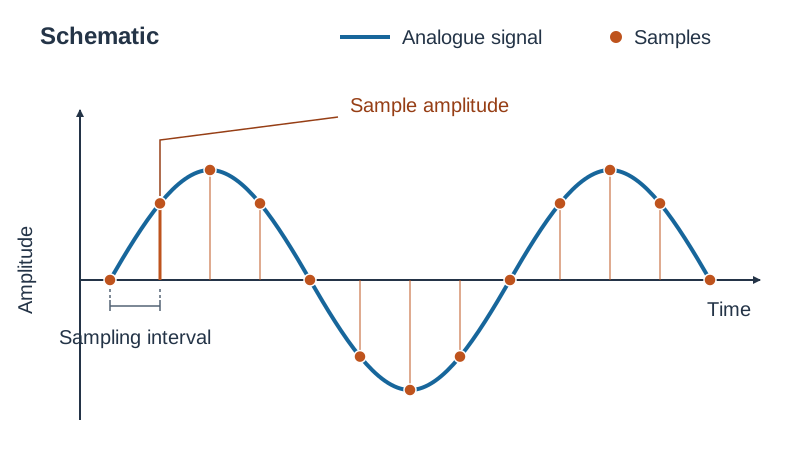
Audio is digitised by sampling analogue sound waves at fixed intervals. The sample rate (Hz) is the number of samples captured per second. The bit depth is the bit capacity used to store the amplitude of each sample.
Lossy formats such as MP3 permanently discard sound detail the human ear is least likely to notice, such as quiet sounds masked by louder simultaneous frequencies. This cuts file size by roughly 90% while keeping speech clear.
Audio editing tools (such as Audacity) let students trim ambient pauses, normalise audio levels, and apply fade-in/fade-out transitions to stop click transients.
Producing an Interactive Multimedia Presentation — Ordered Steps
- Define project purpose and target audience.
- Storyboard each display screen, planning text, images, audio clips, and buttons.
- Prepare and compress digital assets into one working project directory.
- Choose navigation architecture: linear (sequential slides) or hierarchical/menu-based (home menu branching to research, design, production, and testing).
- Build interactive controls: navigation buttons, hyperlinks, and interactive hotspots.
- Test the complete presentation on the school PC, verifying audio playback, button links, and the 3-minute time limit.
- Provide source acknowledgements on a closing credits screen.
Virtual Reality (VR) versus Augmented Reality (AR)
- Virtual Reality (VR): Completely replaces the real world with a computer-generated 3D environment, typically viewed through a headset.
- Augmented Reality (AR): Overlays digital assets, such as 3D CAD models or assembly guides, onto a live view of the physical world via a camera display.
Key terms
- RAM
- Random Access Memory; volatile, high-speed read/write memory used by the CPU to hold the operating system, running applications, and active data.
- ROM
- Read-Only Memory; non-volatile permanent memory containing fixed startup firmware routines (such as BIOS or UEFI) required to boot the system.
- Clock Speed
- The frequency of timing pulses generated by the CPU's internal clock oscillator, measured in gigahertz (GHz), where 1 GHz equals 10^9 cycles per second.
- Data Bus
- A bidirectional set of physical lines that carries data words between the CPU, memory controllers, and peripheral interfaces.
- Address Bus
- A unidirectional set of conductive lines used by the CPU to specify the physical memory address it wants to read from or write to.
- Control Bus
- A set of lines carrying synchronisation signals, read/write commands, and interrupt pulses across computer hardware.
- Kilobyte (KB)
- A digital capacity unit equal to 2^10 (1024) bytes. A megabyte is 1024 KB and a gigabyte is 1024 MB.
- ASCII
- American Standard Code for Information Interchange; a 7-bit character-encoding standard representing 128 characters using unique binary numbers.
- LAN
- Local Area Network; interconnected computers and peripheral equipment sharing resources within a single room, lab, or building.
- TCP/IP
- Transmission Control Protocol / Internet Protocol; the foundational internet protocol suite governing packet disassembly, addressing, routing, and reassembly.
- HTTPS
- HyperText Transfer Protocol Secure; an internet protocol that encrypts web communications using SSL/TLS to protect transmitted data.
- SFTP
- Secure File Transfer Protocol; an encrypted network protocol used to transfer files between remote computers safely.
- Phishing
- Untargeted fraudulent messages mimicking trusted organisations to trick users into revealing confidential credentials.
- Spear Phishing
- A targeted fraudulent attack using researched, personalised information to trick an identified individual into revealing credentials.
- Whaling
- A specialised category of spear phishing directed specifically at high-ranking corporate executives or senior managers.
- Ransomware
- Malicious software that encrypts user storage drives and demands a ransom payment to obtain the decryption key.
- Multi-Factor Authentication (MFA)
- An identity verification process requiring two or more independent factors (knowledge, possession, or biometrics) before granting access.
- GDPR
- General Data Protection Regulation; EU privacy law governing the lawful collection, processing, security, and retention of personal data.
- Gamma Correction
- A non-linear image adjustment that lightens or darkens mid-tone luminance without moving the absolute black (0) or absolute white (255) reference points.
- Raster Graphics
- Digital images made of a fixed grid of coloured pixels that lose clarity and show pixelation when enlarged.
- Vector Graphics
- Digital drawings defined by mathematical coordinates and formulas, allowing infinite scaling without loss of sharpness.
- Sample Rate
- The number of digital audio measurements captured per second from an analogue sound wave, measured in hertz (Hz).
- Bit Depth
- The number of binary bits allocated to record the amplitude level of each digital sample in audio or image processing.
- Augmented Reality (AR)
- A technology that overlays digital information, models, or graphics onto a live view of the physical world in real time.
Check yourself
State the primary operational difference between a computer's data bus and its address bus.
The data bus is bidirectional and carries actual data words between the CPU, memory, and peripherals. The address bus is unidirectional and carries the physical memory address that the CPU wants to access.
How many bytes are contained in 4 KB using the syllabus binary convention?
4 × 1024 = 4096 bytes.
A teacher wants students to open and copy, but not edit or delete, drawing templates on a school server. Describe the steps required.
(1) Log on to the server with administrator credentials. (2) Create a user group for the class and add student accounts. (3) Open the template folder's sharing/security properties. (4) Assign the group Read-only permissions so files can be opened but not modified or deleted. (5) Log in as a student to test that saving changes is refused.
Calculate the uncompressed file size, in MB, of a 30-second mono voice recording at 22,050 Hz with 8-bit depth.
22,050 samples/s × 1 byte/sample × 1 channel × 30 s = 661,500 bytes. 661,500 ÷ 1024 = 646.0 KB. 646.0 ÷ 1024 ≈ 0.63 MB.
Why is multi-factor authentication (MFA) more secure than relying solely on a password?
MFA requires two or more independent factors (something you know like a password, plus something you have like a phone verification code). Stolen passwords alone cannot grant access without the physical second factor.
What is the difference between Augmented Reality (AR) and Virtual Reality (VR)?
AR overlays digital information or graphics onto a live view of the physical world, whereas VR creates an immersive computer-generated simulation that completely replaces the physical surroundings.
Why can a CNC laser cutter work directly from an SVG or DXF file but not from a JPEG photograph?
SVG and DXF are vector files containing mathematical line coordinates that define cutting toolpaths, whereas JPEG is a raster bitmap composed of coloured pixels with no line vectors.
In standard 7-bit ASCII, uppercase 'B' has the decimal code 66. What is the decimal code for lowercase 'b'?
98. Lowercase letters are always 32 higher than their uppercase equivalents (66 + 32 = 98).