

Communications and Graphic Media is the universal visual and technical language used across design, engineering, and manufacturing to develop, document, and communicate technical solutions. In Leaving Certificate Technology, this core topic links conceptual freehand sketching, rendering, 2D and 3D projection systems, standardised dimensioning, CAD/CAM modelling, physical mock-ups, and structured design folio reporting. In the written paper, graphic media underpins compulsory questions in Section A and Section B. In the coursework project, graphic communication earns 36 marks directly in the design folio across design ideas (18 marks) and working drawings (18 marks), while also driving the photographic manufacturing record (10 marks) and presentation skills (5 marks).
Principles of Technical Projection and Working Drawings
Projection is a standardised mathematical method of representing a three-dimensional object on a flat, two-dimensional drawing surface. Working drawings rely on orthographic projection, which views an object squarely through multiple separate two-dimensional views positioned at 90° to the surface planes. Orthographic views show true shapes, exact lengths, and undistorted angular relationships, making them the only projection method suitable for direct workshop manufacture.
A complete orthographic drawing generally consists of three related views aligned with one another:
- Front Elevation: Looking squarely at the primary face to show length and height.
- End Elevation: Looking squarely from the side (left or right) to show depth and height.
- Plan: Looking directly down from above to show length and depth.
Two standardised international systems govern how these views are arranged on paper:
- First-angle projection: The Irish and European standard. Each view is projected onto a plane on the far side of the object. When you look from above, the plan lands underneath the front elevation; when you look from the left, the end elevation lands on the right of the front elevation. Remember: the object is between you and the paper, so each view is pushed through to the far side. The projection cone symbol shows the small end of the cone on the left.
- Third-angle projection: The North American standard. Each view is projected onto a plane between the viewer and the object. When you look from above, the plan sits directly on top of the front elevation; when you look from the left, the end elevation sits on the left. Remember: the paper is between you and the object, so each view is pulled back to the near side. The projection cone symbol shows the small end of the cone on the right.
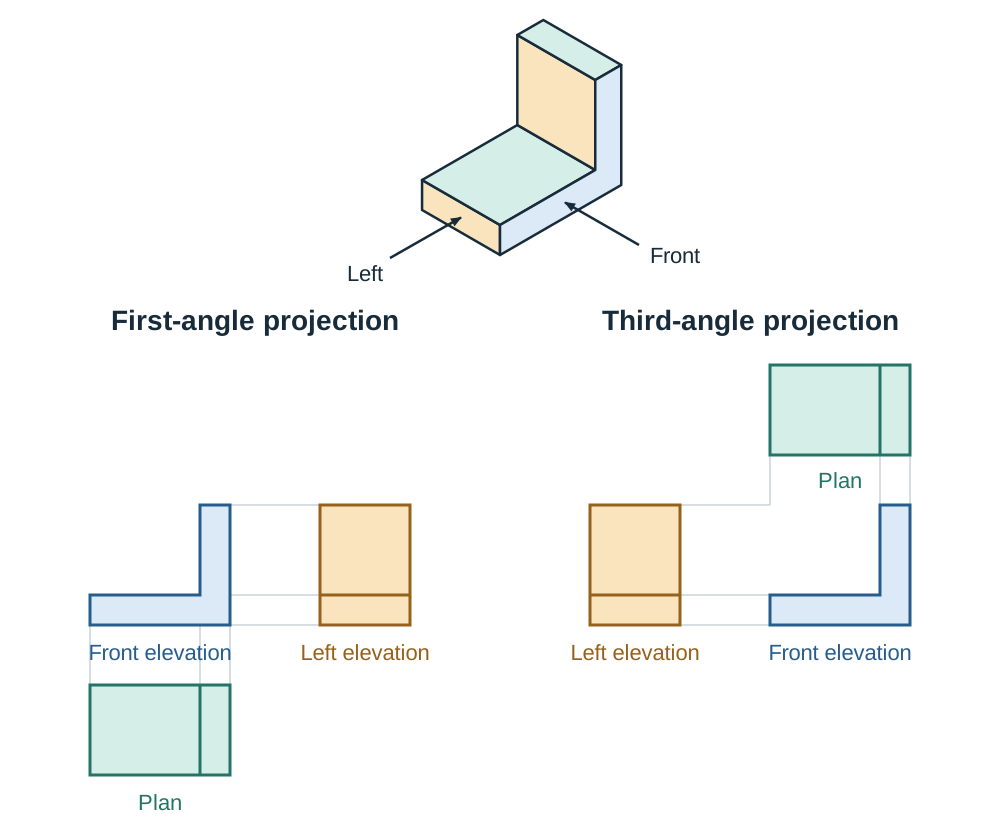
Because reversing these layouts leads to serious manufacturing errors, every working drawing must include the standardised projection cone symbol in its title block to define which system is being used.
Standardised Line Conventions and Dimensioning Practice
Technical drawings rely on agreed standards so that a drawing prepared by one designer has exactly one unambiguous meaning for any technician or examiner reading it.
Standard Line Conventions
Different line weights and styles communicate distinct physical and geometric features on a drawing:
| Line Style | Thickness | Technical Meaning and Application |
|---|---|---|
| Thick continuous | 0.50 mm | Visible outlines and exterior edges that can be seen directly |
| Thin continuous | 0.25 mm | Dimension lines, projection lines, and hatching lines |
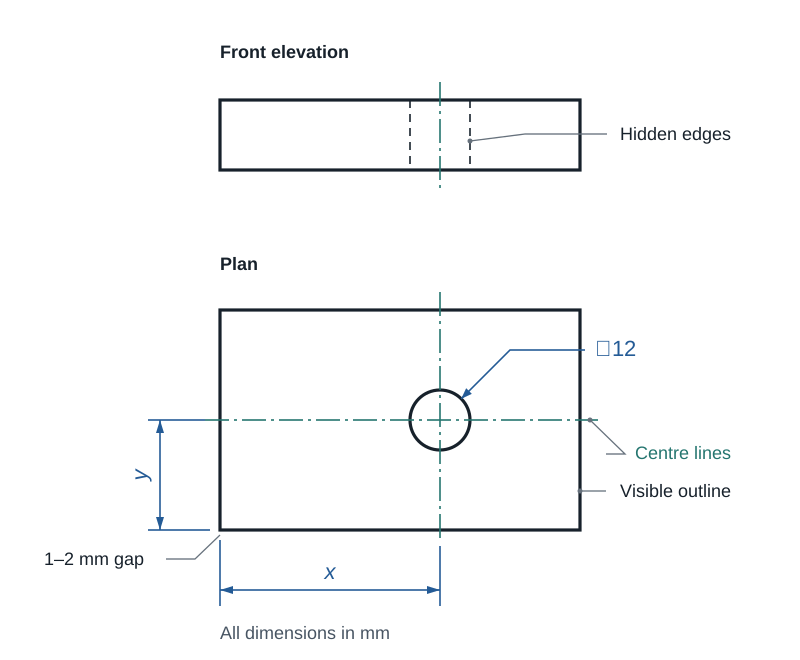
| Thin dashed | 0.25 mm | Hidden detail, interior voids, or edges concealed behind surfaces |
| Thin chain | 0.25 mm | Centre lines, axes of symmetry, and pitch circles for drilled holes |
| Thin chain, thick at ends | 0.25 mm / 0.50 mm | Cutting plane lines for sectional views, with direction arrows |
Standard Dimensioning Practice
Dimensioning communicates the exact real-world dimensions required to make a part without guessing or taking a physical ruler to the page:
- Projection lines (extension lines) extend outward from the feature being measured. They must leave a visible gap of 1 to 2 mm from the outline of the object so they do not blend into the perimeter of the component.
- Dimension lines are thin continuous lines terminated with neat, filled arrowheads that make direct contact with the projection lines.
- Dimensions should sit outside the outline of the object where practical. Values are centred above horizontal dimension lines or oriented along vertical lines, never crossed by other lines.
- Standard engineering dimensions are given in millimetres (mm). A single general note stating 'All dimensions in mm' in the title block avoids repeating unit letters after every number.
- Circular features use the symbol ⌀ for diameter and R for radius. A hole is dimensioned in two ways: its size, given as a diameter (e.g. ⌀12), and its position, given by locating its centre lines from two datum edges of the part.
The Golden Rule of Dimensioning
A dimension figure always states the actual manufactured size of the object, no matter what scale the drawing is at. If a casing is 240 mm long and drawn at a scale of 1:2, the drawn line on paper is 120 mm long, but the dimension label must read 240.
Sectional Views, Assemblies, and Reading Drawings
Complex parts and mechanisms require specific graphical conventions to reveal internal details and assembly relationships without creating visual clutter.
Sectional Views
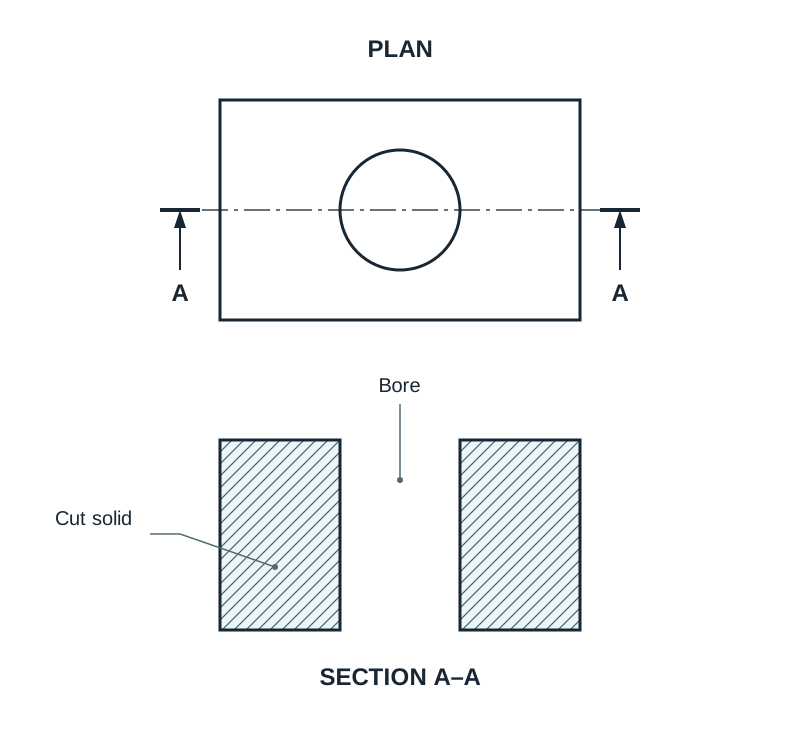
When a part has intricate internal detail, too many hidden-detail dashed lines make a drawing unreadable. A sectional view shows the part as if it had been cut through and the near portion removed:
- Cutting plane line: A thin chain line, drawn thick at each end and change of direction, with arrows showing the viewing direction and capital letters identifying it, such as A–A.
- Section title: The resulting view is clearly titled to match the cutting plane, such as 'SECTION A–A'.
- Hatching: Cut solid material is filled with thin continuous lines at 45°, evenly spaced. Adjacent components in an assembly are hatched in opposite directions or at different spacings so the interface between them remains distinct.
- Hidden detail omission: Hidden detail is normally omitted in a sectional view because the internal features are now directly visible.
- Sectioning convention: Shafts, bolts, nuts, screws, pins, keys, webs, and ribs are not hatched when the cutting plane passes along their length. They are drawn solid because cutting them provides no additional useful information.
Exploded Views and Assembly Drawings
- An assembly drawing shows all component parts fitted together in their final working positions.
- An exploded view is a 3D pictorial (usually isometric) drawing with individual components pulled apart along their axes of assembly. Thin chain centre lines trace through each part to indicate the exact order and direction of assembly.
- Each component receives an item number in a balloon (a small circle connected by a leader line touching the part).
- The balloons link directly to a parts list (bill of materials) table, positioned in or beside the title block, containing columns for item number, part name, quantity, material, and standard stock or catalogue size.
Reading a Drawing: Orthographic Views to Isometric Sketch
Examiners regularly provide orthographic views and ask you to sketch the 3D pictorial view. Work in this logical sequence:
- Check the projection cone symbol to confirm first-angle or third-angle projection.
- Pick off the three overall dimensions: length and height from the front elevation, depth from the plan.
- Lightly construct an isometric crate using a vertical height line and two 30° receding axes matching these maximum dimensions.
- Transfer features one face at a time from the view showing their true profile. A dashed line in one view represents a feature hidden behind a face, which corresponds to a solid profile on an adjacent view.
- Interpret circular features: a circle in the plan with vertical hidden lines in the front elevation represents a hole drilled through the part, drawn as an ellipse on the isometric top face.
- Line in all visible edges with a thick continuous line. Leave the construction crate faint, and never show hidden detail on a pictorial sketch.
Scale Ratios and Layout Calculations
Scale is the mathematical ratio comparing the size of the drawing on paper to the actual physical size of the object:
When expressed as the ratio :
- Full size (1:1): The drawing on paper matches the actual physical size of the component.
- Reduction scale (1:2, 1:5, 1:10): Used for larger casings, frames, or full products so they fit neatly on standard A4 or A3 sheets. Every actual dimension is divided by the scale factor.
- Enlargement scale (2:1, 5:1): Used for micro-switches, latches, or small gear teeth to make small details readable. Every actual dimension is multiplied by the scale factor.
Scale preserves all linear proportions and angles. However, surface area scales by the square of the linear ratio. At a scale of 1:2, each linear edge is halved, meaning the drawn area occupies of the full-size area.
3D Pictorial Representations: Isometric, Oblique, and Perspective
Pictorial drawings display an object in three dimensions as it appears to the human eye. They can be understood at a glance by clients, users, and non-technical stakeholders, making them ideal for initial design proposals and folio presentations.
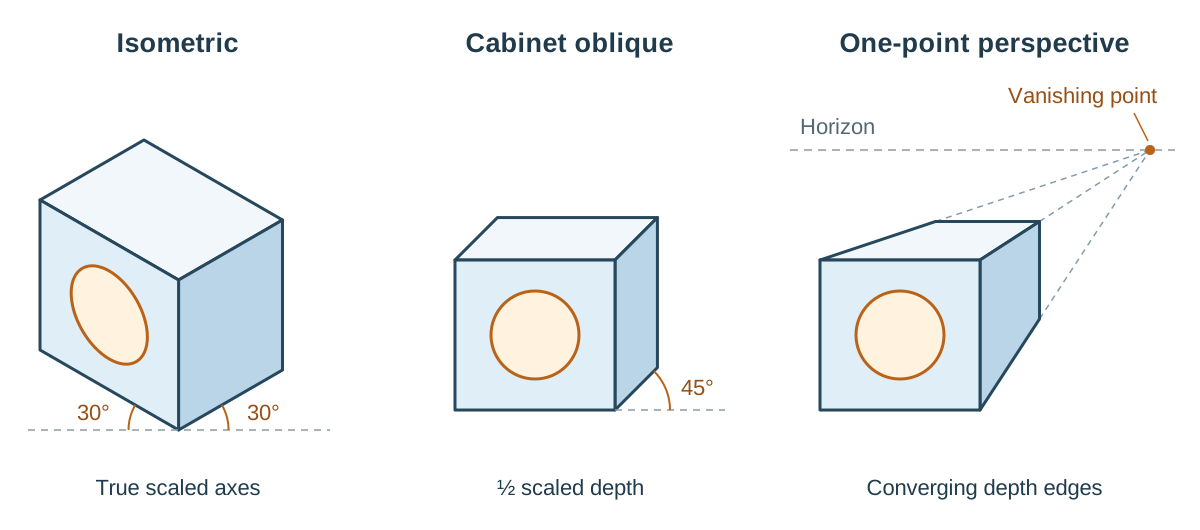
1. Isometric Drawing
Isometric drawing shows three visible faces simultaneously with balanced visual weighting:
- Vertical edges on the object remain strictly vertical on paper.
- Both horizontal receding axes are drawn at 30° to a horizontal baseline.
- In Leaving Certificate Technology, isometric drawings are constructed using true scaled measurements laid off directly along the vertical and 30° receding axes. This makes isometric drawings measurable along their primary axes.
- Circles on isometric faces appear distorted as ellipses, which requires construction points or an ellipse template.
2. Oblique Drawing
Oblique projection places the front face of the object flat and parallel to the viewer:
- The front elevation retains its true shape and proportions without distortion. Circular details, arcs, and dials on the front face are drawn directly with a compass.
- The side and top faces recede backwards along an axis set at 45° (or occasionally 30°).
- To prevent unnatural visual elongation, receding edges are frequently drawn at half their scaled depth (cabinet oblique). Oblique is the best choice for quick concept sketches when the front face contains complex curves or cut-outs.
3. Perspective Drawing
Perspective replicates human optical vision:
- Parallel lines converge as they travel into the distance, meeting at one or more vanishing points on a horizon line.
- Objects appear progressively smaller the further away they are from the observer.
- Perspective gives the most realistic view of a product, so it is the best choice for presenting a finished proposal to a client or user. However, because sizes are deliberately distorted by distance, perspective drawings cannot be scaled or measured for workshop manufacture.
Freehand Sketching, Rendering, and Effective Annotation
Freehand sketching is the primary thinking tool in design. It allows a designer to explore multiple possibilities in seconds without rulers or compasses.
The Crating Technique
Proportions are easily lost when sketching freehand. To maintain correct proportions, designers use crating:
- Lightly sketch a preliminary 3D bounding box (a 'crate') using faint construction lines to establish the total height, width, and depth.
- Subdivide the crate to mark off cut-outs, curves, and component positions.
- Sketch the true profile of the product within this wireframe box.
- Trace over the visible outlines firmly using a thick continuous line, leaving the construction crate faint.
Visual Enhancement Through Rendering
Rendering adds tone, texture, colour, and highlights to transform a line sketch into a realistic representation that communicates 3D form, volume, and material finish:
- Choose one imaginary light source — top-left at 45° is the usual choice — and keep it the same on every sketch, so all your shadows fall the same way.
- Use smooth transitions between light and dark across curved surfaces to convey roundness on cylinders and fillets.
- Use surface marks to show material properties: parallel grain lines convey timber; smooth, sharp gradients indicate plastics; fine stippling suggests cast metal or textured rubber.
- Leave sharp white streaks along leading edges to communicate polished metals, acrylic, or glass.
- Example — rendering a plastic casing: shade the right-hand and lower faces darker than the top face; leave a narrow white streak along the top front edge for the highlight; add a soft grey cast shadow on the ground to the lower right; keep the front face lightest. Caption it 'ABS casing, matt finish' so the examiner knows what material you intended.
Annotating Design Sketches
Folio heading 5 requires annotated sketches of three possible solutions, and heading 6 requires detailed annotated manufacturing sketches. Unannotated sketches lose marks heavily. Aim for four to six annotations per idea, ensuring each note explains something the drawing cannot show:
- Function: What the feature does (e.g. 'hinged lid gives access to refill the pill trays').
- Material and justification: What it is made from and why (e.g. 'casing in 3 mm acrylic — light, can be laser cut, easy to clean').
- Manufacture and joining: How parts are fabricated and assembled (e.g. 'corner joined with finger joints, glued' or 'M4 machine screws into threaded inserts so it can be opened for repair').
- Ergonomics and dimensions: Critical user-centred sizes (e.g. 'button ⌀30 mm, raised 4 mm — suits reduced fingertip sensitivity in older users').
- Link to specification: Direct reference to design requirements (e.g. 'meets Spec 3: audible alarm ≥ 70 dB').
- Honest evaluation: Note a genuine drawback (e.g. 'weakness: deep recess hard to clean'). Acknowledging limitations makes the subsequent justification of your optimum solution credible.
Standard Graphic Signs, Symbols, and Diagrams
Standardised symbols and diagrams communicate functional relationships, operating procedures, and safety rules without language barriers.
Technical Drawing Symbols
| Symbol | Meaning |
|---|---|
| ⌀ | Diameter |
| R | Radius |
| □ | Square section |
| t | Material thickness |
| ⌵ | Countersink |
| ⌴ | Counterbore |
| Truncated cone | First-angle or third-angle projection standard |
Safety Sign Conventions
Safety signs follow strict international colour and geometric shape conventions:
- Prohibition: Circular with a red border and a diagonal crossbar on a white background with a black symbol (e.g. 'No naked flames').
- Warning: Triangular with a yellow background, black border, and black symbol (e.g. 'Caution: Laser radiation' or 'Risk of electric shock').
- Mandatory: Circular with a solid blue background and white symbol (e.g. 'Eye protection must be worn').
- Safe condition / emergency: Rectangular with a solid green background and white symbol (e.g. emergency exits and first aid points).
- Fire-fighting: Rectangular with a solid red background and white symbol (e.g. fire extinguishers and hose reels).
Environmental and Product Symbols
In folio heading 3 (environmental impact, 10 marks), standard product symbols demonstrate lifecycle awareness: the Mobius loop recycling triangle with polymer resin identification numbers (such as 1 for PET and 5 for PP), the European CE compliance mark, and the WEEE crossed-out wheelie bin symbol denoting separate disposal for electrical waste.
Schematic Diagrams
Unlike realistic drawings that show external appearance, a schematic diagram communicates system function and logical connections:
- Circuit Schematics: Use standard international symbols (such as resistors, capacitors, LEDs, operational amplifiers, and relays) connected by straight orthogonal lines. They show electrical signal flow from inputs on the left to outputs on the right, independent of physical component layout.
- Flowcharts: Use standard shapes (ovals for start/stop, rectangles for processes, diamonds for decisions with Yes/No branches, parallelograms for inputs/outputs) to explain control logic and microcontroller programs.
Computer Graphics, CAD/CAM, and Vector Interoperability
Computer graphics software enables designers to produce precise working drawings and 3D digital models. CAD operates on standard drafting principles while providing greater dimensional precision and rapid modification.
Vector Versus Raster (Bitmap) Graphics
- Vector graphics: Store graphic data as mathematical coordinates, lines, and curves. They can be scaled to any size without losing sharpness. Because vector files describe exact continuous cutting paths, they are required by computer-controlled machinery like laser cutters and CNC mills.
- Raster (bitmap) graphics: Store images as a grid of coloured pixels. Enlarging a raster image causes pixelation and blur. Raster files (such as .JPEG and .PNG) contain only colour maps and no path information, meaning they cannot drive CAM tools directly; a raster outline must be traced or redrawn as vector geometry first.
Essential CAD File Formats
- Native files: Software-specific formats (such as
.sldprtor.f3d) that preserve the full parametric feature tree and design history, accessible within the parent package. - .DXF (Drawing Exchange Format): The standard 2D vector file format used to export profiles directly to laser cutters and CNC routers.
- .STEP (Standard for the Exchange of Product Model Data): A universal neutral 3D format used to transfer solid geometry cleanly between different CAD packages and multi-axis CNC machines.
- .STL (Standard Tessellation Language): A 3D mesh format that breaks curved surfaces into thousands of flat triangular facets. Slicing software uses .STL files to calculate toolpaths and layer heights for 3D printers.
Physical and Virtual Modelling
Modelling allows a designer to evaluate and refine a concept before cutting costly materials in the workshop.
Physical Models in Easily Worked Materials
Physical models are built using cheap, easily shaped materials such as corrugated card, high-density foam board, balsa wood, or modelling clay. They serve specific practical functions:
- They reveal true physical scale, bulk, and proportion that a computer monitor cannot fully convey.
- They allow hands-on tactile testing of ergonomics, such as palm grip comfort, finger reach, and weight balance.
- They identify assembly interferences before working with sheet plastics or aluminium.
Virtual CAD Modelling
Virtual models exist entirely inside 3D CAD software. They allow infinite changes without wasting physical materials, verify mating relationships in multi-part assemblies, and provide direct digital toolpaths for CAM machines.
Distinguishing a Model from a Prototype
- Model: A representation built to investigate or present appearance, aesthetic form, scale, and ergonomics. It does not need to operate mechanically or contain functional electronics.
- Prototype: A fully operating trial version built with working electro-mechanical systems to evaluate functional performance, mechanical reliability, and safety against the design brief.
Design Report Production and Folio Structure
At Higher Level the coursework is worth 200 marks, which is 50% of the subject. Those 200 marks are split evenly: design folio 100 marks and artefact 100 marks. So the folio is half the coursework and one quarter of your overall Technology grade.
Document the design journey continuously as it happens, including modifications, failed tests, and abandoned ideas that helped refine the final solution. Report production involves three connected activities:
- Recording: Capturing client needs, anthropometric measurements, sketches, circuit test data, and workshop fabrication photographs.
- Processing: Organising data systematically, using spreadsheets to calculate component costings, and creating Gantt charts to track planned versus actual progress.
- Presenting: Formatting the folio with consistent headings, page numbers, figure captions, and clear written annotations.
Project Management with Gantt Charts
A Gantt chart is a bar chart mapping project tasks against time. Tasks are listed down the left side, and time in weeks runs across the top. Horizontal bars indicate the start and end weeks of each stage:
- Overlapping bars represent concurrent tasks (e.g. testing an electronic circuit while ordering chassis materials).
- Sequential bars indicate dependencies (e.g. assembling the casing cannot occur before laser-cutting the panels).
- Draw a second bar in a contrasting colour directly underneath each planned task to record actual completion dates. Folio heading 9 demands a 'comparison of planned schedules and actual schedules'; without this dual-bar tracking, marks are lost in both heading 2 and heading 9.
The 10 Official SEC Folio Headings (Higher Level)
Coursework folios must follow the 10 official State Examinations Commission headings:
- Analysis of thematic brief (7 marks): Researching the broader context of the theme and setting chosen parameters.
- Overall management of the project (5 marks): Time, resource, and budget planning with an initial Gantt chart.
- Environmental impact of the project (10 marks): Lifecycle analysis, material selection, energy requirements, and recycling.
- Research, investigation and specifications of brief (7 marks): Investigating existing solutions and stating a clear brief with measurable specifications.
- Design ideas and selection of optimum solution (18 marks): Original annotated freehand sketches of three possible solutions, with the chosen design identified and justified.
- Sketches and drawings for manufacture (18 marks): Fully dimensioned working drawings, circuit schematics, flowcharts, models, scale details, and assembly views.
- Production planning (10 marks): Materials and component lists, costings, work breakdown schedules, and critical path timing.
- Product realisation (10 marks): Logical sequence of manufacture supported by a chronological photographic record.
- Testing, evaluation and critical reflection (10 marks): Testing against specifications, schedule comparison, justified modifications, and critical reflection.
- Presentation and ICT (5 marks): Folio sequencing, material quality, source bibliography, and ICT presentation skills.
Note: These headings and marks reflect the SEC coursework brief. While the main headings remain consistent, mark breakdowns can vary with the brief issued for a given year — always confirm against the brief provided to your class.
Key terms
- Orthographic Projection
- A standardised drawing system representing a 3D object using multiple perpendicular 2D views, typically front elevation, end elevation, and plan, preserving true dimensions for manufacture.
- First-Angle Projection
- An orthographic drawing convention used in Ireland and Europe where views are projected onto planes behind the object, placing the plan below the front view and the left view to the right.
- Third-Angle Projection
- An orthographic drawing convention used in North America where views are projected onto planes between the observer and the object, placing the plan above the front view.
- Working Drawing
- An accurate, scaled, and dimensioned drawing that provides all the orthographic views, tolerances, and assembly notes needed for manufacture.
- Scale
- The mathematical ratio of drawing length to actual physical length, expressed as reduction (e.g. 1:5) or enlargement (e.g. 2:1).
- Isometric Drawing
- A 3D pictorial drawing where vertical edges remain vertical and horizontal receding axes are set at 30° to the horizontal, with true scaled lengths laid off along the axes.
- Oblique Drawing
- A pictorial drawing where the front face is drawn flat and undistorted at true scale, with receding depth edges drawn at an angle, typically 45°.
- Perspective Drawing
- A realistic pictorial drawing where parallel lines converge toward distant vanishing points, replicating human vision; cannot be scaled for manufacture.
- Crating
- A freehand sketching technique where a faint 3D bounding box is drawn first to establish correct proportions before drawing the detailed object inside.
- Rendering
- The application of light and shade, tone, texture, colour, and highlights to a drawing or virtual model to convey realistic volume and material finish.
- Sectional View
- A technical view showing internal features as if a portion of the object has been cut away along an identified cutting plane line, with solid material shown by 45° hatching.
- Exploded View
- A 3D pictorial drawing showing component parts separated along assembly axes, keyed to a parts list with balloon item numbers.
- Gantt Chart
- A project management bar chart plotting scheduled and actual task durations against a weekly timeline, showing concurrent work and dependencies.
- Schematic Diagram
- A simplified technical drawing using standard international symbols to show system function, wiring connections, or logic flow rather than physical appearance.
- Vector Graphic
- A digital graphic defined by mathematical coordinates and paths, infinitely scalable without quality loss, used to drive CAM machine paths.
- Raster Graphic
- A digital image composed of a grid of coloured pixels that pixelates when enlarged, unsuitable for direct CAM toolpaths.
- DXF
- Drawing Exchange Format, a universal 2D vector file format used to export flat cutting paths to laser cutters and CNC machines.
- STEP
- A universal neutral CAD file format used to transfer complete 3D solid geometry between different CAD platforms and CNC milling software.
- STL
- Standard Tessellation Language, a 3D file format that represents solid surfaces as a mesh of triangles, used by slicing software to create 3D printer toolpaths.
- Easily Worked Materials
- Inexpensive, easily shaped materials such as card, foam board, balsa, and clay, used to build rapid physical mock-ups to evaluate size and ergonomics.
- Prototype
- A fully functional trial build of a design incorporating operating electro-mechanical systems to test practical performance and reliability against the brief.
- Design Folio
- A comprehensive written and graphic report documenting the full design process from brief analysis to testing, worth 50% of the Leaving Certificate project mark.
Check yourself
Where is the plan view placed relative to the front elevation in first-angle orthographic projection?
Directly below the front elevation.
What is the specific drafting function of a thin long-and-short chain line?
It represents centre lines, axes of symmetry, and pitch circles for circular features or holes.
A part is measured as 45 mm long on a drawing drawn at a scale of 1:5. What is its actual manufactured length?
225 mm (45 mm × 5 = 225 mm).
Why can a laser cutter cut directly from a .DXF file but not from a .JPEG file?
A .DXF file contains mathematical vector paths that the laser toolhead can follow continuously, whereas a .JPEG is a raster image made of coloured pixels with no cutting path coordinates.
In first-angle projection, a component displays a 60 × 20 mm rectangle in the front elevation, a 60 × 40 mm rectangle in the plan, and a 40 × 20 mm square with a vertical dashed line 10 mm from the left in the end elevation. What is the component?
A rectangular block 60 mm long × 40 mm deep × 20 mm high, containing a hidden vertical step, slot, or hole located 10 mm from one end.
What is the standard meaning of a triangular safety sign with a yellow background and a black border?
A warning sign indicating a hazard (such as electric shock risk or laser radiation).
State the maximum physical dimension permitted for an artefact submitted for the Leaving Certificate Technology coursework assessment.
500 mm.