

Graphics and design form the communication and problem-solving core of Leaving Certificate Engineering. Design is the structured method of turning an open-ended need into a safe, reliable, and functional product by balancing materials, shapes, sizes, and manufacturing processes. Graphics provides the visual language needed to record, refine, and communicate these ideas using standardised working drawings and Computer-Aided Design (CAD) models. For Higher Level, you must be able to interpret working drawings, calculate tolerances and limits of fit, size components using factors of safety, evaluate design criteria such as ergonomics, and explain modern CAD/CAM, CNC, and 3D printing workflows.
Engineering Graphics, Drawing Types, and Standards
A written description of an engineering component is slow to read and open to misinterpretation. Standardised engineering drawings follow international conventions (such as ISO and BS standards) to provide an exact visual language that can be understood in any workshop worldwide.
The Title Block
Every working drawing carries a title block in the bottom right-hand corner. It gives essential manufacturing and administrative details: the component name, drawing number, scale, projection symbol, material specification, general tolerances, measurement units (normally mm), drafter's name, date, and revision status.
Types of Engineering Drawings
- Detail drawing: A drawing of a single component, fully dimensioned and toleranced with its material stated, giving all information needed to manufacture it.
- Assembly drawing: Shows all components fitted together in their working positions. Instead of full manufacturing dimensions, it uses numbered balloon references to show how parts relate.
- Exploded view: A pictorial drawing showing components separated along their assembly axes to illustrate the correct sequence of assembly for manuals and maintenance.
- Parts list (bill of materials): A table placed above or beside the title block detailing item numbers, part names, quantities required, materials, and standard stock specifications (for example, "M6 × 30 socket head cap screw, 4 off").
Orthographic Projection and Projection Symbols
Orthographic projection represents a three-dimensional object through flat, two-dimensional views projected at right angles: an elevation (front view), an end view, and a plan (top view).
- First-angle projection: The view seen from above (the plan) is drawn below the front elevation, and the view seen from the left is drawn on the right. Each view is projected through the object onto the far plane.
- Third-angle projection: The view seen from above (the plan) is drawn above the front elevation, and the view seen from the left is drawn on the left.
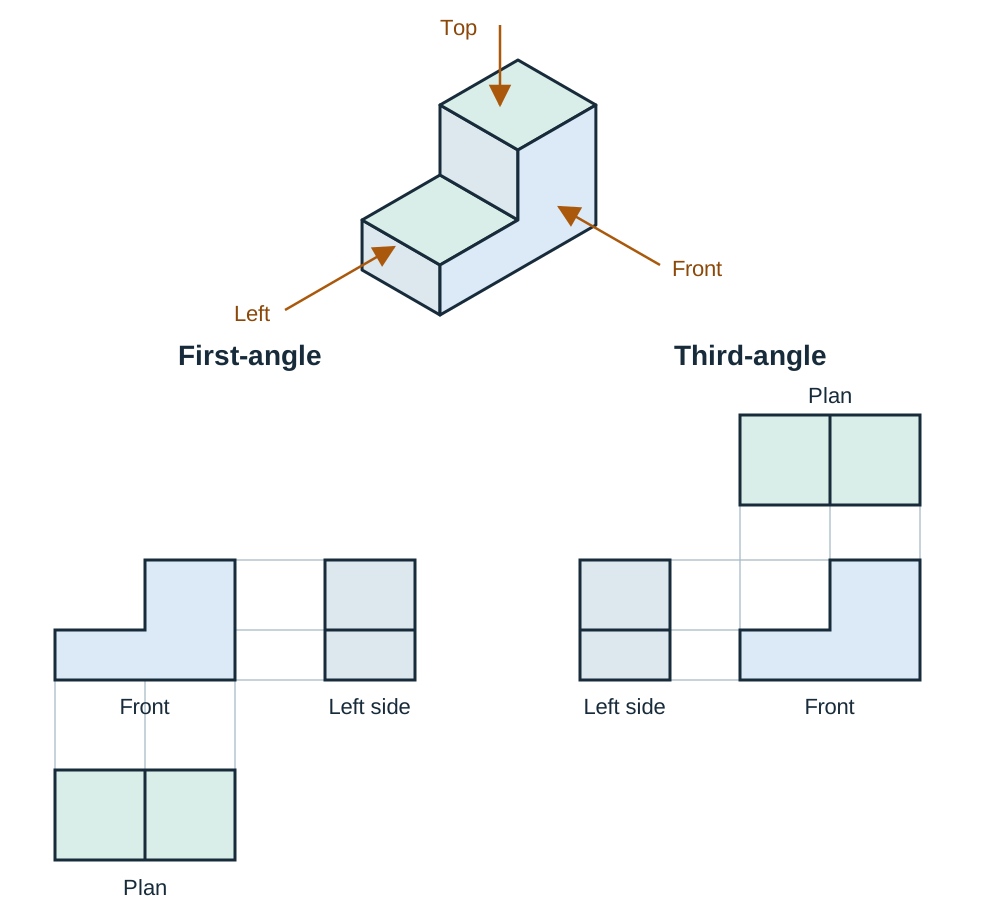
The system used is identified in the title block by a projection symbol depicting a truncated cone:
- In first-angle projection, the small-diameter end view is drawn to the right of the cone profile.
- In third-angle projection, the small-diameter end view is drawn to the left of the cone profile.
Standard Line Types and Hatching Rules
- Continuous thick line: Visible outlines and edges.
- Thin dashed line: Hidden detail representing concealed edges or internal bores.
- Thin chain line (long dash, short dash): Centrelines, pitch circle lines, and axes of symmetry.
- Continuous thin line: Dimension lines, projection lines, leaders, and section hatching.
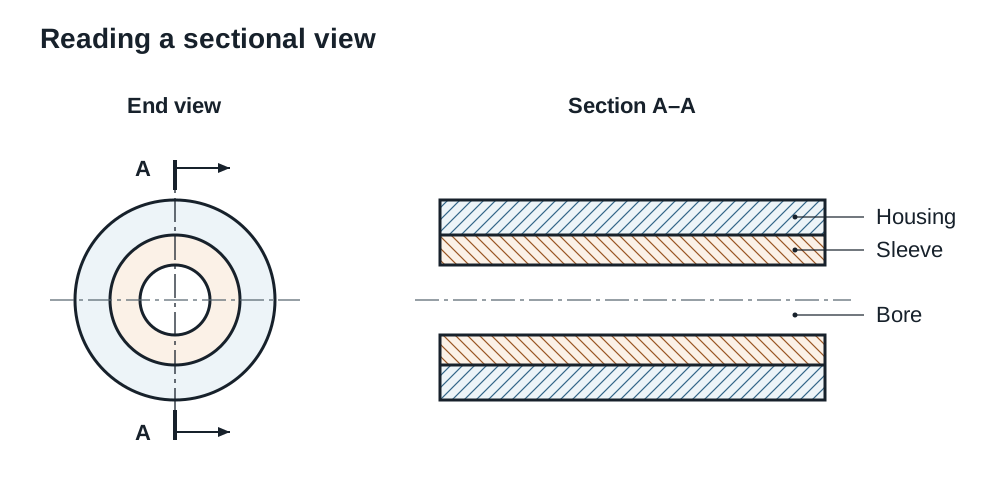
- Thin chain line with thick ends: Path of the cutting plane for a sectional view.
A sectional view shows internal features as if the part were cut through. Cut solid metal is hatched with continuous thin lines at . When two or more parts touch in an assembly section, hatch adjacent parts in opposite directions or alter the line spacing. Keep hatching spacing identical across any single component, even if interrupted by a bore. Thin webs and ribs are left unhatched when cut along their plane to avoid giving a false impression of solid thickness. Solid shafts, bolts, nuts, screws, rivets, keys, and dowel pins are conventionally not sectioned longitudinally; they are shown in full outside view.
What the Examiner Looks for in Drawing Answers
Use a sharp pencil and distinct line weights. Project views strictly in the requested angle. Dimension outside component outlines from a shared datum, and never repeat a dimension. Include and symbols, label section planes clearly (such as section A–A), hatch at , and complete all title block data.
Structural Integrity, Factor of Safety, and Metal Fatigue
Components must support operational loads without fracturing or undergoing permanent plastic deformation.
Stress and Strain
Stress () is the internal force distributed per unit of cross-sectional area:
The standard unit is the newton per square millimetre (), which is identical to the megapascal (). Converting forces to newtons and dimensions to millimetres yields stress directly in .
Strain () is the ratio of change in length () to the original length ():
Because strain divides a length by a length, it has no units.
Factor of Safety
The factor of safety (FoS) provides a structural margin against unexpected overloads, material flaws, tool marks, and gradual wear. It is defined as:
For ductile metals subjected to steady static loading, failure is based on yield strength, the point where permanent plastic deformation begins. For brittle metals or lifting equipment ratings, the ultimate tensile strength (breaking load) is used instead.
Metal Fatigue and Stress Concentrations
Metal fatigue is the progressive failure of a component subjected to fluctuating, alternating, or cyclic stresses well below its static tensile strength. Failure begins as a microscopic crack at a surface flaw or sharp corner. With each load cycle, this crack propagates through the metal until the remaining sound cross-section can no longer carry the load, leading to sudden brittle fracture.
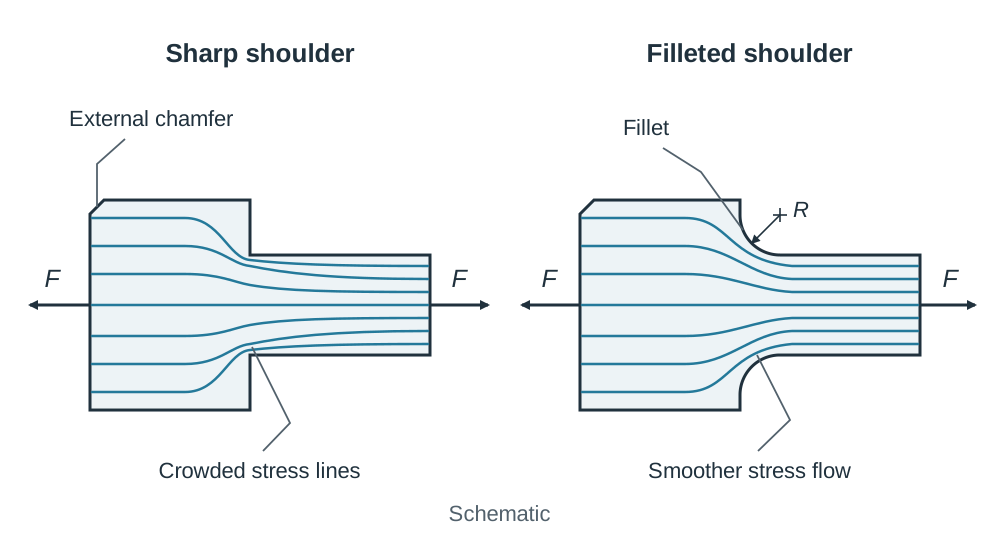
Abrupt changes in cross-section create stress concentrations that accelerate fatigue cracks. To protect components against fatigue:
- Specify a generous internal transition radius, known as a fillet, at stepped shoulders to distribute stress lines smoothly.
- Ensure a fine ground or polished surface finish to remove machining marks that act as crack initiation sites.
- Machine external chamfers on sharp outside corners to eliminate fragile edges and ease assembly.
Dimensioning, Limits, Fits, and Coordinate Setting Out
Dimensions state exact sizes and spatial relationships. Dimension lines are placed outside the component outline, aligned with projection lines, and referenced from a primary datum surface, edge, or centreline to prevent cumulative errors.
Scale Calculations
Scale is the ratio of drawing size to actual physical size:
For a drawing, the drawing is half full size. Multiply any length measured on paper by to find the real size. For instance, a line measured as represents an actual length of . Conversely, on a drawing, the drawing is twice full size, so divide measured lengths by . The dimension written on the drawing must always state the true physical size of the finished part, never the scaled paper length.
Limits and Tolerances
Machining cannot produce absolute, theoretical sizes economically. A tolerance is the total permissible variation in a dimension:
For a bore marked , the upper limit is , the lower limit is , and the tolerance is .
Fits and the Hole-Basis System
Allowance is the intentional difference in size between mating parts before assembly.
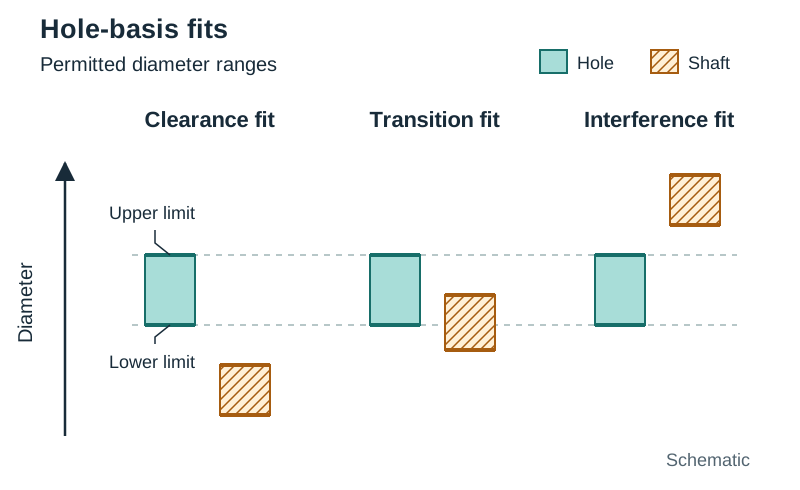
- Clearance fit: The shaft is always smaller than the hole, leaving a positive operating gap. Used for rotating shafts or sliding bushes.
- Interference fit: The shaft is always larger than the hole, requiring force, press tools, or thermal expansion/contraction to assemble. The parts grip tightly and cannot move relative to one another.
- Transition fit: The tolerance bands overlap. The assembly may result in either a slight clearance or a slight interference, providing accurate location with the ability to dismantle.
- Hole-basis system: The hole size is kept constant to standard reamer or drill sizes, while the shaft diameter is varied to achieve the required fit, keeping tooling costs low.
Coordinate Systems
Setting out features during benchwork or on a surface plate uses two primary systems:
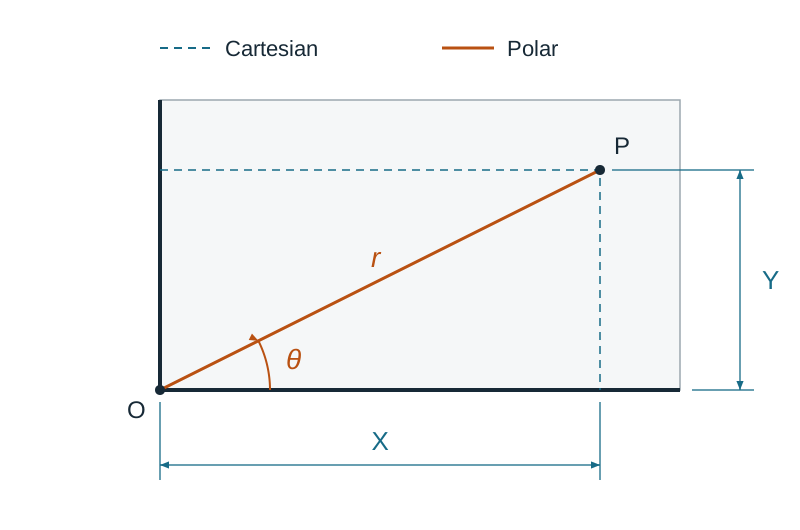
- Cartesian coordinates: Locates points via linear and displacements measured from two mutually perpendicular datum edges.
- Polar coordinates: Locates points via a radial distance () and an angular displacement () from a central pivot point, standard for PCD bolt circles.
The Engineering Project Design Process
The design process provides a step-by-step framework for turning an open-ended brief into a working physical product:
- The Brief and Problem Definition: Analyse the problem to extract all operating constraints (dimensions, mass, working load, power supply, and safety rules).
- Research and Investigation: Examine existing commercial products, mechanisms (such as linkages, cams, and gear trains), standard components, and workshop materials.
- Design Specification: Compile a definitive checklist of testable quantitative and qualitative requirements against which the finished prototype will be evaluated.
- Generating Ideas (Ideation): Produce multiple annotated freehand sketches showing different mechanical solutions. Sketches must illustrate how mechanisms function, not just cosmetic outlines.
- Development: Evaluate concepts against the specification, select the best solution, refine sizes, choose materials, and produce detailed working drawings.
- Manufacture (Realisation): Safely build the prototype using appropriate workshop processes such as benchwork, lathe turning, milling, sheet metal fabrication, or 3D printing.
- Testing and Evaluation: Operate the prototype under realistic working conditions against every point of the specification, record defects, and suggest improvements.
Quality Control (QC)
Quality control is the system of inspection procedures used throughout manufacture to verify that materials, dimensions, and operational performance conform to the working drawings and design specification. Checks use micrometers, vernier callipers, thread gauges, dial indicators, or coordinate measuring machines (CMM) to maintain safety, reliability, and interchangeability.
Applied Design Example: Bicycle Phone Mount
- Brief: Design an adjustable mount to secure a smartphone to bicycle handlebars.
- Specification: Must clamp handlebars measuring , hold phones up to , weigh under , require no tools to attach, have no sharp edges, and use school workshop materials.
- Research: Reviewed ball joints, threaded bar clamps, rubber bands, and cam levers.
- Ideation: Sketched (a) a thumbscrew split clamp, (b) an over-centre cam-lever clamp, and (c) a silicone strap harness.
- Development: Chose the cam lever for rapid toolless fitting; planned an aluminium body with rubber jaw inserts to protect handlebars; drafted working drawings.
- Manufacture: Turned the hinge pins, milled clamp jaws, cut grip pads, and assembled with dowels.
- Testing: Cycled over uneven tracks. The phone tilted under heavy vibration, leading to a development modification: increasing the cam throw by and adding textured silicone pads.
The Design Function and Evaluation Criteria
The design function balances four fundamental engineering decisions:
The Four Pillars of the Design Function
- Material selection: Matching mechanical properties (tensile strength, toughness, hardness, corrosion resistance, machinability) to working loads and environment. For example, using high-carbon silver steel for a centre punch so its point can be hardened and tempered.
- Shape and geometry: Deciding forms for structural stiffness, user ergonomics, tool access, and smooth stress flow. For example, adding corner fillets on stepped shafts to prevent fatigue cracking.
- Size and sizing: Calculating minimum dimensions based on stress and factor of safety, then specifying standard commercial sizes. For example, calculating a minimum pin diameter of and specifying the next standard size, round bar (or an M6 bolt), to preserve the required safety margin.
- Manufacturing process: Choosing methods suited to production quantity, dimensional tolerances, and workshop equipment. For example, using lathe turning and milling for a one-off prototype, but high-pressure die casting or injection moulding for high-volume commercial manufacture.
Design Evaluation Checklist
- Function: Does the product do its job safely, reliably, and as described in the brief?
- Ergonomics: Adapting the design to the human user, ensuring comfortable grip, manageable operating force, sensible posture, and clear control visibility.
- Anthropometric data: Using tables of human physical measurements (such as hand grip diameter, reach, and eye height) to fix handle sizes and working clearances.
- Aesthetics: Visual appeal, proportion, shape, surface texture, and colour.
- Safety: Elimination of sharp edges, pinch points, exposed moving gears, and electrical hazards.
- Cost: Material selection, machining time, assembly labour, and volume economies.
- Maintenance: Ease of dismantling, cleaning, lubricating, and replacing worn items.
- Environment and sustainability: Material recyclability, manufacturing energy demands, and total operational lifespan.
Pictorial Sketching for Design Concepts
- Isometric sketch: Drawn with two horizontal axes angled at and the third axis vertical. All three axes use the same scale, preserving realistic proportions across the overall assembly.
- Oblique sketch: The most complex face is drawn flat and true to shape, with depth axes projected back at and scaled to half length to avoid visual distortion. Ideal when a single face contains numerous circular features.
- Always lay out light construction boxes first, firm in final outlines, and add clear annotation notes explaining materials, pivot points, and operating mechanisms.
Computer-Aided Design (CAD) and Digital Modelling
CAD involves using software to create, modify, analyse, simulate, and document engineering drawings and solid models.
Syllabus Scope (Appendix 1 Context)
The detailed CAD, CAM, and CNC outcomes are set out in Appendix 1 of the syllabus as extra material for Leaving Certificate Vocational Programme candidates, and the syllabus states that examination questions on that appendix are optional. In practice, CAD, CNC, and rapid prototyping principles come up regularly across the written paper, so every Higher Level candidate should be prepared to answer on them.
Advantages and Disadvantages of CAD
Advantages over manual drafting boards:
- Edits are made quickly by altering the digital model without redrawing from scratch.
- Standard parts (bearings, bolts, fasteners, circlips) are imported directly from pre-drawn component libraries.
- Dimensional accuracy is exceptionally high, with geometry calculated to multiple decimal places and dimensions generated automatically.
- Drawing files are easily stored, duplicated, and shared worldwide across networks without degradation.
- 3D models allow motion simulation and stress analysis (Finite Element Analysis) before any metal is cut.
- The virtual 3D CAD geometry feeds directly into CAM software and 3D printers, removing manual data re-entry.
Disadvantages:
- High initial investment for computer hardware, software licences, and specialised training.
- Risk of data loss, corruption, or cyber threats without robust backup routines.
- Total dependence on stable electrical power and hardware availability.
CAD Hardware Peripherals
- Central Processing Unit (CPU): Performs software commands, parametric calculations, and rendering.
- RAM (Random Access Memory): Provides high-speed active memory to handle complex 3D parts and assemblies smoothly.
- Storage Drive (SSD/HDD): Stores CAD software, libraries, and design projects securely.
- Visual Display Unit (VDU/Monitor): High-resolution display showing viewports, wireframes, and rendered solid surfaces.
- Plotter / Large-format printer: Produces large A2, A1, or A0 paper working drawings for workshop use; standard printers produce A4 and A3 sheets.
2D CAD vs 3D Parametric Solid Modelling
- 2D CAD: Digital equivalent of the drawing board, producing flat vector geometry (lines, arcs, layers) where each orthographic view must be drawn independently.
- 3D parametric solid modelling: Generates virtual solid objects defined by dimensional parameters and geometric constraints (such as concentric, parallel, or tangent relationships). Modifying one dimension updates all linked orthographic views, cross-sections, and parts lists automatically.
CAM, CNC Machining, and Rapid Prototyping
A digital CAD model must be translated into tool movements or build layers before it can be manufactured.
The CAD to CAM Workflow
- Neutral File Export: The completed 3D CAD model is exported into a neutral format that other programs can read: STEP (or IGES) for solid geometry going to CAM, DXF for 2D flat profiles, and STL (a triangulated surface mesh) for 3D printing.
- Toolpath Generation: Computer-Aided Manufacturing (CAM) software takes the geometry, applies cutting feeds and speeds, selects tooling, and calculates cutting toolpaths.
- Software Simulation: The machining cycle is tested virtually on screen. This lets the programmer check that the tool will not hit the clamps holding the work, and find programming errors on screen instead of on the machine, so no tooling is broken and no material is wasted.
- Post-Processing: The CAM software converts verified toolpaths into machine-specific G-codes (geometric moves) and M-codes (machine functions like coolant on and spindle start).
CNC Coordinate Programming Basics
Before running a part programme, the machinist establishes a program datum (part zero) on the workpiece, such as a corner or face centre. All subsequent coordinates reference this point.
- Absolute programming (G90): Every coordinate is measured from the fixed program datum. An error on one line does not affect later positions.
- Incremental programming (G91): Each coordinate is measured from the tool's current position as a relative step. Ideal for repeated hole patterns, but an error in one move carries through every subsequent cut.
- Common codes: G00 (rapid positioning), G01 (linear cutting feed), G02/G03 (circular interpolation clockwise/anticlockwise); M03 (spindle start clockwise), M05 (spindle stop), M08 (coolant on), M30 (program end and reset).
Machine Control and Capacity
- Open-loop control: The machine controller issues stepping signals to motors without checking actual physical travel. If a tool stalls or misses steps, the controller does not know, causing dimensional errors.
- Closed-loop control: Uses sensors such as optical rotary encoders on lead screws or linear scales on slides to monitor actual position and speed. This feedback is compared against the programmed position in real time, and the controller corrects drive errors automatically, ensuring high accuracy and repeatability.
- Machine tool envelope: The maximum physical volume enclosed by the total working travel of the X, Y, and Z axes. The workpiece, clamps, and tool movements must fit inside this envelope.
Fused Deposition Modelling (FDM) Rapid Prototyping
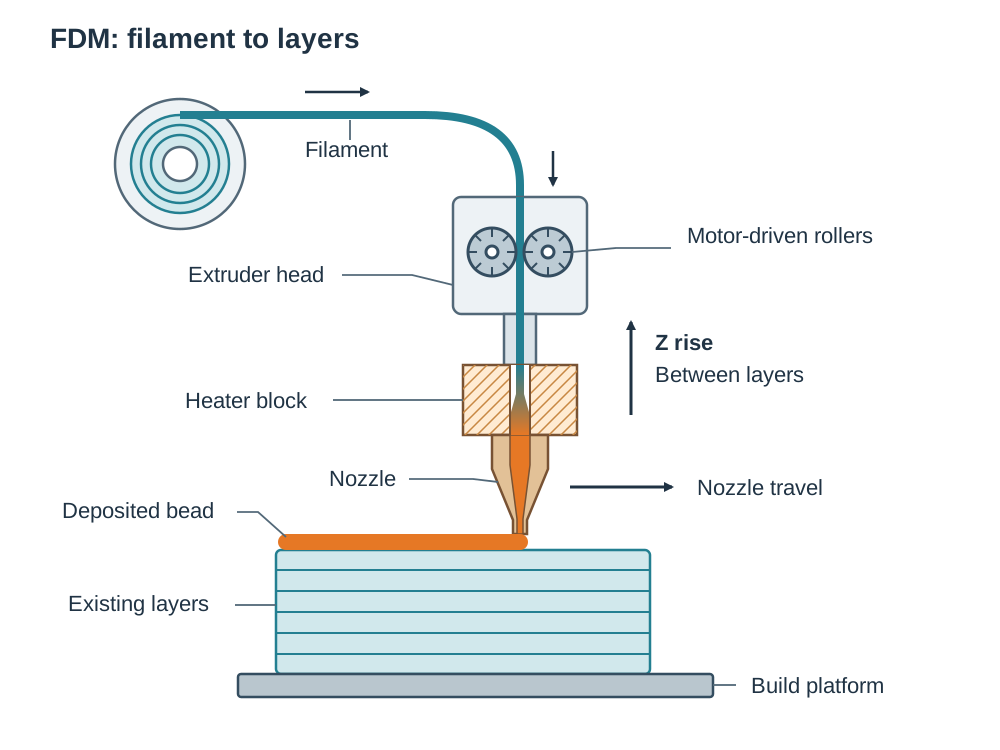
Fused Deposition Modelling is an additive manufacturing method that builds components layer by layer directly from an STL file.
An FDM printer relies on four main parts:
- Extruder head: A small motor and pair of gripping rollers that pull the thermoplastic filament off the spool and push it forward at a controlled rate.
- Heater block: An electrically heated metal block that melts the plastic filament to its extrusion temperature.
- Nozzle: A fine orifice (typically ) that deposits molten bead lines along the programmed toolpath.
- Build platform: The flat bed supporting the part. After each layer solidifies, the Z-axis indexes by one layer thickness — on most machines the platform lowers, on others the extruder head rises — and the next layer is deposited on top.
Common filaments include PLA (polylactic acid), ABS (acrylonitrile butadiene styrene), and PETG.
Applications: Rapid prototyping is ideal for checking ergonomics and fit, producing complex one-off shapes that cannot be machined conventionally, making scale models of buildings and sites for architects, and producing custom-fitted medical implants and prosthetics. It is not suitable for high-volume mass production, where injection moulding or die casting is far faster and more cost-effective per unit.
Key terms
- Working Drawing
- A fully dimensioned technical drawing showing orthographic views, sections, tolerances, and material specifications needed to manufacture and inspect a component.
- First-Angle Projection
- An orthographic arrangement where the plan view is positioned below the front elevation and the view from the left is drawn on the right.
- Third-Angle Projection
- An orthographic arrangement where the plan view is positioned above the front elevation and the view from the left is drawn on the left.
- Sectional View
- A drawing view revealing internal features as if sliced along a cutting plane, with solid cut material indicated by thin 45° hatching lines.
- Datum
- A reference edge, surface, or centreline from which all dimensional measurements and marking-out coordinates originate to eliminate cumulative errors.
- Tolerance
- The total permissible variation in a specified dimension, calculated as the upper limit of size minus the lower limit of size.
- Limits of Size
- The maximum and minimum permissible dimensions between which the actual finished size of a manufactured feature must lie.
- Clearance Fit
- A mating fit where the shaft is always smaller than the hole, guaranteeing a clearance gap for relative motion.
- Interference Fit
- A mating fit where the shaft is always larger than the hole, requiring force or heat to assemble and locking the parts together.
- Factor of Safety
- The ratio between the failure load (or ultimate material strength) and the safe working load (or allowable design stress).
- Safe Working Load
- The maximum working force or load that a component or piece of lifting equipment is certified to support safely in regular service.
- Metal Fatigue
- The progressive structural failure of a material subjected to repeated, fluctuating cyclic stresses well below its static tensile strength.
- Stress Concentration
- A localised point of sharply increased stress caused by an abrupt geometric change, such as a sharp internal corner, hole, or tool mark.
- Fillet
- A rounded internal corner that smooths the geometric transition between two surfaces, reducing stress concentrations.
- Computer-Aided Design (CAD)
- Software used to produce, modify, simulate, and document 2D engineering drawings and 3D solid virtual models.
- Software Simulation
- A virtual on-screen preview of a machining cycle that checks for tool collisions, verifies clamp clearances, and validates toolpaths before cutting metal.
- Closed-Loop Control
- A CNC control system that uses position and velocity feedback from encoders to continuously correct drive errors in real time.
- Machine Tool Envelope
- The total maximum working volume defined by the physical limits of travel along the machine's X, Y, and Z axes.
- Fused Deposition Modelling (FDM)
- An additive manufacturing process where a continuous thermoplastic filament is melted and extruded layer by layer through a fine nozzle onto a build bed.
- Polylactic Acid (PLA)
- A biodegradable thermoplastic derived from renewable plant starches, commonly used for stable, low-warp 3D printing.
- Acrylonitrile Butadiene Styrene (ABS)
- An engineering thermoplastic known for high impact resistance, rigidity, and thermal endurance, commonly used in 3D printing.
- Ergonomics
- The practice of designing products, tools, and work environments to match the physical capabilities and comfort of the human user.
Check yourself
What is the primary layout difference between first-angle and third-angle orthographic projections?
In first-angle projection, the plan view is drawn below the front elevation; in third-angle projection, the plan view is drawn above the front elevation.
A component drawing is drawn to a scale of 1:5. A hole centre is measured as 38 mm from the datum edge on the drawing paper. What dimension must be written on the drawing?
190 mm (calculated as 38 mm × 5; dimensions always state the true physical size of the finished part).
A bearing bush is dimensioned Ø30.00 +0.04/+0.01 mm. State the upper limit of size, the lower limit of size, and the tolerance.
Upper limit = 30.04 mm, lower limit = 30.01 mm, and tolerance = 30.04 − 30.01 = 0.03 mm.
A tie rod supports a safe working load of 15 kN. If the factor of safety is 5:1, what is the ultimate breaking load of the rod?
The ultimate breaking load is 75 kN (calculated as 15 kN × 5).
Why are dimensions referenced from a single common datum surface or centreline on a working drawing?
Referencing from a single datum prevents cumulative measurement errors (tolerance buildup) during workshop marking out and machining.
Name the four core mechanical components of an FDM 3D printer.
The extruder head (drive mechanism), heater block, nozzle, and build platform (print bed).
What is the engineering purpose of introducing a fillet radius at a stepped shoulder on a rotating drive shaft?
A fillet smooths the cross-sectional transition, eliminating localised stress concentrations and preventing failure from metal fatigue under cyclic bending loads.
What is the difference between open-loop and closed-loop control on a CNC machine?
Open-loop control sends move signals without feedback and cannot detect positioning errors. Closed-loop control uses sensors (encoders) to measure actual axis positions and feeds data back to correct errors in real time.