
Assemblies is one of the five Applied Graphics options in Leaving Certificate Design & Communication Graphics. If you choose to study it, it is examined in Section C of the written paper, appearing as Question C-5 on recent papers. The topic requires you to take detailed orthographic drawings of individual machine parts, figure out how they interlock and move, and draw them fully put together at a given scale and operating condition. The same assembly-modelling skills are also central to the Student Assignment coursework, which requires every candidate to create a SolidWorks assembly of 5 to 10 parts within a 10-page portfolio by 15 January 2027, regardless of which options they choose on the written paper. At Higher Level, the syllabus expects a deeper mastery: interpreting complex multipart assemblies, drawing multiple sectional views, applying surface texture symbols, dimensioning operating limits, and indicating methods of assembly. Under the 2027 examination arrangements, Section C of the terminal paper gives you a choice among all five options, and you answer any one question for 60 marks.
Reading Detail Drawings, Abbreviations, and Sheet Conventions
Before you put pencil to paper on an assembly question, you have to decode the individual component drawings. The exam paper gives you separate detail drawings of each part, marked up with standard engineering symbols, tolerances, and machining callouts. Missing what a callout means almost always leads to putting a part in the wrong place.
Standard Abbreviations You Must Be Able to Read
| Callout | Meaning and Practical Application |
|---|---|
| Ø / R | Diameter / radius |
| SØ / SR | Spherical diameter / spherical radius |
| □ 20 | Square section, 20 mm across the flats |
| A/F / A/C | Across flats / across corners for hexagonal nuts, bolts, and spanner flats |
| PCD | Pitch circle diameter: the circular centreline along which hole centres lie |
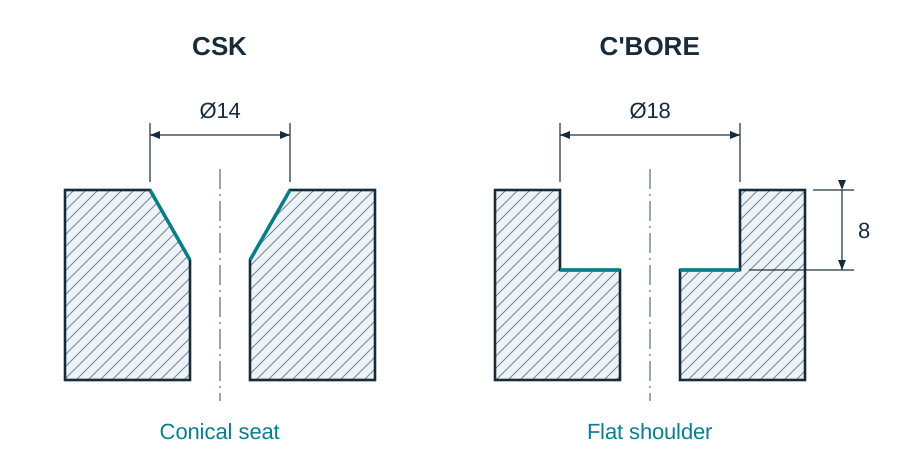
| CSK Ø14 | Countersunk hole to a 14 mm top diameter for flush-head screws |
| C'BORE Ø18 × 8 DEEP | Counterbored cylindrical recess, 18 mm diameter and 8 mm deep, giving a flat seating shoulder for a socket head cap screw |
| CHAM 1 × 45° | Chamfer cut 1 mm back at 45° to remove sharp corners and help lead-in |
| U'CUT | Undercut: a shallow relief groove at a shaft shoulder so a mating bush seats fully flat |
| MATL / REQD | Material specification / quantity required for one complete unit |
| TYP | Typical: the dimension or feature repeats identically at similar positions |
| LH / RH | Left hand / right hand thread or component orientation |
| NTS | Not to scale: never measure directly off the page with your rule |
| ASSY | Assembly: indicates the complete collection of mating parts |
| M10 × 1.5 | ISO metric coarse thread, 10 mm nominal diameter, 1.5 mm thread pitch |
Read the whole parts list (sometimes called a bill of materials) before you begin. A parts list tabulates the item numbers, part names, quantities required, and materials (such as cast iron, mild steel, phosphor bronze, or nylon). Parts are cross-referenced to the drawing using balloon referencing — small, numbered circles linked to individual components by thin leader lines that terminate in an arrowhead touching the component outline or a dot placed inside the component body.
Line Weights and Pencil Grades
Examination marking schemes allocate credit specifically to line hierarchy. Using the right pencil grade keeps the drawing legible under dense hatching:
- Thick continuous lines (0.5 mm, HB): visible component outlines and the thickened ends or bend points of a cutting plane.
- Thin continuous lines (0.25 mm, 2H): hatching (section lining), projection lines, dimension lines, and leaders.
- Thin chain lines (0.25 mm, 2H): centrelines, pitch circle diameters, and paths of motion. Centrelines must start and finish with long dashes extending 2 to 3 mm past the solid outline.
Terminal Exam Drafting Strategy and Operating Conditions
Question C-5 carries 60 marks on the written paper. The marking scheme splits these marks into three distinct categories: part-by-part marks for the outline and internal detail of every single component; a major block of marks for the correct relative positioning of all components; and presentation marks for accurate hatching, centrelines, line quality, and clearly shown points of contact.
Because marks are allocated component by component, leaving a part out entirely gives you zero for that item. Even if time is running out, draw every component from the parts list in its approximate location. A slightly rough part still picks up outline marks, whereas an omitted part forfeits both its individual marks and positioning credit.
Showing Points of Contact and Operating Conditions
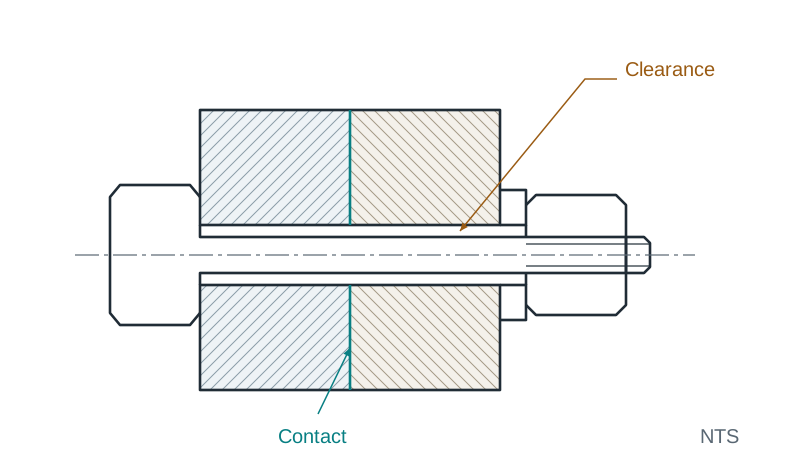
Recent exam papers explicitly state: Clearly show all points of contact. A point of contact is anywhere two parts physically touch when assembled. You must draw a single continuous line at each contact interface, never two lines. Common points of contact include:
- A shaft shoulder seated flush against the end face of a housing boss or bush.
- The underside of a bolt head or nut pressing against a flat washer, and the washer pressing on the casting face.
- The tip of a set screw (grub screw) seated firmly against a dimple, flat, or groove on an internal shaft.
- The ends of a compression spring bearing flat against their respective seating pockets.
Where parts do not touch, show the clearance gap cleanly. For example, a bolt shank passing through an unthreaded clearance hole must show a small, visible gap on either side.
Most exam questions specify an exact operating condition, such as a lever inclined at 45°, a swivel arm raised at 15°, a jaw gap equal to 26 mm, or a handle in the vertical position. Always construct this operating geometry first using light 2H lines. If you draw the individual parts first and attempt to rotate or slide them into position afterwards, every connected part will end up displaced and you will lose the relative positioning marks for the whole assembly.
The Five-Step Drafting Sequence
- Check the prompt constraints: identify the stated angle of inclination, jaw opening, or handle position, and note any given scale.
- Lay down primary datums: draw the horizontal base line or ground face, followed by the primary vertical centreline of the main body or spindle bore.
- Construct the operating frame: draw light lines representing the required lever angle or jaw opening. Fit the moving parts directly onto these reference lines.
- Place hardware and verify contacts: draw all bushes, pins, retaining washers, set screws, and nuts, making sure contacting faces share a single outline.
- Line in, hatch, and centreline: go over visible outlines in crisp HB lead. Apply thin 2H hatching lines, draw centrelines extending past all circular features, and title the view (for example, SECTION A-A).
Sectioning Conventions, Thread Standards, and Springs
A sectional view shows what an assembly looks like after an imaginary cutting plane slices through it. Sectioning exposes internal cavities, bearings, and threaded connections without cluttering the drawing with dashed hidden lines.
Fundamental Rules for Hatching (Section Lining)
- Line quality and angle: draw hatching as thin continuous lines (2H) angled at 45° to the main horizontal or vertical axis of the drawing. Use a consistent pitch spacing of 3 to 4 mm. Spacing lines tighter than 3 mm on an A3 assembly drawing is slow and creates dark patches that obscure component outlines.
- Touching components: where two separate components touch, reverse the hatching direction to 135° (-45°). If three parts meet at one joint, hatch the third part at 45° with a wider spacing (such as 5 to 6 mm), or use 30° or 60°, so all three parts remain visually distinct.
- Uniformity across views: an individual component must keep the exact same hatch angle and spacing across every separate pocket of that component in the view, and across every other sectional view on the sheet.
- Voids: drilled oil ways, clearance bores, and empty cavities remain completely unhatched.
Standard Components Kept in Full Elevation (Never Sectioned Longitudinally)
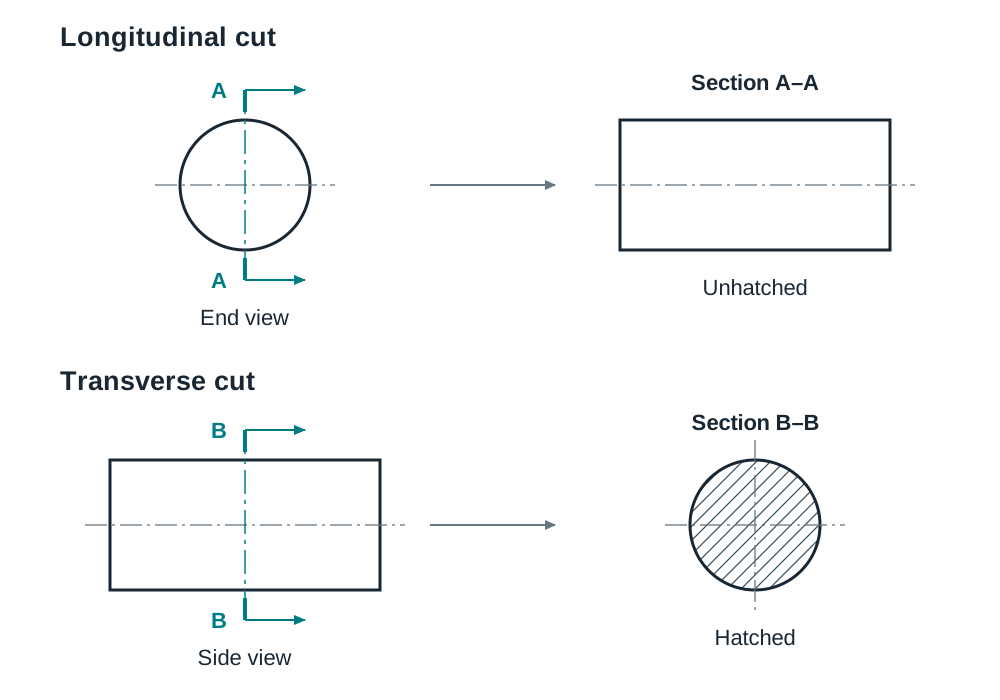
When the cutting plane cuts lengthwise along the axis of solid cylindrical parts, standard hardware, or thin supports, they are never hatched. They are drawn in full external elevation:
| Component Category | Parts Kept in Full Elevation | Draughting Reason |
|---|---|---|
| Fasteners | Bolts, screws, studs, nuts, washers, rivets, split pins, cotters | Standard parts easily recognised by outside shape; hatching provides no useful internal information. |
| Transmission parts | Solid shafts, spindles, axles, keys, gear teeth, and the balls or rollers of a bearing | Solid cylinders have no internal cavities. In ball or roller bearings, the rolling elements stay solid, but the inner and outer races are hatched at opposite angles. |
| Structural webs | Stiffening ribs, gusset plates, wheel spokes | Slicing through their central plane gives a false impression of solid metal bulk. |
This non-sectioning rule applies strictly to longitudinal cuts. If the cutting plane slices transversely across a solid shaft, pin, or rib, the resulting slice is cut solid metal and must be hatched. Operating levers and handles are ordinary functional components; when the cutting plane slices through a lever body, hatch it like any other cut part. Only the pivot pin passing through its boss remains unhatched.
Helical Compression Springs in Section
A helical spring is drawn by conventional representation rather than as a true geometric helix:
- Establish the spring axis and draw thin boundary lines for the outside diameter and inside bore.
- Draw the spring at its assembled length, never its free length. If the detail drawing lists a free length of 45 mm, but the assembled cavity is only 35 mm, compress the coils evenly into the 35 mm space.
- The cutting plane slices transversely across each wire coil. Therefore, each cut coil is drawn as a circle (or small ellipse) of the wire diameter and hatched solid. A spring wire is one of the few cylindrical shapes hatched in an assembly, because the cut is transverse.
- Show both end coils resting flat against their respective seating faces.
Screw Threads in Section
- External thread (bolts and studs): the crests (nominal major diameter) are thick continuous lines. The thread roots (minor diameter) are thin continuous lines. When cut longitudinally, the bolt shank remains unhatched.
- Internal thread (tapped holes): the inner drilled hole (minor diameter) is drawn with thick continuous lines. The outer tapped depth (major diameter) is drawn with thin continuous lines. Hatching of the casting body extends right up to the thick minor diameter line.
- Thread engagement: where a bolt screws into a tapped hole, the bolt geometry overrides the internal thread across the full length of engagement.
Specialised Sectional Views and Dimensioning Assemblies
At Higher Level, assembly problems regularly require specialised sectioning methods or ask you to dimension specific operational distances.
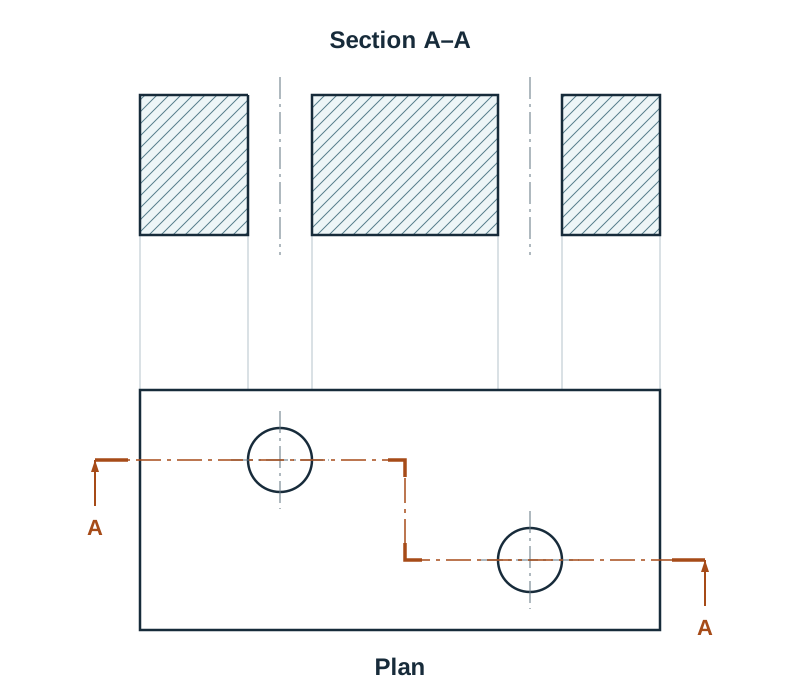
Specialised Sectional Views
- Half section: used on symmetrical components. One quarter of the object is cut away, showing half the view in internal section and the other half in external elevation. The dividing line down the centre is a thin chain centreline, not a thick outline. Hidden detail is omitted from both halves.
- Offset section: used when important internal features (such as staggered oil holes or mounting lugs) do not lie along a straight line. The cutting plane steps at 90° right angles to pass through every feature. In the resulting sectional view, do not draw lines where the plane stepped; project the section as one flat, unbroken surface.
- Aligned section: used on parts with radially positioned arms or spokes. The cutting plane passes through the angled feature, which is then revolved through an acute angle (less than 90°) into the principal projection plane before projecting. This shows the true radial length of the arm without foreshortening.
- Revolved section and removed section: a revolved section rotates the profile of a spoke, rib, or handle 90° directly on the view to reveal its cross-section. A removed section places that profile outside the view with an identifying reference letter and scale.
- Broken-out section: uses an irregular, freehand continuous line to strip away a small area of material to reveal a single internal detail (like a blind keyway) without cutting the whole part.
- Views of sectioned objects: if asked to draw a companion view of a sectioned object (such as a sectional plan on B-B below a sectional elevation on A-A), project the new cut surfaces directly from the cutting plane. Hatch each part using the identical angle and pitch used in the first view, and do not carry hatching onto surfaces the second cutting plane did not slice.
Dimensioning on an Assembly Drawing
An assembly drawing is not dimensioned like a detail drawing. You do not repeat every manufacturing size. You provide only the dimensions needed to install or operate the unit: overall height, width, and depth; mounting hole centre-to-centre distances; operational limits (such as minimum and maximum jaw gap); and any specific distance requested in the prompt.
To place an assembly dimension correctly:
- Draw thin projection lines perpendicular to the feature, leaving a 2 mm gap from the component outline and extending 2 to 3 mm past the dimension line.
- Draw a thin dimension line capped by sharp, closed arrowheads about 3 mm long.
- Place the figure above the dimension line near the centre, reading from the bottom of the page for horizontal dimensions and from the right-hand edge for vertical dimensions.
- Keep dimensions outside the drawn components, and never place a dimension inside a hatched area.
- State the true size of the part, never a scaled measurement. A 120 mm shaft drawn at 1:2 is dimensioned 120.
Joining Methods, Welds, Surface Texture, and Exploded Views
The Higher Level syllabus requires you to understand, indicate, and justify methods of assembly, differentiating between demountable (temporary) joints and permanent joints.
Indicating the Method of Assembly
Mechanical joints fall into two distinct groups:
- Demountable joints: fasteners that allow non-destructive disassembly for maintenance, lubrication, or part replacement. These include through bolts with hexagonal nuts, cap screws threading directly into a tapped casting, studs with nuts, set screws locking collars to shafts, split pins retaining slotted nuts, and circlips retaining pins.
- Permanent joints: connections that cannot be taken apart without damaging the components. These include solid riveting, press fits (interference fits), adhesive bonding, and welding.
On the drawing board, you indicate the assembly method in three ways:
- By drawing convention: drafting the fastener, clearance hole, and contact faces correctly conveys the joint type.
- By balloon and leader note: attaching a balloon to the hardware with an instructional note (for example, PART 5 PRESS FIT INTO PART 2, or M8 GRUB SCREW LOCKS LEVER TO SPINDLE).
- By welding symbol: an arrow pointing to the joint connects to a horizontal reference line. A right-angled triangle on the reference line denotes a fillet weld; a rectangle or V-notch denotes a butt weld. The weld size (leg length) is placed to the left of the symbol (such as 6 ▷ for a 6 mm fillet weld). A symbol placed below the reference line indicates the weld is on the arrow side; placed above the line, it means the weld is on the other side.
Surface Texture and Finish Symbols
Critical mating surfaces (such as bearing housings, sliding ways, and pressure seals) require controlled surface roughness, specified using a tick-shaped symbol:
- Basic tick symbol: two lines inclined at about 60° to the surface line.
- Machining required: a horizontal bar closes the top of the tick into an inverted triangle, meaning material removal by turning, milling, or grinding is compulsory.
- Machining prohibited: a small circle drawn inside the tick vertex, meaning the surface must remain in its original as-cast or forged condition.
- Roughness value (Ra): a short horizontal extension line runs off the top of the longer leg. The roughness value in micrometres (for example, 3.2, 1.6, or 0.8) is written above this horizontal line. Smaller Ra numbers mean a smoother, higher-precision surface.
Exploded Views
An exploded view separates components along their common assembly axes, showing the order and direction in which parts go together. Every part maintains the identical 3D orientation it occupies in the assembled state. Parts are pulled apart along thin chain trail lines that connect mating axes. Ensure parts do not overlap on the page, and add balloon references matching the parts list.
3D CAD Assembly Modelling and Coursework Integration
Assemblies provide the ideal context for 3D CAD modelling. In SolidWorks, the modelling process mirrors physical workshop assembly. You generate 2D orthographic, sectional, and exploded views directly from the completed 3D assembly file.
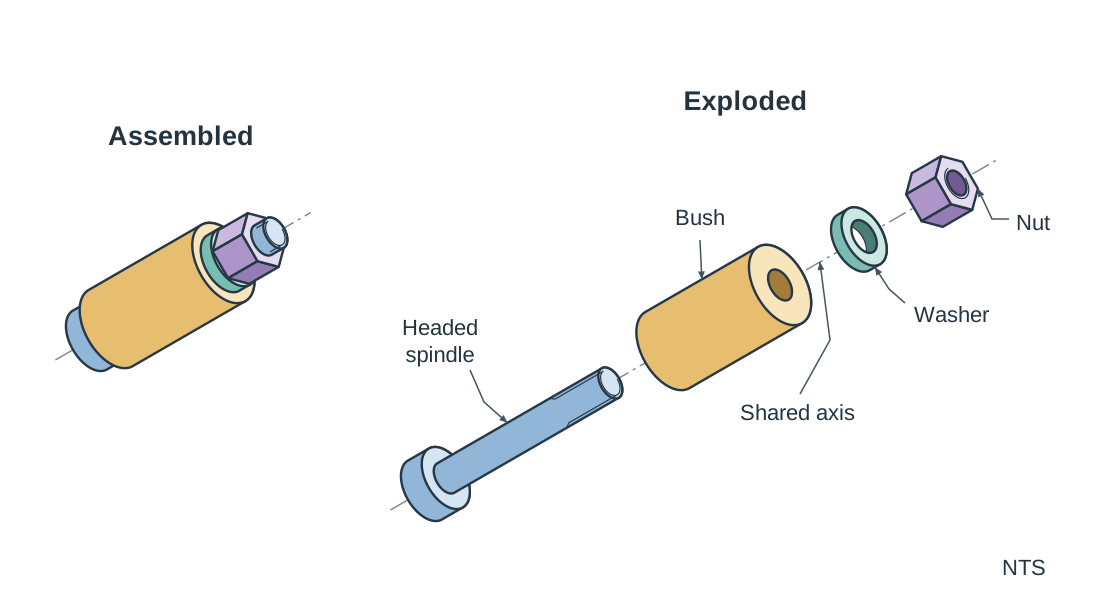
Parametric Assembly Workflow
- Bottom-up modelling: create each component as an individual part file (.sldprt). In an assembly file (.sldasm), bring in the primary base or casting first and lock it to the assembly origin. Then import secondary components and align them using mates.
- Standard mates: a concentric mate aligns cylindrical axes (such as seating a spindle in a bush). A coincident mate brings planar faces into flush contact. A distance mate sets operational clearances (like a jaw gap), while an angle mate sets an operating lever to an exact angular inclination.
- Design intent: build parts using symmetric extrusions from central planes and tie critical features to common dimensions, so that downstream changes update automatically without mates failing.
- Exploded configurations: use the Exploded View tool to pull parts out along their functional axes, generating automatic exploded trail lines for presentation drawings.
2027 Coursework Parameters
Under the 2027 assessment arrangements and SEC circular S56/26, the Higher Level Student Assignment is based on the design of a kettle. Coursework accounts for 160 marks (40% of the total marks available in Design and Communication Graphics; the terminal written paper carries the other 60%). The portfolio is capped at 10 A3 pages. Coursework must be completed by Friday 15 January 2027 (no further work after that date), with the bound A3 portfolio and individual USB then stored by the school and submitted to the SEC later, in late March.
- Output 3: a complete SolidWorks model comprising at least 5 but no more than 10 parts, an assembly file, a 2D drawing, and an eDrawing file.
- Output 4: one to two printed portfolio pages displaying detailed orthographic views, an exploded view, a rendered pictorial view, and section or detail views extracted directly from the SolidWorks assembly.
Key terms
- Assembly Drawing
- A working technical drawing showing how individual components fit together, align, and function as a complete mechanism.
- Parts List
- A structured table (also called a bill of materials) specifying part numbers, descriptions, quantities, and material classifications for every item in an assembly.
- Cutting Plane
- An imaginary slicing plane that reveals internal features, drawn as a thin chain line with thickened ends, direction arrows, and reference letters.
- Hatching (section lining)
- Thin continuous parallel lines drawn at 45° across solid material cut by a cutting plane, reversing direction between touching parts.
- Balloon Referencing
- Numbered circular tags attached to components by thin leader lines to cross-reference each part with the parts list.
- Points of Contact
- Interfaces where mating components physically touch under assembled conditions, drawn as a single boundary line rather than two lines.
- Pitch Circle Diameter (PCD)
- The diameter of the circular centreline passing through the centres of a circular pattern of holes, bolts, or pins.
- Across Flats (A/F)
- The distance measured perpendicularly between opposite parallel flat faces of a hexagonal or square nut or bolt head.
- Across Corners (A/C)
- The maximum diagonal distance between opposite vertices of a hexagonal or square fastener head.
- Cap Screw
- A threaded fastener that passes through a clearance hole in one part and screws directly into a tapped hole in another, requiring no external nut.
- Stud
- A headless cylindrical rod threaded on both ends with a plain central shank, used where through-bolts cannot fit or to protect cast threads.
- Set Screw
- A fully threaded fastener tightened through an outer collar or hub against an inner shaft to lock them against relative movement.
- Half Section
- A sectional view of a symmetrical object where one quarter is removed, showing half in internal section and half in external elevation.
- Offset Section
- A sectional view where the cutting plane steps at 90° angles to pass through staggered features, drawn without step dividing lines.
- Aligned Section
- A sectional view where an angled feature (such as a spoke or arm) is revolved through an acute angle into the projection plane to show its true shape.
- Revolved Section
- A sectional profile of a bar, handle, or rib drawn directly on the main view by rotating its cross-section 90° about its centreline.
- Removed Section
- A cross-sectional profile drawn outside the main view, identified with reference letters and scale.
- Surface Texture Symbol
- A standardised tick symbol specifying surface roughness (Ra) in micrometres and whether machining is mandatory or prohibited.
- Ra
- Roughness average: the arithmetic average value of surface roughness profile deviations, expressed in micrometres.
- Design Intent
- A CAD modelling strategy where geometric relationships and dimensions ensure parts and assemblies update predictably when modified.
- Concentric Mate
- A CAD assembly constraint that aligns the central axes of two cylindrical or conical features.
- Coincident Mate
- A CAD assembly constraint that forces two planar faces or points into flush, coplanar contact.
- Exploded View
- A technical illustration showing components separated along their functional assembly axes to communicate assembly sequence and structure.
Check yourself
Which components remain unhatched when sliced along their longitudinal axis in an assembly section?
Bolts, nuts, screws, studs, washers, rivets, split pins, keys, solid shafts, the balls and rollers of bearings, gear teeth, and structural ribs or spokes.
Three separate parts touch at a single junction in a sectional view. Part A is hatched at 45° with 3 mm pitch. How should parts B and C be hatched?
Part B is hatched at 135° with 3 mm pitch. Part C is hatched at 45° with a wider pitch (such as 5 to 6 mm) or angled at 30°/60°, so all three parts remain clearly distinguishable.
A detail drawing specifies a compression spring with a free length of 45 mm, but the assembled cavity is 35 mm. What length do you draw, and are the cut coils hatched?
Draw the spring at its assembled length of 35 mm with coils evenly spaced. The cut coils are hatched solid because the cutting plane slices transversely across the wire diameter.
What is the key drawing rule regarding the 90° step lines of an offset cutting plane in the final sectional view?
The step lines where the cutting plane changes direction are completely omitted from the sectional view; the cut face is drawn as one continuous, flat surface.
How are line weights and hatching bounded in an internal tapped hole shown in section?
The minor diameter is drawn with thick continuous lines, the major root diameter with thin continuous lines, and hatching extends right up to the thick minor diameter line.
What is the formula relating the across-flats (A/F) and across-corners (A/C) dimensions of a regular hexagonal bolt head?
A/C = A/F / cos(30°), which equals A/F divided by approximately 0.8660.
What does a surface texture tick symbol with a closed top horizontal bar and 'Ra 0.8' indicate?
It specifies that material removal by machining is compulsory to achieve a fine surface roughness limit of 0.8 micrometres.
Under the 2027 examination arrangements, what are the question choices in Section C and the portfolio parameters for the kettle brief?
In Section C, you answer any one option question for 60 marks. The Higher Level Student Assignment portfolio is capped at 10 pages, requires a 5 to 10 part SolidWorks assembly, and is due by 15 January 2027.