

The Software Development Process and Methodologies
Building reliable software requires a structured process. Without one, teams quickly run into missed deadlines, blown budgets, and buggy programs that fail to do what the user needed. The Leaving Certificate specification models software development as an iterative cycle of six stages:
- Investigate: Define the problem clearly, identify user and stakeholder needs, and examine whether building a solution is feasible.
- Plan: Understand the problem fully, break it into smaller tasks, assign team roles, and set a timeline with milestones.
- Design: Create a representation of the solution (such as flowcharts, pseudocode algorithms, and screen sketches) and decide which tools and programming languages to use.
- Create: Implement the plan by writing the code, setting up data structures, and commenting functions clearly.
- Evaluate: Determine whether the solution is appropriate. Check whether it meets the user requirements, and carry out testing to eliminate errors.
- Document: Report, present, and reflect on the process. Record what was done, how computational concepts were applied, what worked well, and what you would change.
Because the process is iterative, you will regularly loop back to earlier stages when testing shows a bug or when a user suggests an improvement.
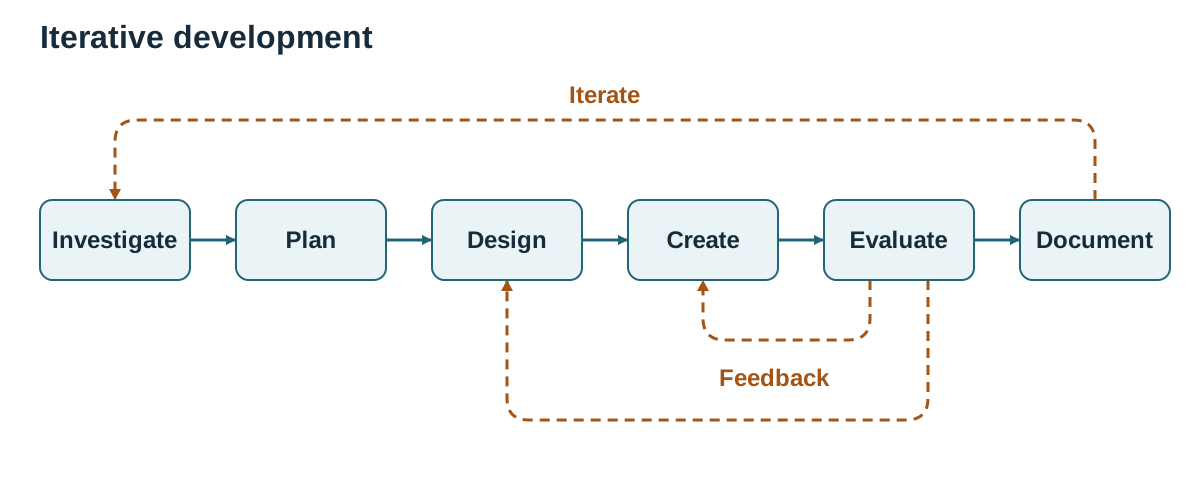
Staged vs Iterative Methodologies
Software projects usually follow one of two broad approaches:
| Feature | Waterfall (Staged / Linear) | Agile (Iterative / Flexible) |
|---|---|---|
| Stage order | Strict sequence: each phase must finish before the next begins. | Short cycles (sprints): planning, coding, and testing happen repeatedly. |
| Requirements | Fixed and signed off at the very start. | Evolving: requirements are reviewed and updated throughout. |
| Handling change | Difficult and expensive to alter course late in the project. | Welcomes change based on ongoing user and client feedback. |
| Working software | Delivered only near the end of the project lifecycle. | Delivered in small, working increments after every sprint. |
| Best used when | Requirements cannot change, such as software for a medical device. | Requirements evolve through user interaction, such as a new student app. |
Feasibility
During the investigate stage, teams assess whether the project is worth pursuing:
- Technical feasibility: Do the hardware, software tools, and technical skills exist to build it?
- Economic feasibility: Is the project financially viable, and do the benefits justify the cost?
- Legal and ethical feasibility: Does the software comply with data protection regulations such as GDPR, licensing rules, and ethical standards for user privacy?
Requirements, Stakeholders, and Team Roles
Before writing code, developers must understand who they are building for and what those people need.
Requirements and Stakeholders
A requirement is something the finished software must do, or a quality it must have:
- Functional requirement: What the system must do. For example, "A student can log in and view their timetable."
- Non-functional requirement: How well the system performs. For example, "The timetable must load in under two seconds" or "The app must be navigable using a screen reader."
A stakeholder is any person or group affected by the software. For a school homework app, stakeholders include students, teachers, parents, the principal, and the IT administrator. Each group brings a different perspective. Parents might want automated deadline alerts, teachers need a fast grading interface, and students need offline access on mobile devices.
Common ways to gather requirements include interviewing stakeholders, distributing surveys, observing how people currently carry out the task, and testing early prototypes with users.
Working in a Team
Most software is built by teams rather than individuals. Assigning distinct roles avoids duplicated effort and ensures every part of the project receives attention:
- Project manager: Coordinates the schedule, tracks progress against milestones, and resolves roadblocks.
- Designer: Plans user flows, screen layouts, and user interface mock-ups.
- Developer / Programmer: Writes and refines code for specific program modules.
- Tester: Designs test plans, prepares test data, and logs bugs.
Effective teams agree on deadlines early, divide work into independent modules so members can work in parallel, communicate regularly, and use shared repositories so everyone works on the latest version.
Decomposition, Modular Design, and Prototyping
Tackling an entire software project in one go is overwhelming. Computational thinking manages this complexity through decomposition and abstraction.
Top-Down Design
Top-down design starts with the main purpose of the software and breaks it down into progressively smaller sub-problems. For example, a canteen-ordering app can be split into three sub-systems: Menu Display, Order Processing, and Payment Handling. Each of these is then divided further until every sub-task can be solved by a single, focused algorithm.
Modular Design
Modular design divides a program into separate, self-contained units called modules or functions. Each module performs one specific task and keeps its internal details hidden. Other parts of the program only need to know what to pass in (the parameters) and what comes back (the return value).
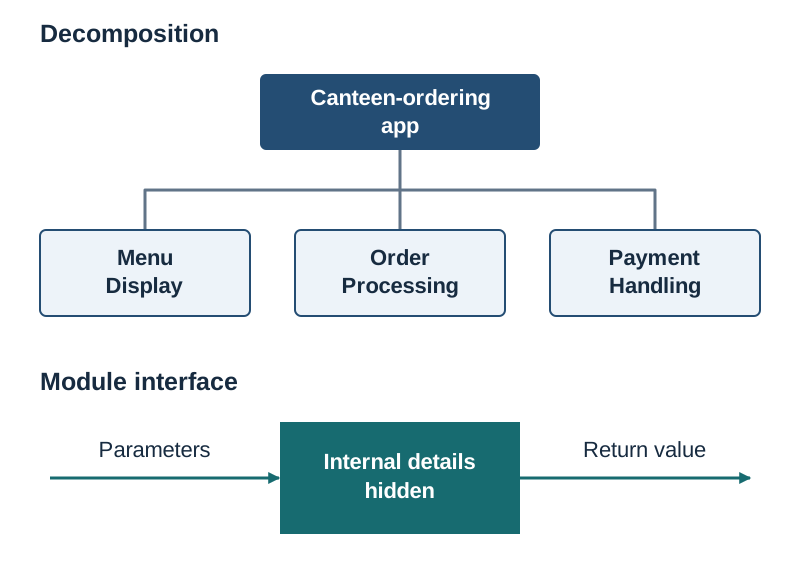
Modular design provides three main benefits:
- Parallel development: Different programmers can write and test separate functions at the same time without interfering with each other.
- Reusability: A reliable validation function written for one project can be reused in future programs without changes.
- Easier debugging: When an error occurs, you can test and fix the individual function without having to search through the entire codebase.
Prototyping
A prototype is an early, simplified version of a system or user interface. It demonstrates key visual layouts and basic interactions so users and clients can give feedback before developers invest time writing backend logic and database connections.
Defensive Design, Input Validation, and Errors
Defensive design means writing code that anticipates mistakes, unexpected inputs, and deliberate misuse. A central defensive technique is input validation, which checks that incoming data is sensible and reasonable before the program processes it.
Common Validation Checks
- Range check: Verifies that a number falls between a set minimum and maximum (e.g. an exam percentage must be between 0 and 100 inclusive).
- Type check: Checks that data belongs to the expected data type (e.g. ensuring an age consists entirely of digits).
- Length check: Confirms that a string is neither too short nor too long (e.g. a password must contain at least 8 characters).
- Format check: Ensures data follows a strict layout pattern. An Irish example is verifying an Eircode, which must follow the pattern of a three-character Routing Key followed by a space and a four-character Unique Identifier (e.g.
D02 X285). - Presence check: Checks that a mandatory field was not submitted blank.
The Limitation of Validation
Validation checks only that data is sensible and follows the rules; it cannot verify that the data is true. For example, typing someone else's Eircode will pass a format check, and entering an age of 45 will pass a 0–120 range check even if the user is actually 15.
Input Validation Loops in Python
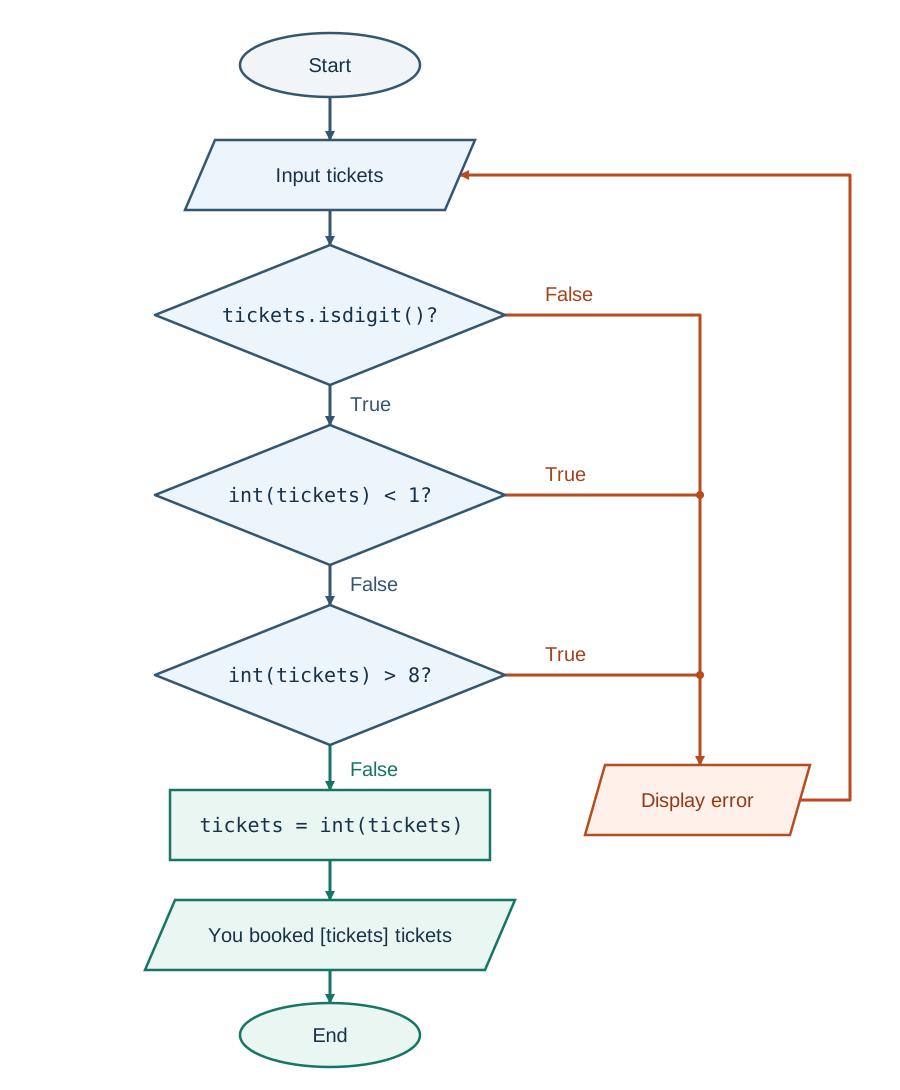
In Python, input() always returns a string. You must validate user input before converting it into an integer, otherwise unexpected text will crash your program.
tickets = input("How many tickets (1-8)? ")
while not tickets.isdigit() or int(tickets) < 1 or int(tickets) > 8:
    print("ERROR: Please enter a whole number from 1 to 8.")
    tickets = input("How many tickets (1-8)? ")
tickets = int(tickets)
print("You booked", tickets, "tickets.")
How this works:
.isdigit()acts as a type check. It returnsTrueonly if every character is a digit. It safely rejects words, spaces, negative signs, and decimal points.- Because Python evaluates logical
orstatements from left to right, it stops checking as soon as one condition is true. Iftickets.isdigit()is false, Python never runsint(tickets), preventing a crash. - The loop repeats until the user supplies a valid value.
Types of Programming Error
- Syntax error: The code breaks the grammatical rules of the language. The program refuses to run at all. Example:
if score > 50missing the colon at the end. - Runtime error: The syntax is correct, but an illegal operation causes the program to crash during execution. Example: dividing a number by zero (
ZeroDivisionError) or trying to convert"ten"to an integer (ValueError). - Logic error: The program runs without crashing but produces the wrong output because the algorithm is incorrect. Example: writing
if age > 18:when the requirement states "18 or over". An 18-year-old is incorrectly rejected. The fix isif age >= 18:.
Debugging Techniques
- Trace tables (dry runs): Stepping through code manually line by line with pen and paper, recording how each variable changes.
- Print statements: Temporarily printing variable values at different points in the code to pinpoint where calculations go wrong.
- Interactive debuggers: Setting breakpoints to pause execution and stepping through the code one line at a time to examine memory.
Software Testing and Evaluation
Testing finds defects, while evaluation determines whether the software is the right solution to the problem.
The Three Stages of Software Testing
The specification defines three progressive stages of software testing:
- Unit testing: Testing individual components or functions on their own, in isolation from the rest of the program. Developers write unit tests during coding to verify that a single function returns the correct output for given inputs. Example: Testing a
calculate_vat()function with several prices to check the arithmetic. - Function (functional) testing: Testing the features of the program against the requirements specification. It checks what the system does from the user's perspective, without looking at internal code. Example: Confirming that clicking "Checkout" displays the correct order summary and updates stock levels.
- System testing: Testing the complete, fully integrated software application end to end on actual hardware and network setups. It assesses whether all parts work together under realistic conditions, including speed, reliability, and security. Example: Verifying that 500 students can log in and submit an online exam at the same time without the server crashing.
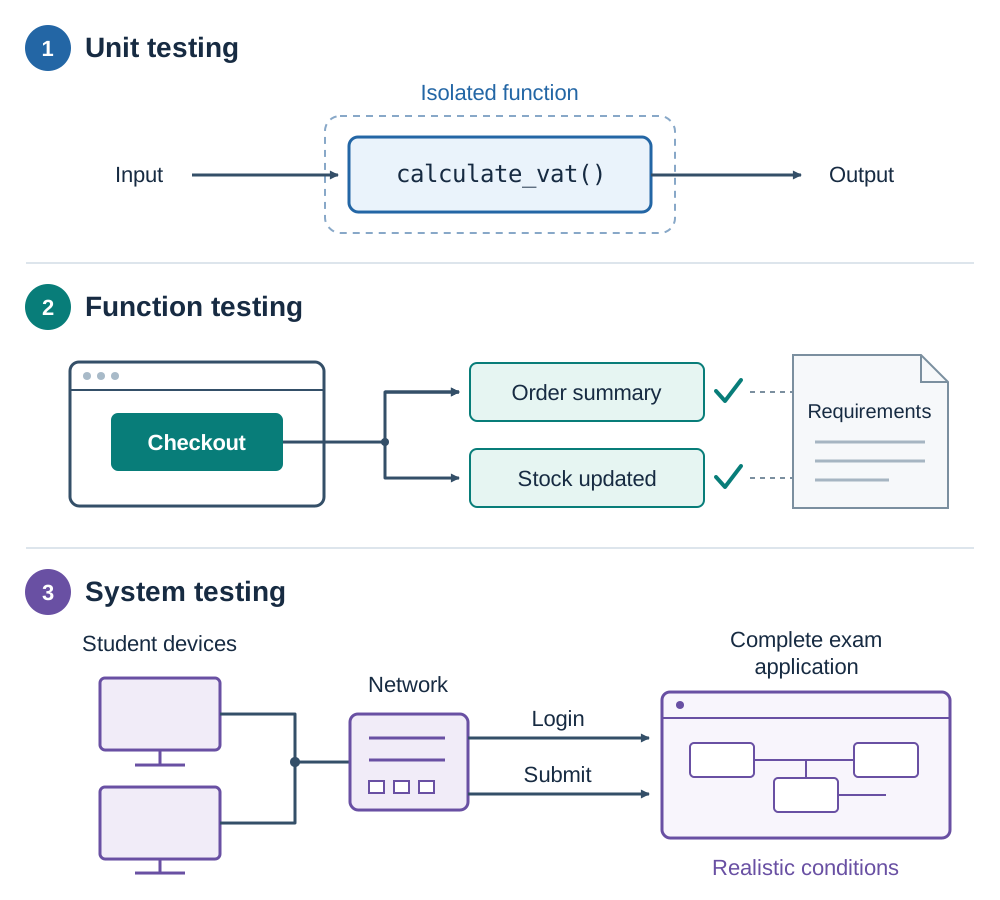
Beyond these stages, developers also distinguish between two testing purposes: functional testing checks what the system does against requirements, while non-functional testing checks how well it performs (execution speed, capacity, and security under load).
Writing a Test Plan
A good test plan tests three categories of data:
- Normal data: Valid values that sit safely inside the expected range (e.g. testing
4for a ticket count requiring 1 to 8). - Boundary data: Values at the edges of acceptability and just outside them (e.g. testing
1and8to ensure they are accepted, and0and9to confirm they are rejected). - Erroneous (Invalid) data: Inputs of the wrong type or completely outside allowable limits (e.g.
"five",-3, or15).
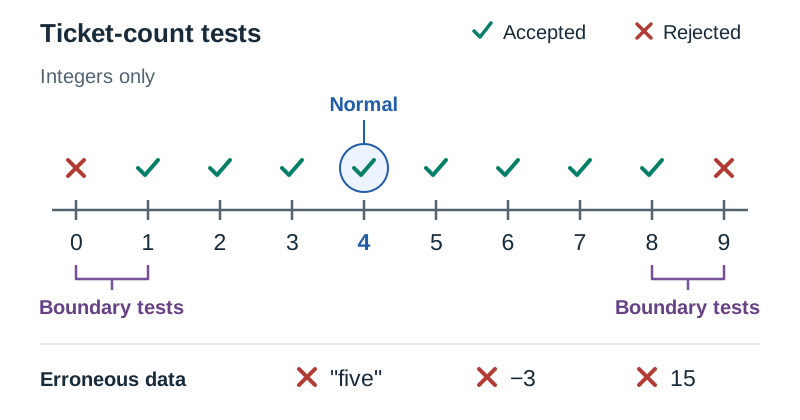
A standard test table includes columns for Test Number, Input Value(s), Type of Test, Expected Output, and Reason. When executing the tests, testers add Actual Output and Pass/Fail columns.
Evaluating, Reflecting, and Documenting
While testing asks "Does the code work without errors?", evaluation asks "Is this the best possible solution to the problem?"
When evaluating a completed program, consider:
- Requirements: Did the finished artefact meet every functional and non-functional requirement set out by stakeholders?
- Efficiency and feasibility: Does the program run quickly, handle reasonable data volumes, and avoid wasting memory?
- Ethical impact: Does the solution protect user privacy and avoid bias?
- Short- and long-term outcomes: Does it work today, and will it continue to work if user numbers increase tenfold?
Reflecting means identifying clear limitations and proposing concrete improvements (such as replacing hard-coded values with database queries). Finally, documenting records the process: code comments explain why tricky logic was written for future developers, and user documentation gives end users clear instructions on how to install and run the software.