

Societal and Cultural Impacts: Benefits and Drawbacks
Computing touches nearly every part of daily life. When exam questions ask you to evaluate these changes, examiners look for balanced arguments that weigh clear benefits against specific social drawbacks.
Communication, Culture, and the Public Square
Digital communication lets people collaborate instantly across borders. Video calls, messaging apps, and shared documents mean project teams no longer need to sit in the same office, and families separated by migration can stay in touch every day. But constant access has a downside. The boundary between professional duty and private rest often dissolves when work messages arrive on personal phones after hours. In public discussion, social media platforms use recommendation algorithms designed to keep people scrolling. These systems frequently promote emotive or sensational posts, trapping users in an echo chamber where they only encounter views that match their own. That dynamic accelerates misinformation and makes civil debate harder.
Education and the Digital Divide
Educational platforms and open online courses mean an ambitious student in a remote village can study the exact same computing material as someone in a major city. Yet this access is far from universal. The digital divide describes the gap between households with high-speed broadband and modern laptops and those without. When schools moved online during recent lockdowns, students lacking reliable internet connections or quiet study spaces fell behind. Having information available online does not help anyone if they cannot afford the hardware or connection to reach it.
The Changing Nature of Work and Careers
Automation and digital services have created entire industries that did not exist thirty years ago, including cloud architecture, mobile app development, data analysis, and cybersecurity operations. Modern logistics systems route parcels with extreme efficiency, and automated factories manufacture goods with microscopic precision.
At the same time, routine cognitive and manual jobs are vanishing. Supermarket self-checkouts, automated bank teller machines, and automated administrative workflows reduce the need for entry-level clerical and retail staff. This leads to structural unemployment, which happens when workers lose their livelihoods because their skills no longer match the demands of a changed economy. Retraining adults for technical roles takes time, public funding, and institutional support.
Under Learning Outcome 1.18, you must also recognise that computing careers extend far beyond writing software in technology firms:
- Direct computing roles include software developers, data scientists, cybersecurity analysts, UX (user experience) designers, and network engineers.
- Wider professions that depend on computing include medicine (bioinformatics and MRI image processing), agriculture (soil nutrient sensors and drone field scans), banking (real-time fraud detection), environmental science (climate modelling and carbon monitoring), and the law (digital forensics and GDPR compliance).
Healthcare and Public Services
Through telemedicine, patients in rural areas can consult hospital specialists without travelling long distances, and high-performance clusters process genomic data in days rather than decades. However, storing public records centrally creates attractive targets for criminals. If an electronic health system is compromised, confidential medical records can be exposed or encrypted for extortion, putting real patient safety at risk.
Historical Milestones and Emerging Computing Trends
Modern computers did not appear overnight. They are the result of mathematical concepts, electrical engineering breakthroughs, and communication protocols developed over the past century.
A Century of Key Milestones
In the 1930s, Alan Turing designed a theoretical model of computation known as the Turing machine. It gave a precise definition of what an algorithm is, and Turing used it to show that some problems cannot be solved by any algorithm. This set the mathematical foundations of computer science.
In the 1940s, John von Neumann formulated the stored-program architecture. Before this, early electronic computers had to be rewired by hand with patch cables every time someone wanted to run a different calculation. Von Neumann's architecture placed both the program instructions and the working data into the same shared memory, which is how modern processors still operate.
In 1947, John Bardeen, Walter Brattain and William Shockley invented the transistor at Bell Labs. Transistors, later made from silicon, replaced hot, fragile glass vacuum tubes. They act as tiny electronic switches for binary ones and zeros, use far less power, produce much less heat, and can be packed by the billion onto a single microchip.
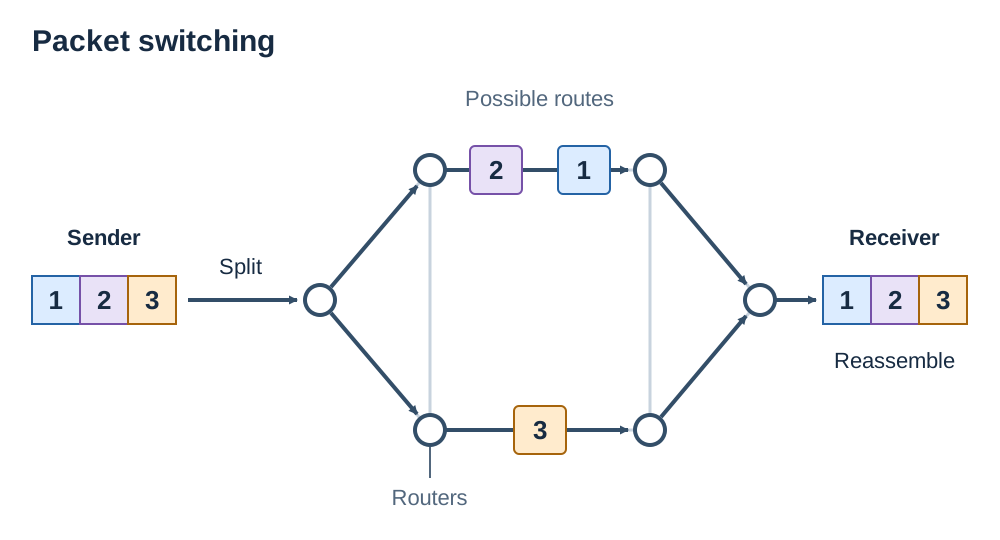
In 1969, the United States Department of Defense launched ARPANET. This network pioneered packet switching, a technique where data breaks down into individual packets that travel independently across shared network links before reassembling at their destination. ARPANET grew into the global infrastructure we now call the Internet.
In 1989, British scientist Tim Berners-Lee invented the World Wide Web while working at CERN. He designed HTML to format documents, URLs to address them, and HTTP to transfer them across networks, creating an open hypertext system that launched publicly in 1991.
From the late 2000s onward, smartphones combined portable processors, GPS, and cellular modems into pocket devices, while cloud computing shifted massive data storage and intensive processing into remote server facilities.
The Internet versus the World Wide Web
Students frequently confuse these two terms on exam papers, but they refer to completely different layers of technology:
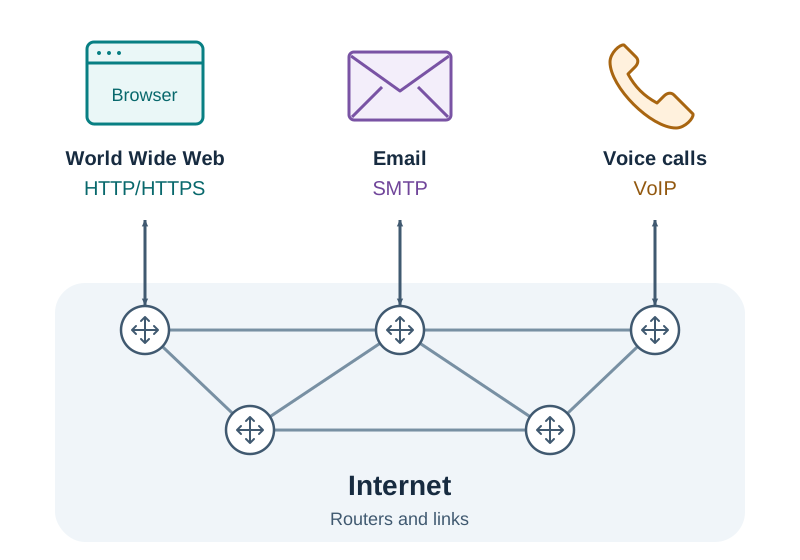
- The Internet is the physical and logical network infrastructure. It is the cables, satellites, routers, switches, and core protocols (such as IP and TCP) that move packets from machine to machine worldwide.
- The World Wide Web is an information service that runs on top of that infrastructure. It consists of web pages, documents, media files, and hyperlinks accessed through web browsers using HTTP or HTTPS.
Many internet services never touch the Web at all. Direct email transfers using SMTP, voice calls over VoIP, online gaming packets, and background software updates travel across the Internet without passing through a website.
How a Turing Machine Works
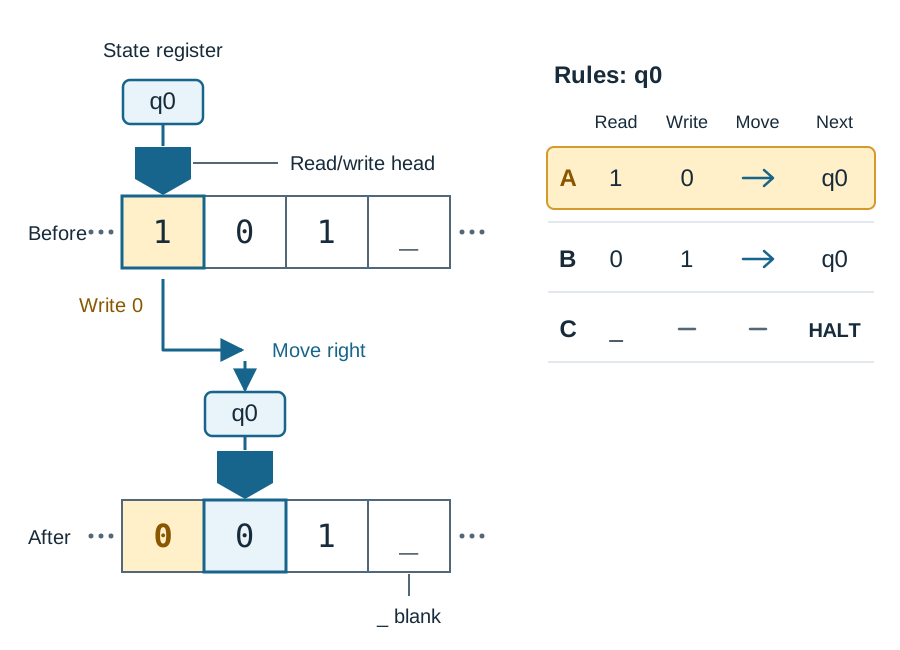
A Turing machine is an abstract mathematical model made of four components: an infinitely long tape divided into individual squares or cells, a read/write head that sits over one cell at a time, a state register that remembers what state the machine is currently in, and a set of instructions called a rule table. In each step, the machine reads the symbol in the current cell, checks its rule table, writes a replacement symbol, shifts the head one cell left or right, and updates its state.
Here is a concrete trace of a simple machine that flips binary bits. The tape contains the symbols 1 0 1 _ where _ represents an empty blank square. The machine starts on the first cell in state q0:
- Rule A: If state is
q0and cell reads1, write0, moveRight, stay inq0. - Rule B: If state is
q0and cell reads0, write1, moveRight, stay inq0. - Rule C: If state is
q0and cell reads_, do not write, halt.
| Step | Current State | Reads | Writes | Tape After Step | Head Shift | Next State |
|---|---|---|---|---|---|---|
| 1 | q0 | 1 | 0 | 0 0 1 _ | Right | q0 |
| 2 | q0 | 0 | 1 | 0 1 1 _ | Right | q0 |
| 3 | q0 | 1 | 0 | 0 1 0 _ | Right | q0 |
| 4 | q0 | _ | — | 0 1 0 _ | None | HALT |
When the machine halts, the processed output on the tape reads 0 1 0. Alan Turing also introduced the Turing test in 1950. He proposed that if a human judge conducts text conversations with an unseen computer and an unseen human and cannot reliably tell which is which, the machine can be said to exhibit intelligent behaviour.
Emerging Computing Trends
LO 1.13 asks you to consider emerging trends that could shape future computing. Two useful examples are:
- Quantum computing: Traditional computers store information in bits that must be either 0 or 1. Quantum computers use quantum bits (qubits), which exploit quantum mechanics to exist in superpositions of states. This property lets them evaluate certain mathematical problems, like factoring giant numbers or simulating complex molecules, far faster than conventional supercomputers. In doing so, quantum machines pose a future threat to current encryption methods, driving research into post-quantum cryptography.
- Internet of Things (IoT): This describes everyday physical objects embedded with sensors, microcontrollers, and network transceivers so they can gather and exchange data automatically. Examples include domestic smart thermostats that adjust heating based on room occupancy, industrial vibration sensors on wind turbines that flag bearing wear before a catastrophic failure, and municipal water meters that report leaks directly to maintenance crews.
Artificial Intelligence, Machine Learning, and Algorithmic Bias
People often use artificial intelligence and machine learning as if they mean the exact same thing, but machine learning is actually one specific approach within the wider field of AI.
Artificial intelligence (AI) is the general engineering pursuit of building machines capable of performing tasks that normally require human intelligence. This includes visual perception, natural language translation, speech recognition, and logical planning. Early AI systems relied largely on hand-crafted rules; for example, an expert medical diagnosis program written in the 1980s contained hundreds of hard-coded IF-THEN statements formulated by human doctors.
Machine learning (ML) takes a different path. Instead of following explicit rules written by a programmer, machine learning algorithms analyse massive collections of historical training data to find statistical correlations. The system then uses those discovered patterns to make predictions about fresh, unseen inputs.
Three Core Types of Machine Learning
- Supervised learning: The algorithm trains on labelled data where every input comes with the correct target answer. For example, an email spam filter trains on millions of emails already tagged as 'spam' or 'inbox'. Over time, it adjusts internal mathematical weights to separate junk messages from normal mail.
- Unsupervised learning: The algorithm receives unlabelled data and searches for natural patterns, clusters, or anomalies on its own. An online supermarket might feed raw customer purchasing histories into an unsupervised model to discover customer buying personas without pre-assigning categories.
- Reinforcement learning: An autonomous software agent learns by interacting with a dynamic environment through trial and error. It receives positive numerical rewards for successful moves and penalties for mistakes. Developers use reinforcement learning to train autonomous vehicles, calibrate factory robotics, and train game-playing engines like AlphaZero.
Deciding When to Use Machine Learning
Machine learning is suitable when you have access to large volumes of accurate training data and the underlying logic is too complex to write out by hand, such as transcribing spoken speech or classifying medical skin scans. It also helps in situations where occasional minor errors are acceptable and can be checked by human staff.
By contrast, machine learning is the wrong tool when you need absolute mathematical certainty. Calculating PAYE tax deductions or pension contributions follows clear legal formulas; using an approximation model here would introduce probabilistic errors into calculations that demand exact figures. You should also avoid machine learning when training data is small, out of date, or heavily biased, or where privacy laws require every single step of a calculation to be provably explainable.
How Algorithmic Bias Emerges
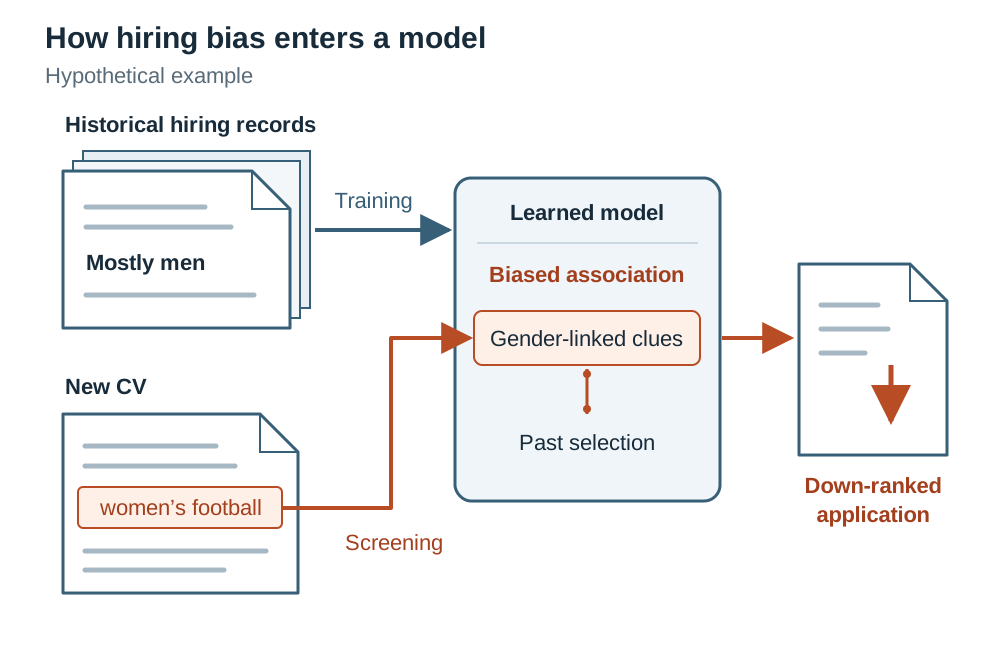
Computers have no conscience or personal beliefs. They purely discover patterns within numbers. If the historical data fed into a machine learning model reflects human prejudice, unequal hiring practices, or skewed demographic sampling, the resulting model captures those injustices and automates them.
Suppose a large technology firm builds an automated screening tool to filter job applicants, training it on fifteen years of past successful engineering hires. Because the industry historically hired mostly men, the training data contains far more accepted male profiles than female profiles. The model observes this statistical correlation and concludes that being male is a predictive factor for job success. As a result, it begins docking points from CVs containing phrases like 'captain of the women's football team' or the names of all-female secondary schools. The algorithm does not hate anyone; it simply replicated the historical bias buried in its training records.
Ethical Principles in Automated Decision Systems
When organisations use automated decision software for serious tasks like employment, criminal justice, or loan approvals, three ethical principles must be respected:
- Transparency: Many advanced models, particularly deep neural networks, act as 'black boxes'. They produce outputs using millions of internal calculations, making it impossible for a developer or an affected applicant to see exactly why a particular decision was made. Systems making high-stakes decisions should use interpretable models so rejected candidates can understand and contest the outcome.
- Accountability: When an automated system causes financial or personal harm, human owners, data providers, and system developers must remain legally and morally responsible. Blaming 'the algorithm' is not an acceptable defence.
- Human agency: A qualified human operator should remain in the loop with the authority to review, question, and overturn automated decisions whenever high-stakes life outcomes are involved.
Data Privacy, the GDPR, and Cybersecurity
Every digital action leaves a trail: card payments at a shop counter, bus travel cards tapped on a reader, search engine queries, and mobile phone location pings. Because this information can be misused, society depends on both robust legislation and technical defences to safeguard personal privacy.
Data Protection Principles and the GDPR
Within Ireland and across the European Union, personal data is legally protected by the General Data Protection Regulation (GDPR). In Ireland, compliance is supervised and enforced by the Data Protection Commission (DPC). The GDPR establishes fundamental duties for any organisation gathering personal records:
- Data must be processed lawfully, fairly, and transparently, collected only for specified, explicit, and legitimate purposes.
- Organisations must collect only what is strictly necessary for that purpose (data minimisation) and keep the records accurate and up to date.
- Records must be kept in a form that permits identification for no longer than necessary, and they must be secured against unauthorised access, alteration, or accidental loss.
Under the GDPR, individuals hold clear legal rights:
- Right of access: You can submit a subject access request to any organisation to obtain a copy of all personal information they hold about you.
- Right to rectification: You can demand that an organisation correct inaccurate or incomplete personal records.
- Right to erasure: Often called the 'right to be forgotten', this allows you to request the deletion of your personal records under conditions like the data no longer being needed for its original purpose.
- Rights regarding automated decision-making: You have the legal right not to be subjected to a decision based purely on automated processing, including profiling, if it produces legal effects concerning you or similarly significantly affects you (for example, refusal of a loan or a job). You have the right to obtain human intervention, express your point of view, and contest the outcome.
Modern Cyber Threats and Their Real-World Fallout
Cyberattacks cause disruption that reaches far beyond damaged computers:
- Ransomware: Malicious software that infiltrates a network and encrypts files so legitimate users cannot open them. The criminals demand a ransom payment in exchange for a decryption key. In May 2021, a criminal gang launched a ransomware attack on the Irish Health Service Executive (HSE). The attack took down IT infrastructure across Irish hospitals, forcing medical teams onto pen and paper, cancelling thousands of outpatient appointments, and delaying vital cancer treatments for weeks.
- Phishing: A social engineering attack where fraudsters send fake emails or SMS messages impersonating legitimate bodies like banks, postal couriers, or the Revenue Commissioners. The messages fool recipients into entering login credentials or bank details on counterfeit web pages.
- Distributed Denial-of-Service (DDoS): An attack where thousands of compromised internet-connected devices, collectively called a botnet, flood a target server with bogus traffic. This overwhelms the server's network bandwidth and memory, taking public websites, banking portals, or utility dashboards offline.
Environmental Sustainability and the Hardware Lifecycle
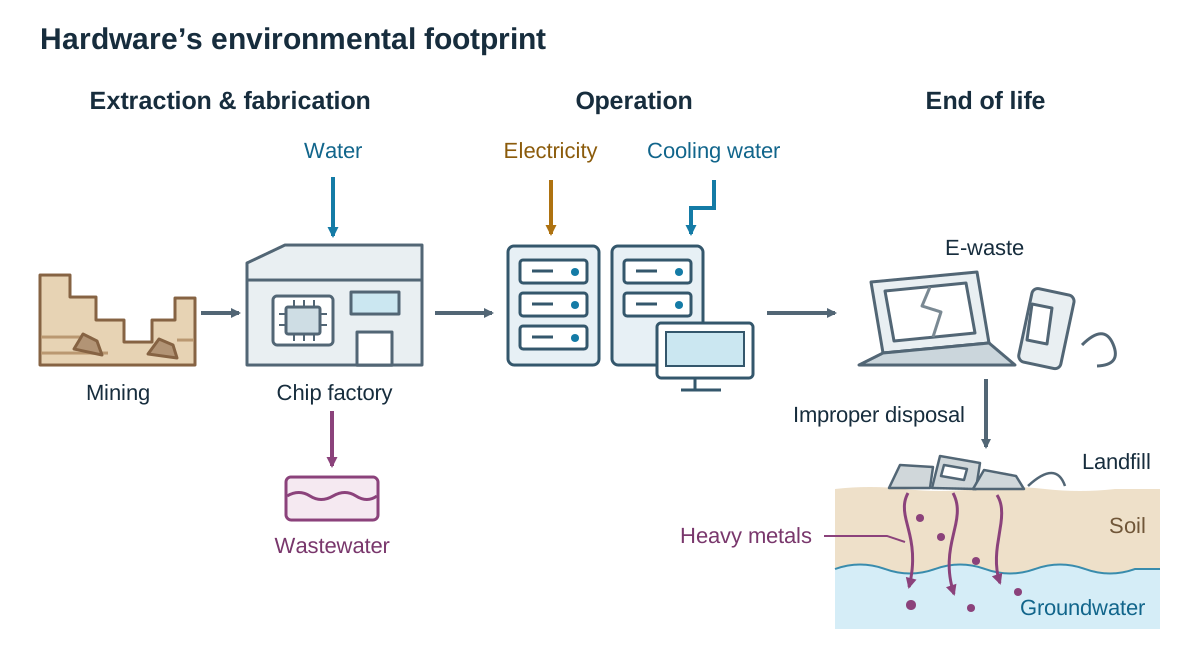
When people think about the environmental cost of computers, they usually think of the electricity drawn from wall sockets while charging laptops or phones. However, the environmental footprint of computing spans three distinct lifecycle stages.
1. Raw Material Extraction and Chip Manufacturing
Every smartphone and laptop contains scarce raw materials. Rechargeable batteries depend on lithium and cobalt, capacitors require tantalum, and speakers and hard-drive motors rely on rare earth elements like neodymium. Mining these minerals tears up delicate ecosystems, consumes massive volumes of industrial chemicals, and can expose mineworkers to dangerous conditions. Once mined, turning raw silicon into microprocessors requires cleanroom fabrication plants. A single semiconductor fabrication facility can consume millions of litres of ultra-pure water every day to rinse silicon wafers, generating hazardous chemical wastewater that must be neutralised before release.
2. Operational Energy and Cooling
Globally, data centres consume substantial portions of national electricity supplies. Ireland is a prominent example: because many international tech firms base their European operations here, data centres consume a rising share of the country's total grid power. These facilities generate tremendous heat from thousands of servers running continuous web traffic, video streams, and machine learning training runs. Cooling those rooms demands industrial refrigeration units and massive chilled-water systems that run around the clock, placing heavy burdens on local energy grids and water resources.
3. End-of-Life Disposal and E-Waste
Because of rapid product update cycles and planned obsolescence, where hardware is intentionally designed to be hard to repair or upgrade, consumers regularly discard working phones and laptops after just two or three years. This creates millions of tonnes of electronic waste (e-waste) annually.
When e-waste ends up in household landfills, toxic heavy metals such as lead, mercury, and cadmium gradually leach out into local soil and nearby groundwater. Worse still, large quantities of electronic waste are shipped illegally to informal scrap yards in developing countries. There, workers burn plastic wire coatings over open fires to recover scrap copper and extract gold using acid baths, releasing poisonous, carcinogenic fumes with no protective equipment.
Sustainable Engineering Solutions
Computer scientists help reduce these impacts through sustainable design practices. Programmers write efficient, low-complexity algorithms that accomplish tasks using fewer CPU cycles, cutting electricity consumption in data centres. Hardware engineers design modular devices where depleted batteries, broken screens, or memory chips can be swapped out individually rather than binning the entire machine. Finally, cloud operators increasingly construct data centres near renewable wind and solar farms to power their operations with clean energy.
Universal Design, Usability, and Adaptive Technologies
Universal design is the practice of designing software, websites, and physical devices so that anyone can access, understand, and use them to the greatest extent possible, regardless of age, size, ability, or disability, without needing special modifications.
The Seven Principles of Universal Design
- Equitable use: The design is useful and appealing to people with diverse abilities, avoiding segregating or stigmatising any group. For example, automatic sliding entrance doors provide the exact same access whether a person uses a wheelchair, pushes a child's buggy, or carries heavy shopping.
- Flexibility in use: The system accommodates a wide range of individual preferences and abilities. For example, a modern operating system lets users choose between touchscreen taps, mouse clicks, keyboard shortcuts, or spoken voice commands.
- Simple and intuitive use: The interface is straightforward to understand regardless of the user's prior experience, knowledge, or language fluency. For example, clean navigation menus with standard descriptive labels and uncluttered layouts.
- Perceptible information: Essential information is communicated through multiple sensory modes so sensory impairments do not lock people out. For example, a smartphone alarm that plays an audio chime, vibrates the chassis, and flashes the screen backlight simultaneously.
- Tolerance for error: The design minimises hazards and the negative consequences of accidental clicks. For example, a system displaying a confirmation dialogue before permanently deleting a file, coupled with an 'undo' button.
- Low physical effort: The design can be operated comfortably with minimal physical fatigue. For example, large, responsive touchscreen buttons on an information kiosk that register light taps without requiring sustained force.
- Size and space for approach and use: Appropriate size and space are provided for approach, reach, manipulation, and use, regardless of the user's body size, posture, or mobility. For example, a public payment terminal installed at a height accessible to both standing adults and people using wheelchairs.
Core Usability Factors
Usability measures how effectively and pleasantly someone can interact with a computer interface. It is evaluated through five recognised factors:
- Learnability: How easily can a first-time user complete basic tasks when encountering the design for the first time?
- Efficiency: Once users learn how the interface works, how quickly can they complete routine tasks?
- Memorability: When users return to the interface after weeks or months away, how easily can they regain proficiency?
- Errors: How many mistakes do users make, how severe are these errors, and how easily can users recover from them?
- Satisfaction: How pleasant, comfortable, and clear does the user find the experience?
Comparing Two User Interfaces
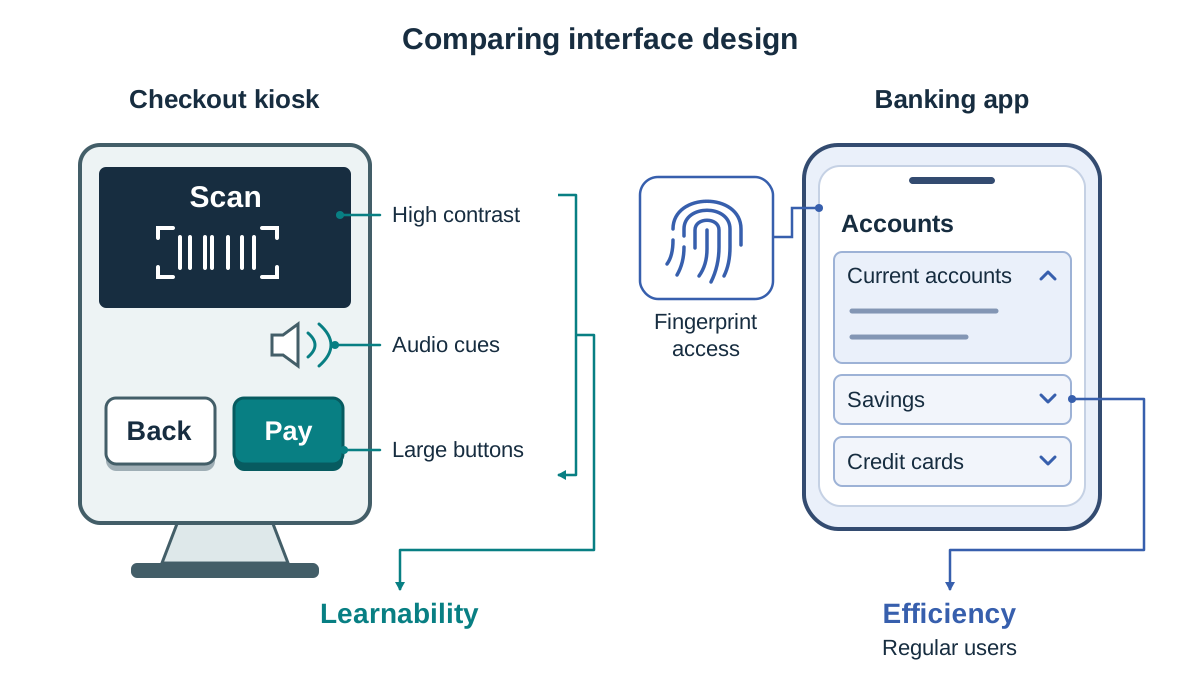
Consider the contrast between an automated supermarket self-checkout kiosk and a mobile banking smartphone app.
- The self-checkout kiosk uses large physical buttons, high-contrast text, and spoken audio instructions at every step. This prioritises simple and intuitive use and high learnability. Infrequent shoppers of any age can walk up and pay for groceries without prior training.
- The mobile banking app requires biometric fingerprint logins and presents a dense, collapsible dashboard showing current accounts, savings, and credit cards. It prioritises security and efficiency for regular users who want to transfer funds in seconds, but its initial learnability is lower for an inexperienced user.
For an older adult trying digital self-service for the first time, the checkout kiosk offers better usability because clear audio cues and large buttons lower cognitive and motor demands, whereas the dense banking menus assume established digital confidence.
Adaptive Technologies
While universal design aims to make standard software usable by everyone out of the box, adaptive technology refers to specialised hardware or software created to help people with specific functional disabilities interact with computers:
- Screen readers: Software programs like NVDA, JAWS, or Apple VoiceOver that convert on-screen text, buttons, and layout metadata into synthesised speech or refreshable braille displays for blind or visually impaired users.
- Alternative input hardware: Sip-and-puff pneumatic switches (which turn gentle puffs or sips of air into mouse clicks), eye-tracking infrared cameras, and oversized foot pedals that let individuals with severe physical motor impairments control a computer.
- Speech-to-text dictation: Audio recognition tools that convert spoken speech into written text, helping people with severe motor difficulties or dyslexia draft documents without relying on a physical keyboard.
Key terms
- Universal Design
- The design of products, environments, and software to be usable by all people, to the greatest extent possible, without the need for adaptation or specialised redesign.
- Adaptive Technology
- Specialised hardware or software created specifically to help individuals with disabilities overcome functional barriers, including screen readers and eye-tracking systems.
- Turing Machine
- A mathematical model of computation consisting of an infinitely long tape, a read/write head, a state register, and transition rules, defining the theoretical limits of what algorithms can compute.
- Machine Learning
- A branch of artificial intelligence where algorithms discover statistical patterns within historical training data to make predictions or decisions on unseen data without explicit rules.
- Algorithmic Bias
- Systematic and unfair errors produced by automated computer models, typically caused by unrepresentative sampling or historical discrimination embedded within the training data.
- General Data Protection Regulation (GDPR)
- The European Union legal framework governing the collection, processing, and storage of personal data, granting individuals enforceable rights over their personal information.
- Digital Divide
- The socio-economic gap between individuals and communities who have access to modern computing hardware and high-speed internet and those who do not.
- Echo Chamber
- An online environment where platform algorithms repeatedly serve users content matching their existing beliefs, shielding them from alternative perspectives.
- Structural Unemployment
- Long-term job loss resulting from fundamental changes in the economy, such as workplace automation eliminating roles faster than workers can retrain.
- Transistor
- A tiny solid-state semiconductor component that acts as an electronic switch or amplifier, replacing fragile vacuum tubes in modern microprocessors.
- Packet Switching
- A network communication method that breaks data into addressed packets that travel independently across shared networks before reassembling at the destination.
- E-Waste
- Discarded electrical or electronic equipment containing toxic substances like lead and mercury that risk environmental contamination when improperly disposed of.
- Planned Obsolescence
- The commercial practice of designing hardware or software with an artificially limited functional lifespan to encourage consumers to purchase newer models.
- Ransomware
- Malicious software that encrypts user storage and files, locking owners out until an extortion ransom is paid to the perpetrators.
Check yourself
Name three principles of universal design and provide a practical computing example of each.
Any three of: 1. Equitable use (e.g. a website interface accessible to both sighted and blind users via screen-reader tags). 2. Flexibility in use (e.g. accepting input via mouse, keyboard shortcuts, or voice). 3. Simple and intuitive use (e.g. standard icons paired with clear labels). 4. Perceptible information (e.g. notifications that chime, flash, and vibrate). 5. Tolerance for error (e.g. confirmation prompts before file deletion with an undo option). 6. Low physical effort (e.g. large tap targets on public kiosks). 7. Size and space for approach and use (e.g. terminals mounted at heights suitable for wheelchair users).
Give one scenario where machine learning is a poor choice, and explain why.
Calculating income tax deductions or VAT. Tax rules follow strict legal formulas that can be written in deterministic code. Machine learning relies on statistical approximations, which could introduce probabilistic errors into calculations requiring 100% legal accuracy.
Trace the final output tape for the bit-flipping Turing machine shown in Section 2 when given the input tape
0 0 1 _starting on the first cell in state q0.The output tape reads
1 1 0before the machine halts on the blank symbol.What is the primary difference between a universal design feature and an adaptive technology?
A universal design feature is built directly into standard products so everyone can use them without alteration (such as closed captions on video), whereas an adaptive technology is a specialised tool designed specifically to help an individual with a disability overcome functional barriers (such as an eye-tracking camera).
Why was the transistor a critical breakthrough compared to vacuum tubes?
Transistors acted as solid-state electronic switches that were vastly smaller, consumed significantly less electrical power, produced much less heat, and were far more reliable and cheaper to manufacture than fragile glass vacuum tubes.
Name two toxic heavy metals commonly found in electronic waste that can contaminate soil and water supplies.
Lead, mercury, or cadmium (any two).