

A communication protocol is an agreed set of rules that says how devices on a network must format, address, send, receive, and check data. On the Internet, these protocols allow machines with completely different hardware, operating systems, and architectures to exchange information reliably. Leaving Certificate Computer Science requires you to understand how the physical Internet supports services like the World Wide Web through the client–server model, how data travels in packets, and the specific roles of the four core syllabus protocols: HTTP (and HTTPS), TCP, IP, and VoIP.
The Internet, the World Wide Web, and the Client–Server Model
A common mistake in exams is treating the Internet and the World Wide Web as the same thing. They operate at completely different levels of abstraction.
- The Internet is the physical global infrastructure of interconnected computer networks. It consists of copper cables, fibre-optic lines, wireless links, routers, switches, and servers connecting billions of devices worldwide.
- The World Wide Web (WWW) is an information service running on top of the Internet. It is a collection of multimedia web pages and digital documents interlinked by hyperlinks and addressed using Uniform Resource Locators (URLs).
In simple terms, the Internet is the roadway network, while the World Wide Web is one specific type of traffic travelling along those roads. Other traffic types, such as email and voice calls, use the same physical highway without being part of the Web.
The Client–Server Model
Web architecture relies on the client–server model:
- Client: A device or application (such as a web browser on a phone or laptop) that initiates communication by sending a request for data or a service.
- Server: A computer (or the program running on it) that listens for requests on the network, processes them, and sends back a response containing the requested resource or an error message.
For example, if you open a browser and request your school timetable: your device sends an HTTP GET request for /timetable (input); the school web server receives the request and fetches the timetable file (steps); and the server sends the HTML page back for your browser to render on screen (output).
Servers are generally named after their specific role: a web server delivers web pages, a mail server routes email, a file server stores shared documents, and a database server runs structured data queries. A single server can handle requests from thousands of clients simultaneously.
In contrast, a peer-to-peer (P2P) network has no central server. Every computer acts as both a client and a server, sharing files directly. Client–server networks are much easier to secure and back up centrally, whereas peer-to-peer networks have no single point of failure but are harder to manage.
Finding the Server: DNS
Routers navigate using numeric IP addresses, not human-readable domain names. When you enter https://www.curriculumonline.ie/index.html into a browser, the browser cannot connect immediately. It first asks a Domain Name System (DNS) server to look up www.curriculumonline.ie and return its numerical IP address. DNS acts like the phone book of the Internet. Once the IP address is returned, the browser opens its connection to that specific server.
Layered Architecture and the TCP/IP Suite
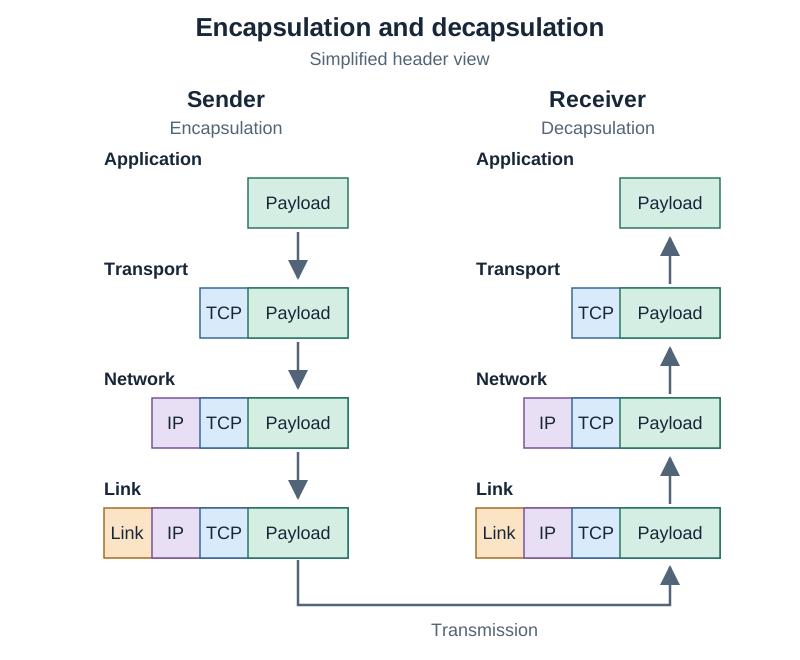
Managing network communication in a single step would be unmanageable. Networking solves this through abstraction, dividing communication into distinct layers. Each layer has a specific job and communicates only with the layers directly above and below it, hiding its internal complexity.
The 4-layer TCP/IP model powers the modern Internet:
| Layer | Core Function | Protocols |
|---|---|---|
| Application | Formats data for user applications and interprets user requests | HTTP, HTTPS, VoIP |
| Transport | Manages host-to-host transmission, packet segmentation, ordering, and reliability | TCP, UDP |
| Network (Internet) | Assigns logical IP addresses and routes packets across different networks | IP |
| Link (Network Access) | Converts packets into physical electrical, optical, or radio frames for local transmission | Ethernet, Wi-Fi |
Note on layer numbers: The layer numbers you sometimes see in networking — Layer 2 for switches, Layer 3 for routers — come from the theoretical seven-layer OSI model. Layer 2 corresponds to the link layer and Layer 3 corresponds to the network layer.
When you send data, it moves down the stack on your device. Each layer wraps the payload with its own control headers, a process called encapsulation. At the receiving end, the data travels back up the stack, and each layer strips away its corresponding header until only the application payload is delivered.
Application Protocols: HTTP and HTTPS
Hypertext Transfer Protocol (HTTP) is an application-layer request-response protocol used to transfer web resources like HTML pages, images, and stylesheets.
A typical HTTP exchange follows four steps:
- The client browser issues an HTTP request, such as
GET /index.html. - The web server receives and parses the request headers and retrieves the file.
- The server returns an HTTP response with a status code (such as
200 OKor404 Not Found) and the payload. - The browser parses the returned data and renders the page.
HTTP vs HTTPS
- HTTP sends data as clear, unencrypted text across port 80 by default. Anyone with access to intermediate routers or packet-sniffing software can read usernames, passwords, and form submissions in transit.
- HTTPS (Hypertext Transfer Protocol Secure) encrypts the entire HTTP exchange using TLS (Transport Layer Security), the successor to the older SSL (Secure Sockets Layer). It operates across port 443 by default. TLS uses cryptographic keys to ensure privacy, authenticate the server using digital certificates, and confirm message integrity so data cannot be altered during transit.
Transport and Network Layers: TCP, IP, and Packet Switching
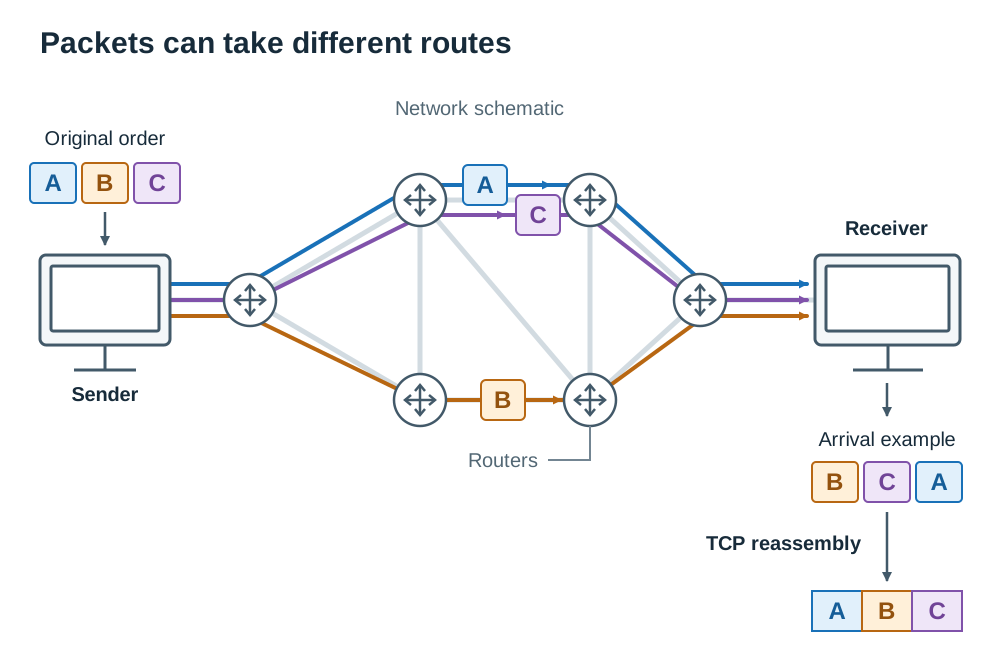
Packet switching means a message is broken into small, individual pieces called packets. Each packet travels independently across the network and may take a different path before being reassembled at the destination. This makes network usage highly efficient because thousands of conversations share the same lines. It also provides resilience: if one route fails, remaining packets are routed around the breakdown. If a packet is corrupted, only that single packet needs to be re-sent, rather than the entire file.
Internet Protocol (IP)
Operating at the network layer, IP handles logical addressing and packet routing.
- An IPv4 address is a 32-bit number written as four decimal values separated by full stops, each between 0 and 255 (for example,
192.168.1.14). Because 32 bits only support roughly 4.3 billion addresses, IPv6 was introduced: a 128-bit address written as eight groups of hexadecimal digits (such as2001:0db8:85a3:0000:0000:8a2e:0370:7334), ensuring ample addresses for all connected devices. - IP attaches a header to each packet containing the source IP, destination IP, and packet length.
- IP is a connectionless, best-effort protocol. It forwards packets across routers towards their destination, but makes no guarantee that packets will arrive, arrive in order, or arrive without duplicates.
Transmission Control Protocol (TCP)
Operating directly above IP at the transport layer, TCP provides reliable, ordered, and error-checked delivery:
- A three-way handshake (SYN, SYN-ACK, ACK) establishes an active connection between client and server before data flows.
- TCP splits data streams into segments and tags each with a sequence number.
- Each segment includes a checksum, a value calculated from the segment's bits. The receiver recalculates this checksum; if the numbers do not match, the damaged segment is discarded.
- The receiving device sends an acknowledgement (ACK) back for every intact segment it receives.
- If the sender's timer expires before receiving an ACK, TCP automatically retransmits the missing segment.
- The receiver uses sequence numbers to reconstruct the data in original order, even if packets arrived out of sequence.
Voice over Internet Protocol (VoIP)
Voice over Internet Protocol (VoIP) is an application-level technology that digitises analogue voice audio into data packets so phone and video calls can travel over IP networks, replacing traditional analogue telephone lines.
The VoIP Transmission Cycle
- A microphone captures voice waves as continuous analogue electrical signals.
- An analogue-to-digital converter (ADC) samples and converts these signals into binary numbers.
- Audio codecs compress the binary data to save bandwidth.
- The digitised audio is packaged into IP packets and transmitted over the network.
- At the destination, packets are unbundled and decompressed, a digital-to-analogue converter (DAC) turns the binary data back into a continuous analogue electrical signal, and the speaker converts that electrical signal into audible sound waves.
Why VoIP Uses UDP Instead of TCP
TCP's reliability mechanisms create delay. If an audio packet drops during a live conversation, waiting for an acknowledgement timeout and a retransmission means that packet arrives hundreds of milliseconds late. Hearing a voice sound half a second late is disruptive, whereas dropping that micro-fragment is barely noticeable. VoIP therefore runs over UDP (User Datagram Protocol) rather than TCP. UDP sends packets without handshakes or retransmissions, keeping latency minimal.
Latency, Jitter, and Buffering
- Latency is the time delay for a packet to travel from speaker to listener. High latency causes people to talk over one another.
- Jitter is the variation in packet arrival times caused by fluctuating network congestion. When packets arrive in bursts or with irregular gaps, the speech sounds robotic or clipped.
- To fix jitter, receiving devices use a playback buffer, briefly storing incoming packets so they can be played back at a smooth, constant pace. Increasing buffer size eliminates jitter distortion, but adds to overall latency.
Advantages and Disadvantages of VoIP
- Advantages: Substantially cheaper call costs (especially international calls using existing broadband); voice, video, and screen sharing can travel over a single network; users can keep their number on any Internet-connected device anywhere.
- Disadvantages: Call quality degrades if bandwidth is low or congestion is high; calls fail entirely during power cuts or Internet outages unless battery backups are present; emergency call geolocation is less precise than a physical landline.
Network Hardware Supporting Protocols
Protocols define software rules, but hardware components are required to transmit, forward, and convert physical signals:
- Network Interface Card (NIC): The hardware component inside every networked device (wired or wireless) that connects it to the physical network. Every NIC has a permanent, globally unique MAC address (Media Access Control address) burned into it during manufacturing.
- Modem: Short for modulator-demodulator. It converts digital data from a computer into an analogue signal for transmission over telephone, cable, or fibre lines from an Internet Service Provider (ISP), and converts incoming analogue signals back into digital data.
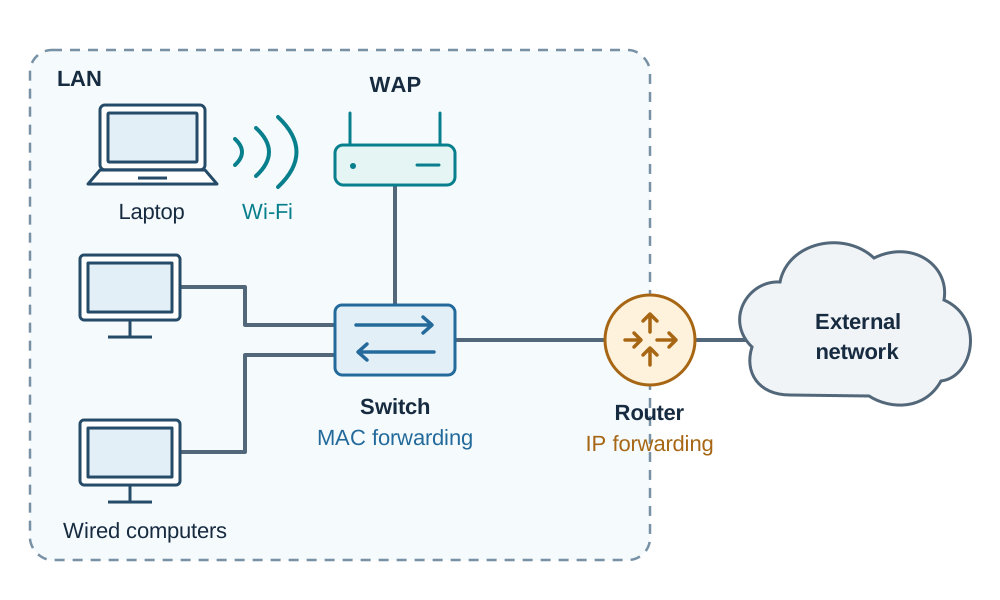
- Network Switch: Connects multiple wired devices within a Local Area Network (LAN). A switch inspects the destination MAC address of each incoming data frame and directs it straight to the specific port of the receiving device, rather than broadcasting it to all devices.
- Router: Connects different networks together (such as connecting your home LAN to your ISP's network). Routers inspect destination IP addresses on incoming packets and use internal routing tables to forward them along the best path.
- Wireless Access Point (WAP): Broadcasts radio signals allowing wireless devices to join a wired local network.
- Gateway: Connects two networks that use completely different communication protocols or data architectures, translating packet formats between them.
- Bridge: Connects two separate segments of the same local network, filtering traffic by MAC address to reduce network congestion.
- Repeater: Amplifies and regenerates electrical or optical signals that have weakened due to cable length (attenuation), extending the network's maximum physical reach.
- Transmission Media: The physical channels carrying data, including twisted-pair copper cables (Ethernet), fibre-optic cables (using pulses of light for high bandwidth, long distances, and immunity to electrical noise), and radio waves (Wi-Fi and mobile data).
Protocol Summary Reference
Use this core summary table to recall the syllabus protocols:
| Protocol | Layer | Key Examination Function |
|---|---|---|
| HTTP / HTTPS | Application | Request-response protocol for web resources. HTTP uses unencrypted plain text on port 80; HTTPS encrypts traffic using TLS/SSL on port 443. |
| VoIP | Application | Digitises, compresses, and streams real-time voice and video calls over IP networks, prioritising low latency over retransmission. |
| TCP | Transport | Breaks data into numbered segments, confirms delivery with acknowledgements, retransmits lost packets, and reassembles data in order. |
| IP | Network | Assigns logical addresses (IPv4/IPv6) and routes independent packets across networks on a connectionless, best-effort basis. |
Key terms
- Communication Protocol
- An agreed set of rules that specifies how devices format, address, transmit, receive, and verify data across a network.
- Internet
- The global physical infrastructure of interconnected computer networks, cables, wireless links, switches, and routers.
- World Wide Web (WWW)
- An application-layer service of interlinked hypertext documents and media accessible via the Internet using web browsers.
- Client–Server Model
- A network architecture where client devices send requests for resources and centralised servers process and return responses.
- DNS (Domain Name System)
- An Internet service that translates human-readable domain names (such as examinations.ie) into numerical IP addresses.
- Packet Switching
- A transmission method where data is split into small packets that travel independently across network paths and are reassembled at the destination.
- TCP
- Transmission Control Protocol; a transport-layer protocol providing reliable, connection-oriented, sequenced, and error-checked packet delivery.
- IP
- Internet Protocol; a network-layer protocol responsible for logical addressing and packet routing across networks on a best-effort basis.
- HTTP
- Hypertext Transfer Protocol; an application-layer request-response protocol for fetching web resources in unencrypted plain text over port 80.
- HTTPS
- Hypertext Transfer Protocol Secure; an encrypted version of HTTP running over TLS/SSL on port 443 to ensure privacy and data integrity.
- VoIP
- Voice over Internet Protocol; an application technology that converts analogue voice into digital packets for real-time transmission over IP networks.
- Sequence Number
- A numerical tag added to each TCP segment so the receiver can detect missing packets and reorder segments correctly.
- Checksum
- A calculated numeric value included in a data packet header used by the receiver to detect bit errors and data corruption.
- Latency
- The time delay taken for a data packet to travel from its source across the network to its destination.
- Jitter
- The variation in packet arrival times caused by network congestion, resulting in stuttering in real-time streaming or VoIP.
- MAC Address
- Media Access Control address; a unique physical hardware identifier permanently assigned to a network interface card (NIC).
- Router
- A network device that forwards data packets between different networks by inspecting destination IP addresses.
- Network Switch
- A local network device that inspects destination MAC addresses to forward frames directly to their target device.
Check yourself
A user can reach a website by typing its numeric IP address directly into a browser, but not by entering its domain name. What is the most likely cause?
A DNS (Domain Name System) failure. The name cannot be resolved into an IP address, even though the web server and physical Internet connection are functioning.
How do an IPv4 address and an IPv6 address differ in bit length and notation?
IPv4 is 32 bits long, written as four decimal numbers separated by dots (e.g. 192.168.1.1). IPv6 is 128 bits long, written as eight groups of hexadecimal digits separated by colons.
What is the function of the checksum field in a TCP segment?
The checksum is calculated from the segment's data bits. The receiver recalculates it upon arrival; if the values do not match, the packet is corrupted, discarded, and retransmitted.
What are the default port numbers used by HTTP and HTTPS respectively?
HTTP uses port 80; HTTPS uses port 443.
Why does VoIP use UDP rather than TCP for real-time voice streaming?
TCP retransmits dropped packets, which introduces delay into live speech. UDP transmits data without handshakes or retransmissions, keeping latency low even if occasional packets drop.
A VoIP call sounds robotic and words are clipped, even though the connection has high bandwidth. Name this issue and state how the receiving device handles it.
The issue is jitter (inconsistent packet arrival times). The receiver uses a playback buffer to briefly hold packets and release them at a steady rate, smoothing out the audio at the expense of a slight delay.
What hardware device connects two separate networks that run on different communication protocols?
A gateway.
What is the difference between a MAC address and an IP address?
A MAC address is a permanent physical hardware identifier burned into a device's NIC for local communication. An IP address is a logical address assigned by the network for routing across networks.