

Computational thinking is a thought process that uses analytic and algorithmic approaches to formulate, analyse, and solve problems so that their solutions can be carried out by a computer. In Leaving Certificate Computer Science, it bridges human problem solving and computer code. It draws on four core techniques—decomposition, pattern recognition, abstraction, and algorithms—and extends to designing general solutions, dry-running code with trace tables, evaluating Big-O complexity, applying heuristics, and systematically testing software.
The Core Techniques of Computational Thinking
Computational thinking is not about thinking like a machine; it is a human problem-solving methodology that allows us to understand problems and design solutions that can be automated.
- Decomposition: Breaking a complex problem or system down into smaller, manageable sub-problems. Each smaller unit can be examined, developed, and tested on its own before assembling the complete solution. For instance, creating an app can be broken down into designing the user interface, reading user input, processing calculations, and saving records to a database.
- Pattern Recognition: Identifying recurring similarities, trends, or shared characteristics within datasets or across different problems. Spotting a pattern allows us to apply known rules or equations rather than solving each instance from scratch. For example, recognizing that the ancestor tree of a honeybee increases as 1, 1, 2, 3, 5, 8 reveals the Fibonacci sequence, where each term from the third onwards is the sum of the two preceding terms ().
- Abstraction: Removing unnecessary details to focus on the essential features needed to solve the problem. It allows us to create generalised models and solutions that work across many situations. In a matchstick game, discarding the colour, wood type, and length of the sticks and representing a pile simply as an integer count is abstraction. The London Underground map is another classic example: surface terrain, streets, and exact track curves are removed, keeping only station sequences and line interchanges.
- Algorithmic Thinking: Developing a clear, ordered, step-by-step sequence of instructions to solve a problem or achieve a goal. An algorithm must be unambiguous and produce the correct output for all valid inputs.
Describing a Concept in an Exam
When an exam asks you to explain a computational thinking concept using an example from a game or problem (such as Nim or a coin puzzle), structure your answer in three distinct steps:
- State the precise definition (for example: "Abstraction is removing unnecessary details to focus on the essential features needed to solve the problem").
- Give the exact example from the problem (for example: "In a matchstick game, physical wooden sticks are represented as an integer variable, and taking sticks away is represented by subtraction").
- Explicitly link the example back to the definition (for example: "This is abstraction because the physical material, length, and colour of the sticks are ignored, leaving only the numerical quantity needed to calculate winning moves").
Flowcharts, Pseudocode, and Compound Boolean Logic
Before writing code in Python, algorithms are planned using pseudocode or flowcharts.
Pseudocode
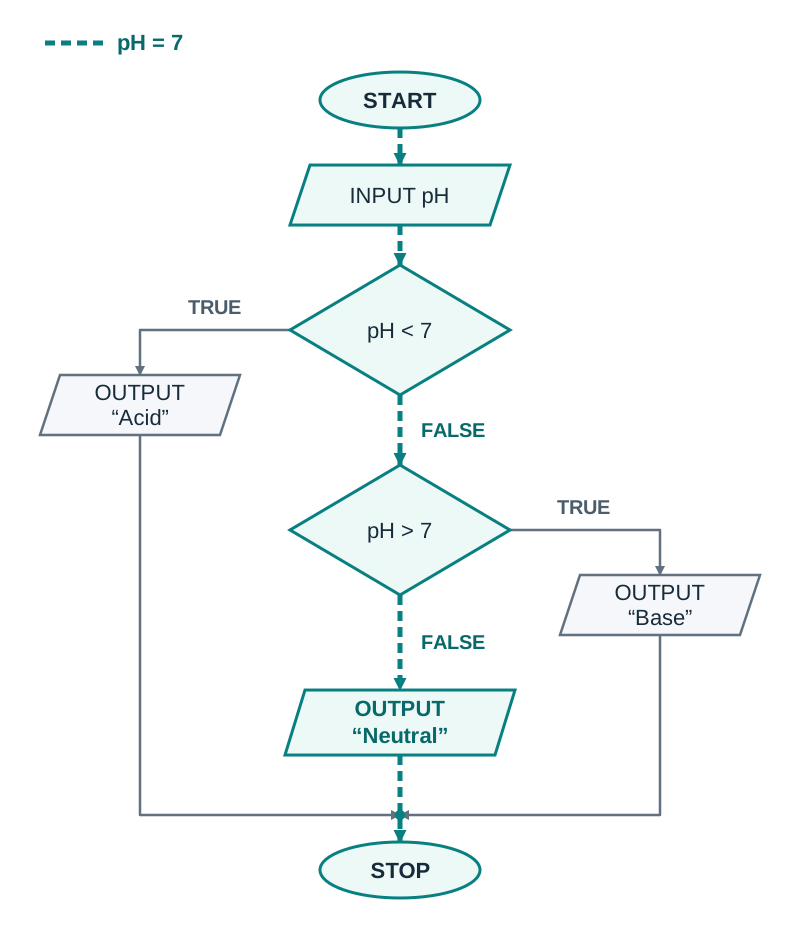
Pseudocode is an informal, structured, plain-English description of an algorithm. It uses standard programming keywords without strict syntax rules:
INPUT pH
IF pH < 7 THEN
    OUTPUT "Acid"
ELSE IF pH > 7 THEN
    OUTPUT "Base"
ELSE
    OUTPUT "Neutral"
ENDIF
Flowchart Symbols
A flowchart models an algorithm visually using standard geometric shapes:
- Terminator (Oval): Marks the START or STOP of the program.
- Input / Output (Parallelogram): Represents receiving data (e.g.
INPUT pH) or displaying results (e.g.OUTPUT "Acid"). - Process (Rectangle): Represents a calculation or internal action (e.g.
total = total + 1). - Decision (Diamond): Represents a condition to test. It has exactly two exit arrows, clearly labelled TRUE and FALSE (or YES and NO).
- Flow lines (Arrows): Indicate the direction and order of execution.
When tracing the pH checker with an input of 7, the first decision (pH < 7) evaluates to False. The flow follows the False branch to the second decision (pH > 7), which also evaluates to False. Following this False branch leads directly to OUTPUT "Neutral".
Compound Boolean Expressions
A Boolean expression evaluates to either True or False. Individual conditions are combined using logical operators:
- AND: Evaluates to True only when both conditions are True.
- OR: Evaluates to True if at least one condition is True.
- NOT: Inverts the truth value of the expression.
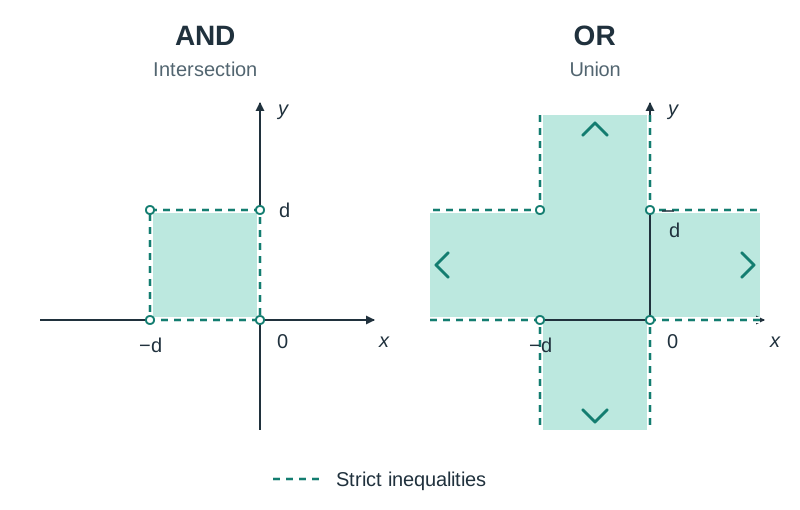
To define a numerical range or spatial area, combine boundary conditions with AND. For example, defining a shaded square in the top-left quadrant with corners at and requires the point to satisfy both horizontal and vertical boundaries:
- Horizontal span (-range):
x > -d and x < 0 - Vertical span (-range):
y > 0 and y < d - Combined condition:
(x > -d and x < 0) and (y > 0 and y < d)
Testing a point inside, such as where , yields , and . Since both are True, the combined expression evaluates to True. Using OR instead of AND would make the expression True for any point in the vertical strip between x = −d and x = 0, or in the horizontal strip between y = 0 and y = d, even far outside the square.
Abstraction, State Spaces, and Systematic Logic Puzzles
Abstraction allows complex physical scenarios to be translated into data structures and states that algorithms can process.
Data and Procedural Abstraction
- Data Abstraction: Representing real objects using only the data values that matter for the problem. In a banking system, a customer is abstracted to an account number, account holder name, and balance.
- Procedural Abstraction: Grouping a set of instructions inside a reusable named function (e.g.
find_highest(score_list)). The rest of the program calls the function by name without needing to know its internal lines of code.
State-Space Modelling: The River-Crossing Puzzle
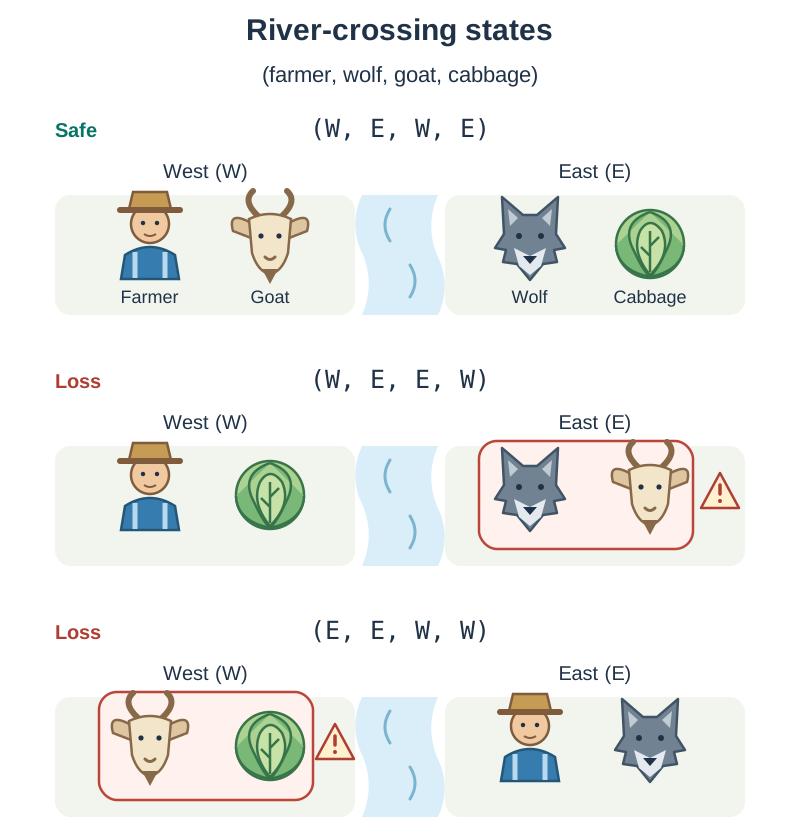
A farmer must transport a wolf, a goat, and a cabbage across a river from the East bank (E) to the West bank (W). The boat holds only the farmer and one other item. If left unsupervised without the farmer on a bank, the wolf eats the goat, or the goat eats the cabbage.
We abstract this world into a 4-tuple: (farmer, wolf, goat, cabbage):
- Initial state:
('E', 'E', 'E', 'E') - Desired goal state:
('W', 'W', 'W', 'W') - Loss states occur when the wolf and goat are left together without the farmer (
wolf == goat and farmer != wolf), such as('W', 'E', 'E', 'W'), or when the goat and cabbage are left together without the farmer (goat == cabbage and farmer != goat), such as('E', 'E', 'W', 'W'). - A valid intermediate non-loss state is
('W', 'E', 'W', 'E'), where the farmer ferries the goat across first, leaving the wolf and cabbage safely separated on the East bank.
Always adhere strictly to the bank labels and travel direction given in the examination question.
Systematic Problem Solving: The Eight-Coin Puzzle
Suppose you have 8 coins, one of which is a heavier fake, and a balance scale. You must find the counterfeit coin in the minimum number of weighings.
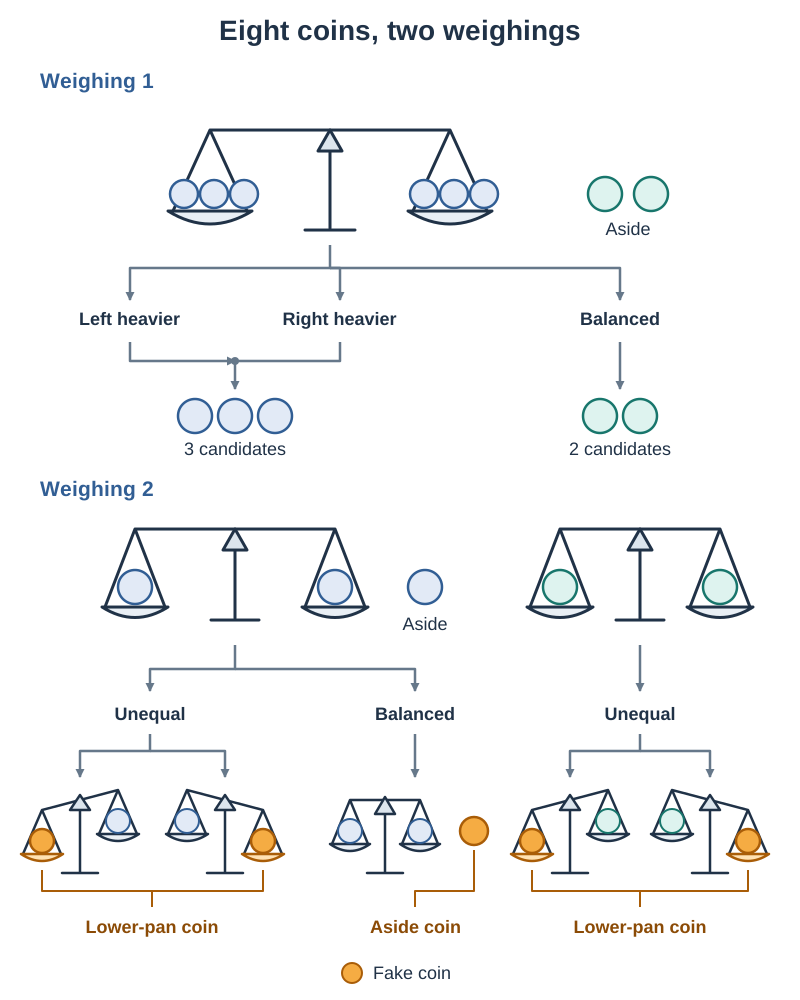
Because a balance scale has three possible outcomes—left heavier, right heavier, or balanced—systematically split the coins into three groups rather than two:
- Weighing 1: Place 3 coins on the left pan and 3 coins on the right pan, leaving 2 coins aside.
- Outcome A (Pans balance): The fake coin is among the 2 coins left aside. For Weighing 2, place one coin on each pan. The heavier coin is the fake.
- Outcome B (One pan is heavier): The fake coin is in that heavier group of 3. For Weighing 2, choose 2 coins from this group and place one on each pan, leaving 1 aside. If one pan drops, that coin is the fake; if they balance, the 1 coin left aside is the fake.
- Conclusion: The fake coin is guaranteed to be identified in a minimum of 2 weighings.
Trace Tables and General Solutions
A general solution is an algorithm that can be applied to different problem instances and consistently produces the correct output, regardless of the specific input values or the size of the input data set.
Trace Tables
A trace table is a technique used to dry-run an algorithm manually line by line. It tracks variable values and conditional outcomes at each step, helping to verify correctness and pinpoint logic errors.
Consider tracing integer division of 14 by 4 using repeated subtraction:
numerator = 14
denominator = 4
quotient = 0

while numerator >= denominator:
    numerator = numerator - denominator
quotient = quotient + 1| Step / Iteration | Condition (numerator >= denominator) | numerator | denominator | quotient |
|---|---|---|---|---|
| Initial values | — | 14 | 4 | 0 |
| Iteration 1 | 14 >= 4 (True) | 10 | 4 | 1 |
| Iteration 2 | 10 >= 4 (True) | 6 | 4 | 2 |
| Iteration 3 | 6 >= 4 (True) | 2 | 4 | 3 |
| Final check | 2 >= 4 (False) | 2 | 4 | 3 |
In the exam, use the exact column layout provided on the paper. Show clearly where the loop stops. If the table has a condition column, record the final check where the condition is False. If it has only variable columns, stop after the last update and do not add extra rows.
Algorithmic Efficiency and Big-O Complexity
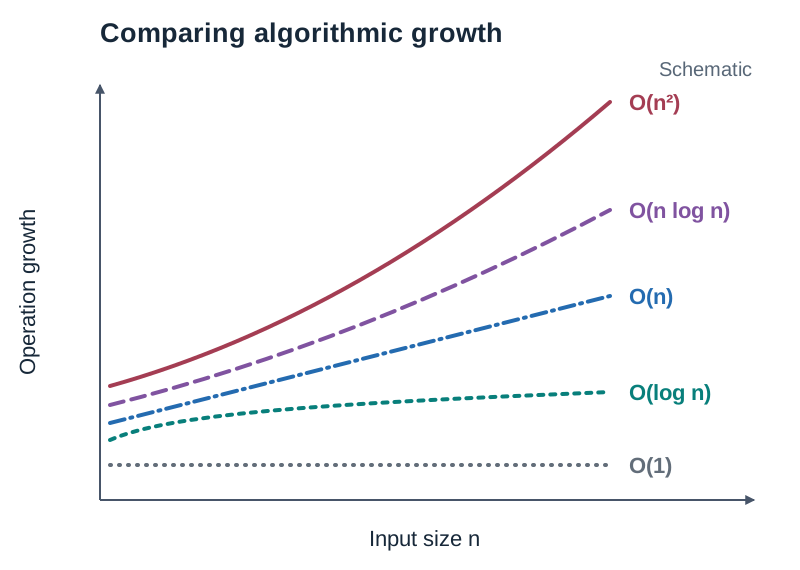
Algorithmic efficiency measures how the number of computational operations grows as the input size increases. It is expressed using Big-O notation. Big-O does not measure clock time in seconds; it reflects the rate of growth in operations.
Search and Sort Complexity Overview
| Algorithm | Best-Case Time | Worst-Case Time | Behaviour and Key Characteristics |
|---|---|---|---|
| Linear Search | Checks elements sequentially one by one from the start. Works on unsorted data. | ||
| Binary Search | Divides the search range in half each step. Precondition: list must be sorted. | ||
| Simple Sort (Selection) | Always performs the full set of comparisons, even if the data is already sorted. | ||
| Bubble Sort | Compares adjacent pairs. ( best-case applies only if an early-exit flag detects no swaps were made). Unless a flag is shown, assume . | ||
| Insertion Sort | Highly efficient for nearly sorted data; quadratic if data is in reverse order. | ||
| Quicksort | Divide-and-conquer algorithm; degrades to if the pivot choices are repeatedly poor. |
Concrete Search Comparison
Searching for the value 23 in the sorted list [2, 5, 8, 12, 16, 23, 38] ():
- Linear Search: Compares 2, 5, 8, 12, 16, 23. It finds the item on the 6th comparison. If the target was absent or at the end, it would make 7 comparisons ().
- Binary Search: Checks the middle element (index 3, value 12). Since , the left half is discarded. The sublist is
[16, 23, 38]. It checks the new middle element (value 23), matching on the 2nd comparison. Doubling the list size adds only 1 extra comparison step ().
Quadratic Growth:
If an algorithm has a complexity of , doubling the input size from to multiplies the number of operations by . Tripling the input size to multiplies operations by .
Heuristics and Limits of Computation
Certain computational problems cannot be solved to exact optimality within a realistic timeframe because the number of combinations grows astronomically.
A classic example is the Travelling Salesperson Problem (TSP): given a list of cities and the distances between each pair, find the shortest route that visits every city once and returns to the starting point. Calculating the exact shortest route by brute force requires evaluating round trips. For 20 cities, that is over routes. Each extra city multiplies the number of routes again, so brute force quickly becomes impractical even for fast computers.
When finding an exact solution is practically impossible, computer scientists use a heuristic.
- Definition: A practical problem-solving approach, estimate, or rule of thumb that produces an approximate, good-enough solution in a reasonable amount of time.
- When to use: When checking every possible answer would take far too long because the number of possibilities grows extremely fast as the problem gets bigger, when computational time and memory resources are limited, or when a quick approximate answer is sufficient for decision-making.
- Limitations: A heuristic does not guarantee an optimal solution, it can get stuck in a local optimum, and it deliberately sacrifices precision and completeness in exchange for speed.
Example: The Nearest Neighbour Heuristic
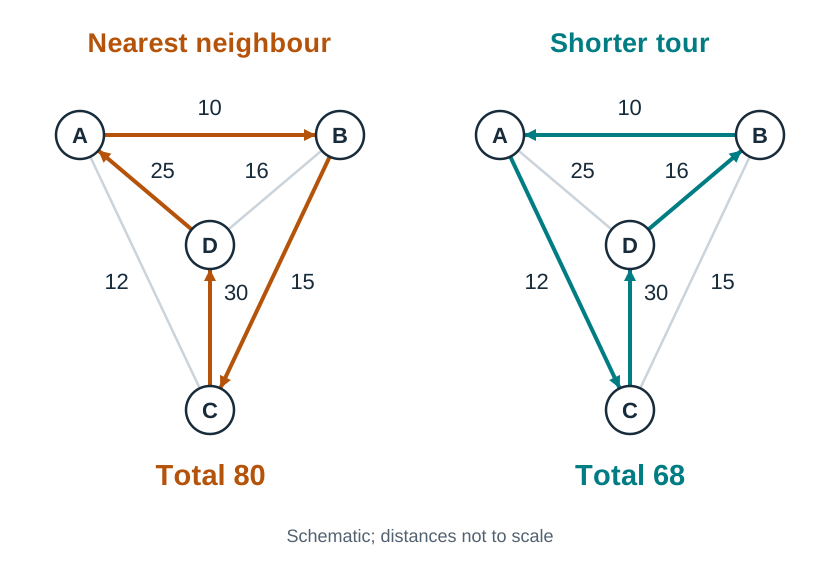
For a salesperson visiting cities A, B, C, and D starting at A, suppose the distances between each pair are: A–B = 10, A–C = 12, A–D = 25, B–C = 15, B–D = 16, and C–D = 30.
- From A, choose the closest unvisited city: B (distance 10).
- From B, choose the closest unvisited city: C (distance 15, because it is closer than D at 16).
- From C, the only remaining city is D (distance 30).
- Return from D back to A (distance 25).
- Total route: A B C D A, with total distance .
While fast to compute, this rule of thumb makes greedy choices at each step without considering the whole tour, so it may miss a shorter overall route. The route A C D B A = , which is shorter. The greedy route is 12 units longer than the best route.
The Design Process, Automation, and Testing
The Leaving Certificate specification defines a six-stage design process for software and applied projects:
- Investigate: Define the problem (e.g. gather end-user needs and research constraints).
- Plan: Understand the problem (e.g. break tasks down into schedules and identify inputs and outputs).
- Design: Create a representation and decide on tools (e.g. write pseudocode, draw flowcharts, or create UI wireframes).
- Create: Implement the plan (e.g. write modular, well-commented code in Python).
- Evaluate: Determine if the solution is appropriate (e.g. verify if the artefact fulfils all user requirements and run code tests).
- Document: Report, present, and reflect on the process (e.g. detail design choices, explain limitations, and review successes).
Staged vs Iterative Development
- Staged Development (Waterfall): Each phase is completed and formally signed off before the next phase begins. It provides clear documentation and fixed milestones, which works well when project requirements are fully understood from the start. However, making changes late in the project is difficult and expensive, and users only see the working software near the end.
- Iterative Development: The system is built, tested, evaluated, and refined in repeated small cycles. Feedback from users is gathered at the end of each iteration to guide the next version. This approach identifies bugs and design flaws early and adapts easily to changing requirements, though project deadlines and scope can sometimes drift.
Types of Errors in Programming
- Syntax Error: The code violates the grammar rules of the language and cannot be compiled or run (e.g. missing a colon at the end of an
ifstatement or misspelling a keyword). - Runtime Error: The program starts executing but crashes mid-run when an illegal operation occurs (e.g. division by zero, or accessing an index outside list bounds).
- Logic Error: The program runs without crashing but produces incorrect or unexpected outputs (e.g. writing
x > yinstead ofx >= y, or using+instead of*). Logic errors are discovered using trace tables and test cases.
Software Evaluation vs Software Testing
- Software Evaluation: Judging whether the software is the best possible solution to the original problem. It considers wide factors including usability, efficiency, feasibility, and ethical impacts.
- Software Testing: Executing the program to identify errors and verify that it matches specified requirements:
- Unit Testing: Testing individual functions, procedures, or modules in isolation to ensure each mathematical routine or subprogram works correctly.
- Function Testing: Checking that each feature does what the requirements say it should (verifying that given specific inputs, the expected output appears), without inspecting the internal code.
- System Testing: Testing the fully integrated application—including the user interface, backend logic, database, and hardware components—working together.
Modelling, Simulation, and Automation
A model is a simplified, abstract representation of a real-world system. A simulation runs that model over time or across thousands of trials to observe how the system behaves under varying conditions. Simulations are used when experimenting in the real world would be too expensive, dangerous, or time-consuming (such as predicting infectious disease spread or simulating canteen queuing times).
Automating processes with computer systems provides major benefits: increased processing speed, reliable consistency, 24/7 continuous operation, and reduction of human calculation errors. However, automation also carries costs: development and maintenance expenses, potential job displacement, energy consumption, and the risk that an uncaught logic error could be executed rapidly at massive scale.
Key terms
- Computational Thinking
- A thought process that uses analytic and algorithmic approaches to formulate, analyse, and solve problems so that solutions can be automated by a computer.
- Decomposition
- The problem-solving technique of breaking a complex problem or system down into smaller, self-contained sub-units that can be addressed independently.
- Pattern Recognition
- Identifying similarities, shared features, or recurring trends within data or across problems to inform solutions.
- Abstraction
- Removing unnecessary details to focus on the essential features needed to solve a problem and build general models.
- General Solution
- An algorithm that applies across different problem situations and consistently yields the correct result regardless of specific values or dataset size.
- Trace Table
- A structured table used to manually step through an algorithm line by line, tracking variable values and condition outcomes across every iteration.
- Big-O Notation
- A mathematical representation describing the rate of growth of an algorithm's computational operations or memory as the input size n increases.
- Heuristic
- A practical rule of thumb or approximation strategy that finds a good-enough solution quickly when calculating an exact optimal solution is practically impossible.
- Unit Testing
- The practice of testing individual functions, methods, or modules in total isolation to verify that each calculates correctly.
- Function Testing
- Testing individual features of a program against their functional requirements to ensure correct outputs for given inputs without inspecting internal code.
- System Testing
- Testing the entire, fully assembled software application across all its user interfaces, databases, networks, and hardware environments.
- Syntax Error
- An error caused by code that breaks the grammatical rules of the programming language, preventing the program from running.
- Runtime Error
- An error that causes an executing program to crash unexpectedly during operation, such as division by zero.
- Logic Error
- A bug where the program runs without crashing but produces incorrect or unintended results.
Check yourself
What abstraction is used to represent the physical sticks in a matchstick game?
Each pile of sticks is abstracted into an integer count of remaining sticks, and removing sticks is modelled as subtraction.
An algorithm with O(n^2) complexity performs roughly 1,000,000 comparisons for 1,000 items. Approximately how many comparisons will it make for 2,000 items?
Roughly 4,000,000 comparisons. Doubling the input size n multiplies the number of operations by 2^2 = 4.
What essential precondition must be satisfied before a binary search algorithm can be executed?
The collection of items must already be in sorted order.
In the eight-coin balance scale puzzle, why are the coins divided into three groups rather than two?
A two-pan balance scale produces three possible outcomes (left pan heavier, right pan heavier, or balanced), so one weighing narrows the suspects to about a third (at most 3 of the 8 coins).
What is the difference between a syntax error and a logic error?
A syntax error breaks the grammatical rules of the programming language and prevents the code from running at all, whereas a logic error allows the program to run without crashing but produces incorrect results.
What is the difference between function testing and system testing?
Function testing checks that individual features produce expected outputs from specific inputs according to requirements without checking internal code, whereas system testing evaluates the complete, integrated program across all interfaces, data stores, and hardware.