

Variables, Data Types, and Type Casting
A variable is a named reference to a value stored in computer memory. You assign values using the single equals sign (=), which is the assignment operator. Variable names in Python follow the snake_case convention (such as total_score or max_attempts), and any text following # on a line is treated as a comment.
Python has simple types that hold a single value and sequence types that hold multiple items in order. The syllabus identifies specific core data types (LO 2.16):
| Syllabus Type | Python Representation | Example |
|---|---|---|
| Boolean | bool | is_valid = True |
| integer | int | count = 14 |
| real | float | celsius = 18.5 |
| char | str of length 1 (no separate char type) | grade = "A" |
| string | str | student_name = "Aoife" |
| date | date from datetime module | from datetime import date<br>exam_day = date(2027, 6, 9) |
| array | list (or nested list for 2D grids) | scores = [55, 72, 88] |
The input() function always returns user input as text (str), even if the user types numeric digits. Performing calculations directly on uncast input results in errors: adding text numbers produces string concatenation (where '5' + '5' becomes '55'), and multiplication repeats strings (where '5' * 3 becomes '555'). To perform arithmetic, apply type casting using int() or float():
age = int(input("Enter your age: "))
height = float(input("Enter your height in metres: "))
Operators, Arithmetic, and Boolean Logic
Python provides arithmetic operators for numeric values and comparison operators that return Booleans (True or False):
| Operator | Name | Example (a = 14, b = 4) | Result |
|---|---|---|---|
+ | Addition | a + b | 18 |
- | Subtraction | a - b | 10 |
* | Multiplication | a * b | 56 |
/ | Floating-point division | a / b | 3.5 |
// | Floor division | a // b | 3 |
% | Modulus | a % b | 2 |
** | Exponentiation (power) | b ** 2 | 16 |
Floor division (//) divides and rounds the answer down to the nearest whole number. If both operands are integers, the result is an integer. Modulus (%) returns the remainder left over after division. These two operators work together in unit conversions and change calculations:
total_cents = 250
euros = total_cents // 100          # 2 full euros
remaining_cents = total_cents % 100  # 50 cents remainder
Modulus is also the standard tool to test for even and odd numbers: number % 2 == 0 is True for even numbers and False for odd numbers.
Comparison operators include equal to (==), not equal to (!=), greater than (>), less than (<), greater than or equal to (>=), and less than or equal to (<=). You can connect multiple comparisons using logical operators: and (both conditions must be true), or (at least one must be true), and not (inverts the Boolean value).
Selection: Conditional Logic and Branches
Selection statements allow a program to choose between different execution paths based on Boolean conditions. In Python, blocks of code controlled by an if statement are defined by indentation (typically 4 spaces) following a colon (:).
An if / elif / else ladder checks conditions sequentially from top to bottom. As soon as one condition evaluates to True, its corresponding block executes and Python bypasses all subsequent branches in the ladder:
exam_mark = 74

if exam_mark >= 80:
    grade = "H1"
elif exam_mark >= 70:
    grade = "H2"
elif exam_mark >= 60:
    grade = "H3"
else:
    grade = "Below H3"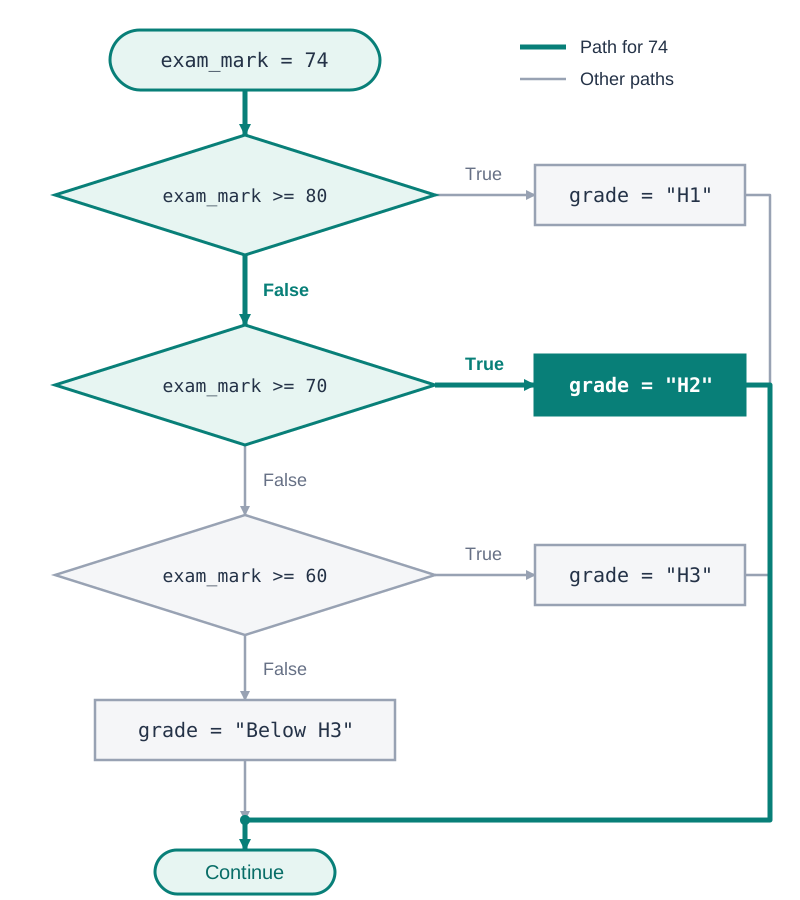
Using elif is essential when checking overlapping conditions. If you write consecutive if statements instead of elif, each condition is evaluated independently. A mark of 85 would satisfy both if mark >= 80: and if mark >= 70:, overwriting grade with the lower boundary value.
Conditionals can also be nested inside other conditional blocks when a secondary decision depends on an initial check passing:
registered = True
attendance = 85

if registered:
    if attendance >= 80:
        status = "Exam entry confirmed"
    else:
        status = "Attendance below minimum standard"
else:
    status = "Student not registered"
Iteration and the Accumulator Pattern
Iteration repeats a block of code. A while loop repeats as long as its condition is True and stops once that condition becomes False. A for loop repeats once for each item in a sequence or collection.
while Loops
Use a while loop when you cannot predict how many repetitions will be needed before reaching an end condition, such as waiting for a specific user input:
answer = ""
while answer != "quit":
    answer = input("Type a word (or quit): ")
    print("You typed:", answer)
for Loops and range()
When you know in advance how many times a block should run, use a for loop with range(). The range() function generates integer sequences up to, but excluding, the specified stop boundary:
range(stop): Produces integers from0tostop - 1.range(4)generates0, 1, 2, 3.range(start, stop): Produces integers fromstarttostop - 1.range(2, 6)generates2, 3, 4, 5.range(start, stop, step): Counts bystep.range(10, 0, -2)generates10, 8, 6, 4, 2.
The Accumulator Pattern
The accumulator pattern maintains a running total, count, or collected list across iterations. Set the tracking variable to an initial value (such as 0 or []) before the loop, update it inside the loop body, and display or process the result after the loop completes:
scores = [12, 18, 15, 20]
total = 0                     # 1. Initialise before loop

for s in scores:
    total = total + s         # 2. Update inside loop

print("Total score:", total)  # 3. Output after loop (Total score: 65)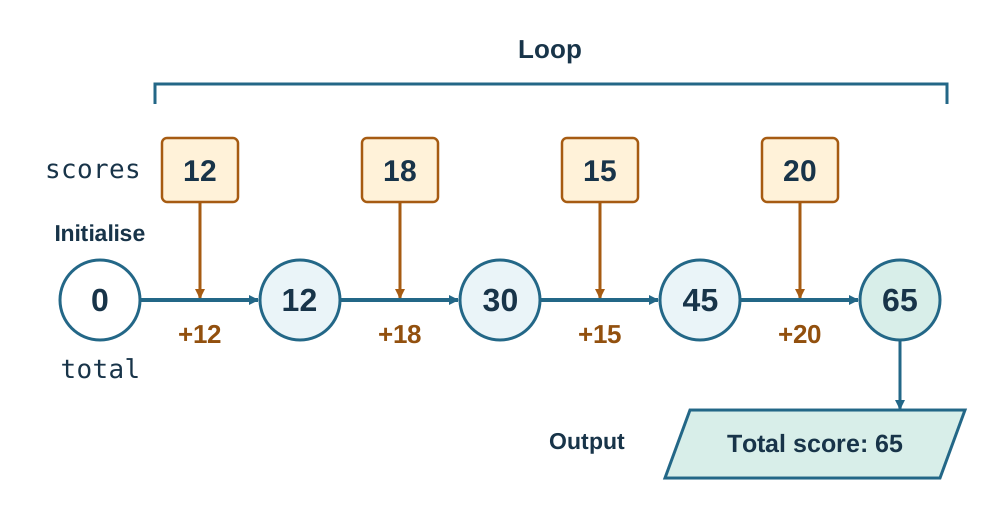
Strings, Lists, and the Boolean Flag Pattern
Strings and lists are zero-indexed, meaning the first element is at index 0. Negative indices count backward from the end, so index -1 retrieves the final character or item.
Slicing
Slicing extracts a section using sequence[start:stop]. The character or element at start is included, while stop is excluded:
subject = "Computer"
print(subject[0:4])  # Output: 'Comp'
print(subject[:3])   # Output: 'Com' (defaults to start at index 0)
print(subject[4:])   # Output: 'uter' (slices through to the end)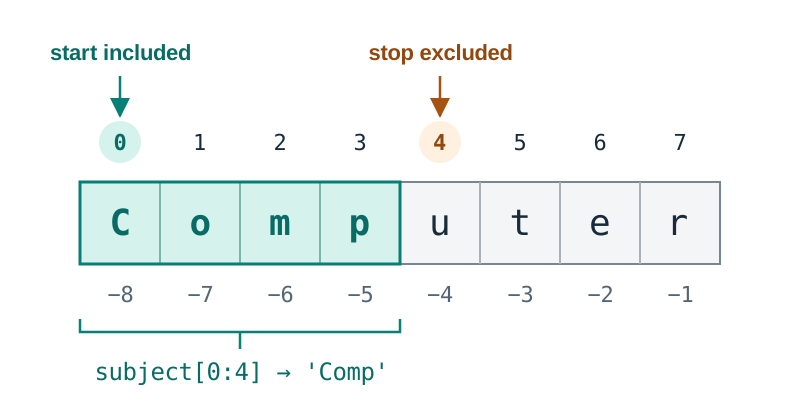
String Immutability and Methods
Strings are immutable and cannot be modified in place. String methods return a newly created transformed string, requiring variable reassignment to save the changes:
.lower()and.upper(): Standardise letter casing for case-insensitive checks..strip(): Removes leading and trailing whitespace..isdigit(): ReturnsTrueonly if the string is non-empty and contains exclusively numeric digits0to9. It returnsFalsefor negative signs ("-5"), decimals ("3.14"), and empty strings ("").
Built-in functions (not methods) ord(char) and chr(code) convert between a character and its ASCII / Unicode integer code (LO 2.17): ord("A") gives 65 and chr(66) gives "B".
raw_entry = "   Dublin   "
clean_entry = raw_entry.strip().upper()  # 'DUBLIN'
List Mutability and Iteration
Lists are mutable, allowing direct modification, additions, and removals in memory:
list.append(value): Adds an item to the end of the list.list.insert(index, value): Inserts an item at the specified index.list.pop(): Removes and returns the final item (or item at a given index).list.remove(value): Removes the first occurrence of a specified value.item in list: Evaluates toTrueif the item is present, avoiding value errors.
To iterate through items directly, use for item in my_list:. When you need to read or alter positions, iterate using indices: for i in range(len(my_list)):.
Looping with a Boolean Flag
A common exam pattern involves checking whether any character in a string satisfies a condition. Initialise a Boolean variable (the flag) to False before the loop, set it to True if a match is found during iteration, and evaluate the flag after the loop:
password = "3Sunshine"
has_digit = False             # Flag initialised before loop

for ch in password:
    if ch.isdigit():
        has_digit = True      # Flag raised upon match

score = 10
if has_digit:
    score = score + 5         # Evaluated after loop finishes
print("Score:", score)        # Output: Score: 15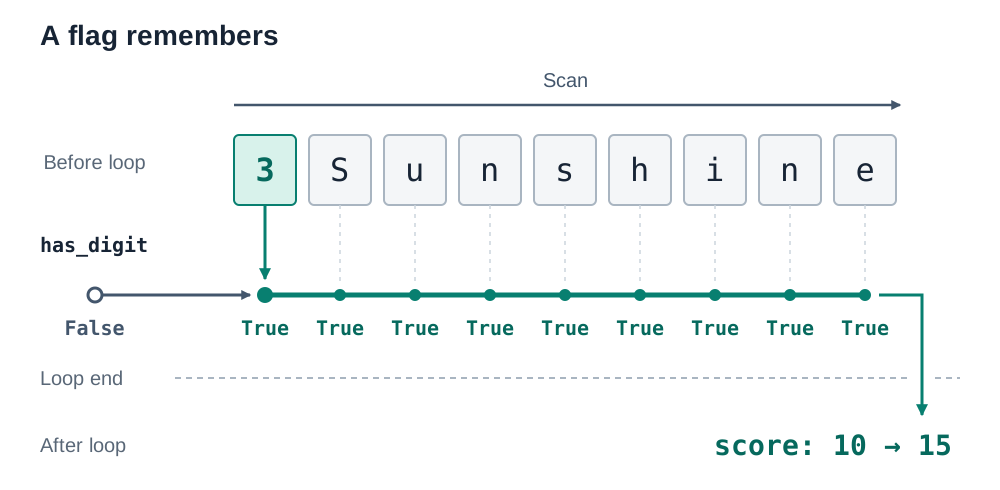
Practical Programming Toolkit: Output, Randomness, Errors, and Built-ins
Practical examination questions rely on a set of core built-in functions and control statements:
Labelled Output
Output must include clear descriptions. You can combine labels and values in three ways:
score = 6
print("Score:", score)        # Commas insert a space automatically: Score: 6
print("Score: " + str(score)) # String concatenation requires explicit str() casting
print(f"Score: {score}")      # Formatted f-string embeds values directly inside { }
Each separate print() statement outputs on a new line.
The random Module
To simulate dice rolls or generate targets in games, import the random module. Note that randint(a, b) includes both boundary values, unlike range():
import random

die_roll = random.randint(1, 6)     # Generates an integer from 1 to 6 inclusive
secret = random.randint(1, 100)    # Generates an integer from 1 to 100 inclusive
Essential Built-in Functions and break
len(seq): Returns the total number of items or characters (e.g.len("Cork")evaluates to4).abs(n): Computes the absolute value, stripping negative signs (e.g.abs(35 - 50)evaluates to15).round(val, n): Rounds a number tondecimal places (e.g.round(3.14159, 2)evaluates to3.14).min(seq)/max(seq): Returns the lowest or highest value in a sequence.sum(seq): Calculates the sum of a list of numbers.break: Immediately exits the nearest enclosing loop. It is commonly used inside an infinitewhile True:game loop when a termination condition is reached:
while True:
    play_again = input("Play again? (Y/N): ").upper()
    if play_again != "Y":
        break
Identifying and Classifying Errors (LO 2.20)
- Syntax error: The code breaks Python's grammatical structure and cannot be parsed or run. Examples include missing colons after an
ifline or mismatched brackets. - Runtime error: The code begins running but crashes on a specific line due to an illegal operation. Examples include dividing by zero (
ZeroDivisionError), casting letters withint("abc")(ValueError), or joining text and numbers without casting (TypeError). - Logic error: The code executes to completion without crashing, but generates incorrect results. Common causes include using
>instead of>=on grade boundaries, or misplacing indentation inside loops.
Functions, Scope, and Recursion
Functions package reusable logic into named modules, defined using def. A parameter is the placeholder variable named in the function definition, while an argument is the concrete value supplied when the function is called. A return value sends computed data back to the calling statement.
def calculate_vat(subtotal, rate=0.23):  # subtotal is a parameter; rate has a default argument
    tax = subtotal * rate
    return round(tax, 2)

order_tax = calculate_vat(100.00)       # 100.00 is the argument passed; order_tax stores 23.0
Variable Scope
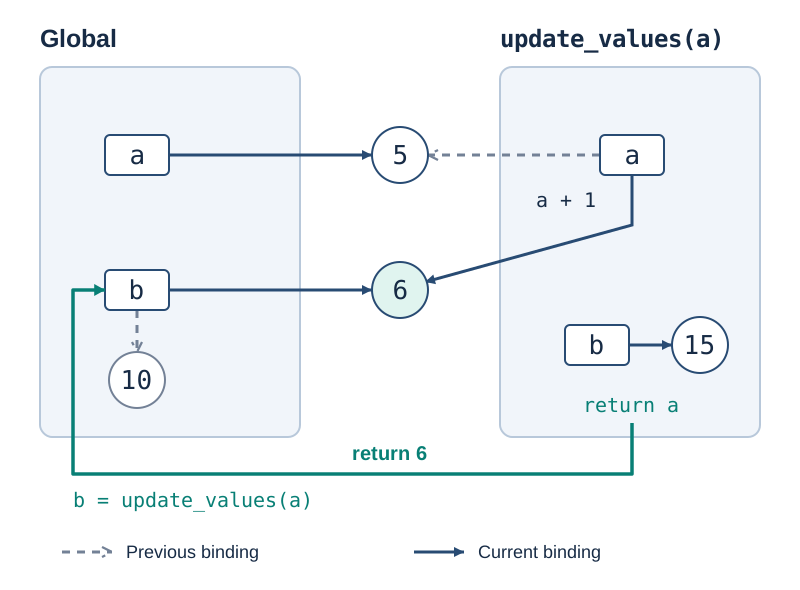
A local variable is defined inside a function. It exists solely while that function is executing and cannot be accessed by the outer program. Reassigning a variable inside a function creates a local variable without affecting global variables of the same name unless declared with global.
Tracing how scope operates:
def update_values(a):
    a = a + 1      # Modifies local parameter 'a' to 6; global 'a' remains 5
    b = 15         # Creates a separate local variable 'b'
    print(a)       # Output: 6
    print(b)       # Output: 15
    return a

a = 5
b = 10
print(a)           # Output: 5
b = update_values(a) # Global 'b' is reassigned the returned value (6)
print(a)           # Output: 5 (unchanged)
print(b)           # Output: 6
Output sequence: 5, 6, 15, 5, 6.
Recursion
A recursive function solves a problem by calling itself with smaller inputs. Every valid recursive function requires two parts (LO 2.9):
- Base case: A terminating condition that stops recursion and returns a direct value without calling the function again.
- Recursive step: The branch that calls the function itself with altered inputs, moving progressively toward the base case.
def factorial(n):
    if n <= 1:                   # Base case
        return 1
    return n * factorial(n - 1)  # Recursive step
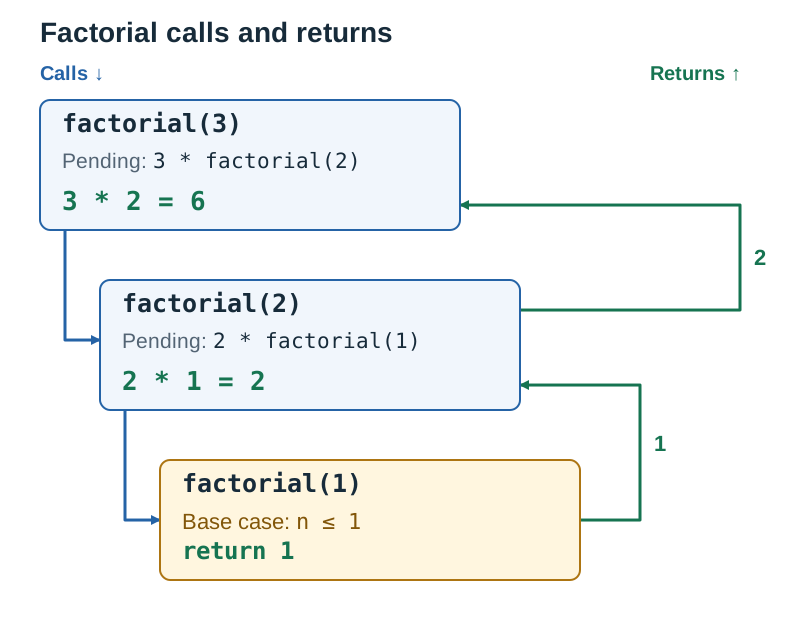
Tracing factorial(3) unwinds through the call stack:
factorial(3)requests3 * factorial(2)factorial(2)requests2 * factorial(1)factorial(1)encounters the base case and returns1- The calculations resolve back up:
2 * 1 = 2, followed by3 * 2 = 6.
If the base case is omitted or unreachable, the function executes indefinitely until Python exhausts its call stack and halts with a RecursionError.
Key terms
- Assignment Operator
- The single equals sign (=) used to store a value in a variable.
- Type Casting
- The explicit conversion of a value from one data type to another, such as converting text to a whole number using int().
- Floor Division (//)
- An arithmetic operation that divides two numbers and rounds down to the nearest whole number.
- Modulus (%)
- An arithmetic operation that returns the remainder left over after division.
- Zero-Indexing
- A sequence numbering system where the first item is accessed at index position 0.
- Mutability
- The property of a data structure (such as a list) that allows its contents to be modified or updated in place.
- Accumulator Pattern
- An algorithmic structure where a tracking variable is initialised before a loop and updated on each iteration to compute a total, count, or list.
- Local Variable
- A variable defined inside a function that exists only while that function runs and cannot be accessed directly by the main program.
- Return Value
- The value passed back from a function to the line of code that called it using the return statement.
- Base Case
- The terminating condition in a recursive function that stops further recursive calls by returning a direct result.
- Recursive Step
- The part of a recursive function that calls itself with a reduced argument, moving closer to the base case.
Check yourself
What values and types are produced by 22 // 5 and 22 % 5?
22 // 5 produces 4 (integer result of floor division). 22 % 5 produces 2 (integer remainder from modulus division).
What is the exact output of this program? def modify(x): x = x + 2 return x x = 10 print(modify(x)) print(x)
12 then 10. Inside modify(), x = x + 2 creates a new value 12 for the local parameter x only, and 12 is returned and printed. The global x was never reassigned, so it is still 10.
If word = 'LeavingCert', what exact substring is returned by word[2:7]?
'aving'. Slicing begins at index 2 ('a') and stops immediately before index 7 ('C').
How do you test whether the item 'Galway' is present in the list counties without using an index loop?
Use the membership operator: if 'Galway' in counties:.
What is the difference between random.randint(1, 10) and range(1, 10)?
random.randint(1, 10) includes 10 as a possible generated integer, whereas range(1, 10) excludes 10 and stops generating at 9.