

Flowcharts, Pseudocode, and Compound Boolean Logic
Before writing code in Python, algorithms are planned using pseudocode or flowcharts.
Pseudocode
Pseudocode is an informal, structured, plain-English description of an algorithm. It uses standard programming keywords without strict syntax rules:
INPUT pH
IF pH < 7 THEN
    OUTPUT "Acid"
ELSE IF pH > 7 THEN
    OUTPUT "Base"
ELSE
    OUTPUT "Neutral"
ENDIF
Flowchart Symbols
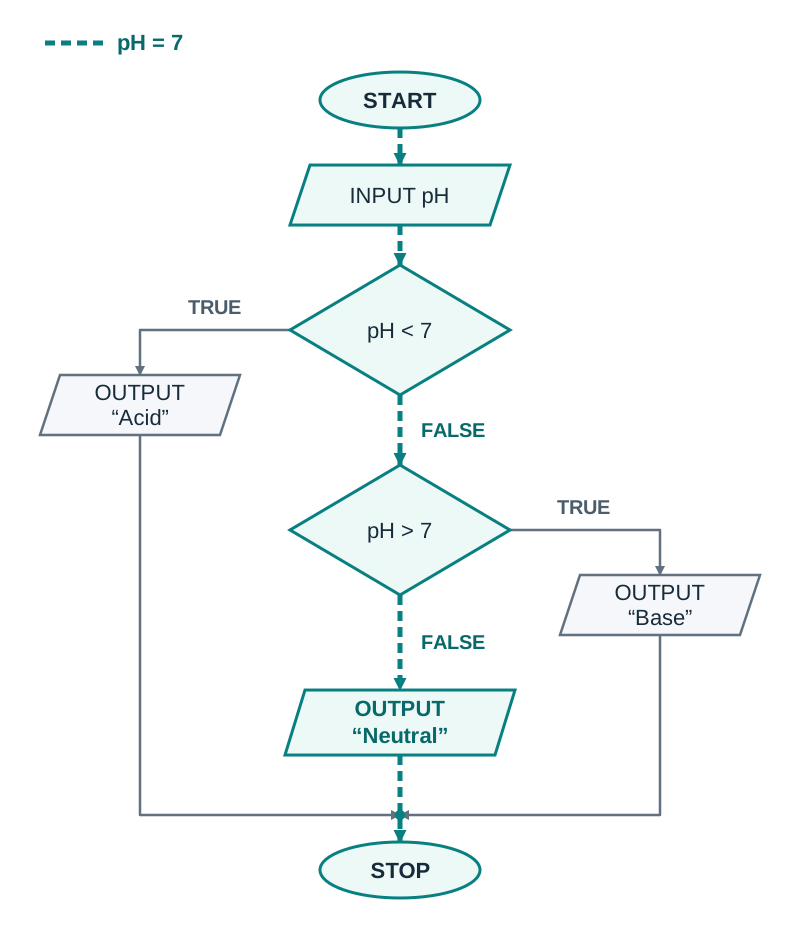
A flowchart models an algorithm visually using standard geometric shapes:
- Terminator (Oval): Marks the START or STOP of the program.
- Input / Output (Parallelogram): Represents receiving data (e.g.
INPUT pH) or displaying results (e.g.OUTPUT "Acid"). - Process (Rectangle): Represents a calculation or internal action (e.g.
total = total + 1). - Decision (Diamond): Represents a condition to test. It has exactly two exit arrows, clearly labelled TRUE and FALSE (or YES and NO).
- Flow lines (Arrows): Indicate the direction and order of execution.
When tracing the pH checker with an input of 7, the first decision (pH < 7) evaluates to False. The flow follows the False branch to the second decision (pH > 7), which also evaluates to False. Following this False branch leads directly to OUTPUT "Neutral".
Compound Boolean Expressions
A Boolean expression evaluates to either True or False. Individual conditions are combined using logical operators:
- AND: Evaluates to True only when both conditions are True.
- OR: Evaluates to True if at least one condition is True.
- NOT: Inverts the truth value of the expression.
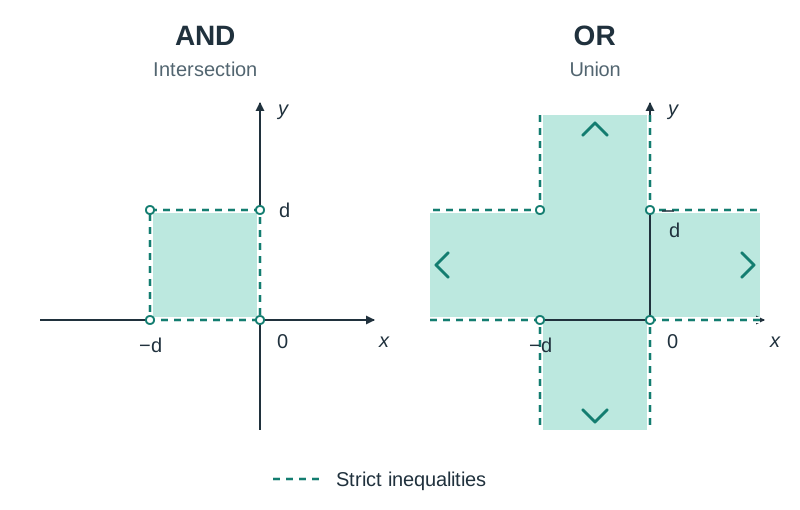
To define a numerical range or spatial area, combine boundary conditions with AND. For example, defining a shaded square in the top-left quadrant with corners at and requires the point to satisfy both horizontal and vertical boundaries:
- Horizontal span (-range):
x > -d and x < 0 - Vertical span (-range):
y > 0 and y < d - Combined condition:
(x > -d and x < 0) and (y > 0 and y < d)
Testing a point inside, such as where , yields , and . Since both are True, the combined expression evaluates to True. Using OR instead of AND would make the expression True for any point in the vertical strip between x = −d and x = 0, or in the horizontal strip between y = 0 and y = d, even far outside the square.
Trace Tables and General Solutions
A general solution is an algorithm that can be applied to different problem instances and consistently produces the correct output, regardless of the specific input values or the size of the input data set.
Trace Tables
A trace table is a technique used to dry-run an algorithm manually line by line. It tracks variable values and conditional outcomes at each step, helping to verify correctness and pinpoint logic errors.
Consider tracing integer division of 14 by 4 using repeated subtraction:
numerator = 14
denominator = 4
quotient = 0

while numerator >= denominator:
    numerator = numerator - denominator
quotient = quotient + 1| Step / Iteration | Condition (numerator >= denominator) | numerator | denominator | quotient |
|---|---|---|---|---|
| Initial values | — | 14 | 4 | 0 |
| Iteration 1 | 14 >= 4 (True) | 10 | 4 | 1 |
| Iteration 2 | 10 >= 4 (True) | 6 | 4 | 2 |
| Iteration 3 | 6 >= 4 (True) | 2 | 4 | 3 |
| Final check | 2 >= 4 (False) | 2 | 4 | 3 |
In the exam, use the exact column layout provided on the paper. Show clearly where the loop stops. If the table has a condition column, record the final check where the condition is False. If it has only variable columns, stop after the last update and do not add extra rows.
Algorithm Representation: Flowcharts, Pseudocode, and Trace Tables
An algorithm takes input data, processes it through logical steps, and produces an output. A good algorithm should be finite (it must stop after a finite number of steps), unambiguous (each instruction is clear and precise), and provide a general solution (it works correctly for any valid input, regardless of data values or input size).
All algorithms rely on three fundamental constructs:
- Sequence: executing instructions in order, one after another.
- Selection: making decisions based on conditions using
if,elif, andelse. - Iteration: repeating instructions using loops such as
forandwhile.
Flowcharts
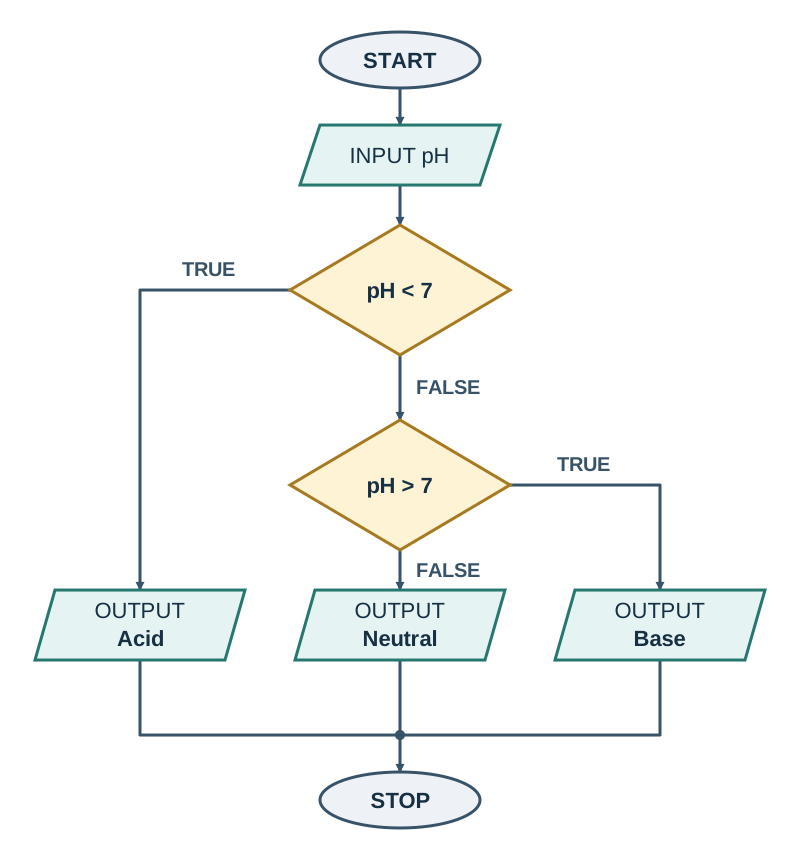
A flowchart represents an algorithm visually using standard geometric shapes:
- Oval (terminator): marks the START or STOP of the program.
- Parallelogram: represents INPUT or OUTPUT operations.
- Rectangle (process): represents a calculation or data assignment (such as
total = total + n). - Diamond (decision): asks a condition with two branch exits, labelled TRUE/FALSE or YES/NO.
When a problem requires multiple conditions (for example, categorising a chemical solution as acid, base, or neutral), decisions connect sequentially. The FALSE branch of the first test (pH < 7) leads directly into the second test (pH > 7). The final output on the second FALSE branch represents the default case (Neutral).
Pseudocode and Trace Tables
Pseudocode expresses algorithmic logic in structured plain English without requiring specific programming language syntax.
SET total TO 0
SET count TO 0
WHILE count < 3
    INPUT n
    total = total + n
    count = count + 1
END WHILE
OUTPUT total / count
A trace table allows you to track and record the value of every variable after each step, verifying program behaviour before running the code.
| Step / Input | n | total | count | count < 3? | Output |
|---|---|---|---|---|---|
| Initialisation | 0 | 0 | 0 | True | |
| Input 5 | 5 | 5 | 1 | True | |
| Input 10 | 10 | 15 | 2 | True | |
| Input 6 | 6 | 21 | 3 | False | |
| Termination | 6 | 21 | 3 | 7.0 |
The loop ends when count reaches 3. The output is 21 / 3 = 7.0 (in Python, standard division / yields a floating-point number).