

JavaScript is a high-level, interpreted, event-driven programming language. Code is executed by the engine inside the browser as the page runs. It supports procedural programming (variables, conditions, loops, and functions) and also works with objects, which is how the web page itself is represented. For the 2027 examination, Python is the language assessed on the written paper; JavaScript is one of the two approved languages for the 30% coursework and the natural choice for an interactive website. Learn the concepts here for the coursework and for theory questions on how web pages work — the control-flow reasoning transfers straight to Python.
The Web Triad and Separation of Concerns
If a web page were a person, HTML would be the skeleton providing structure, CSS would be the clothes and appearance, and JavaScript would be the muscles enabling movement and reaction.
- HTML (HyperText Markup Language): A markup language that builds the structural skeleton and content of the page using tags such as
<h1>,<p>, and<button>. - CSS (Cascading Style Sheets): A styling language that defines presentation, visual design, colours, fonts, and layout.
- JavaScript: A full programming language that controls behaviour and interactivity: evaluating expressions, making decisions, executing loops, and updating the page.
Keeping these three technologies apart follows a principle called separation of concerns: each part of the system has one job. Separating structure, styling, and computational logic makes systems easier to test, debug, and maintain. Only JavaScript is a true programming language with variables, conditional branching, loops, and modular functions.
Client-Side Execution, Node.js, and Coursework Rules
JavaScript is best known as a client-side language, running inside the end user's browser. It can also run server-side using Node.js. This distinction matters for a database-driven site: code in the browser cannot connect to a database directly, so it requests the data from a program on the server, which queries the database and returns the results (usually as JSON).
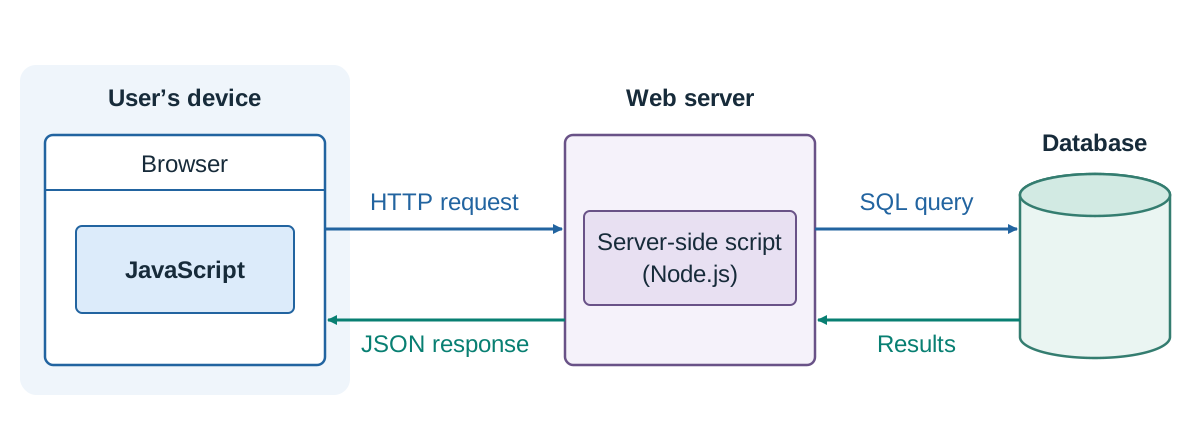
When a user visits a site, the browser downloads the HTML, CSS, and JavaScript files to the local machine. The browser engine executes the code locally on the user's CPU. This removes the need for a round trip to the server for those particular actions: validating an email field or recalculating a running total happens immediately in the browser. The files themselves still have to be downloaded first, and any information that comes from a database still needs a request across the network.
Two different things, easily confused
- The four applied learning tasks in Strand 3 are done in teams during the two years. They are not marked by the SEC; both teacher and student verify that they were completed. There is no restriction on the language used in them.
- The coursework assessment (30%) is set by the SEC towards the end of term 1 of sixth year, runs for about 10 weeks, and must be done individually — no group work. Python and JavaScript are the languages approved for it. It is submitted electronically and marked by the SEC.
Two habits that protect marks in the coursework:
- Reference everything you borrowed. Any code, image, dataset, or text taken from a tutorial, library, or another author must be cited in the report.
- Comment your code and name variables meaningfully.
let ticketQtybeatslet x, and a one-line comment above each function saying what it does and what it returns makes the artefact readable — the criteria reward being able to explain the processes involved, not just a working screen.
Variables, Syllabus Data Types, and Operators
let declares a variable whose value you intend to change; const declares one that must not be reassigned — const passMark = 40; followed by passMark = 50; causes an error. Note that const stops you pointing the name at something new; it does not freeze the contents of an array or object, so items can still be added to a const array. Statements end cleanly with a semicolon (;).
Mapping Leaving Certificate Data Types (LO 2.16)
The Leaving Certificate specification details standard procedural data types:
| Syllabus Data Type | JavaScript Representation | Example |
|---|---|---|
| Integer | Unified Number type | let goals = 3; |
| Real (floating-point) | Unified Number type | let weight = 68.5; |
| Boolean | Boolean (true or false) | let isRegistered = true; |
| Char | Single-character string | let grade = "A"; |
| String | Sequence of characters in quotes | let county = "Galway"; |
| Date | Date object | let now = new Date(); |
| Array | Ordered, zero-indexed collection | let marks = [55, 70, 84]; |
JavaScript does not separate integers from decimal floats. Both belong to the Number type, meaning 7 / 2 evaluates to 3.5. To obtain a rounded integer quotient, use Math.floor(7 / 2), which evaluates to 3.
Operators and Expressions
- Basic arithmetic uses addition (
+), subtraction (-), multiplication (*), and division (/). - Exponentiation (`
)** raises a base to a power:5 ** 2` is 25. - Modulo (
%): An arithmetic operator that returns the remainder left after dividing the left operand by the right. A point students lose marks on: when the left number is smaller than the right (as in2 % 5), 5 goes into 2 zero times with 2 left over, so2 % 5is 2. - Pre-increment (
++a) increments the variable first and returns the new value. - Post-increment (
a++) returns the original value first, incrementing the variable afterwards. - Strict equality (
===) and strict inequality (!==) verify both value and data type without implicit conversion. Never use a single equals sign (=) inside a condition:if (x = 5)assigns 5 toxand always evaluates to true, introducing a silent logic error.
Control Flow: Selection, Iteration, and Linear Search
Control structures dictate which statements execute and how often.
Selection (if, else if, else)
Conditions sit inside round brackets (), and executable code blocks are enclosed in curly braces {}.
let mark = 85;
let grade;

if (mark >= 80) {
  grade = "Distinction";
} else if (mark >= 40) {
  grade = "Pass";
} else {
  grade = "Unsuccessful";
}
In an if ... else if ... else chain, branches are mutually exclusive. The first condition that evaluates to true executes, and all remaining branches are skipped. Replacing else if with independent if statements creates a logic flaw where higher grades are evaluated, but subsequently overwritten by broader lower conditions.
Iteration (while and for loops)
- A
whileloop checks a condition before every cycle. The tracked counter must be updated inside the loop body to avoid infinite loops. - A
forloop bundles initialisation, condition check, and increment step into a single header, making it ideal for traversing arrays.
let scores = [12, 18, 24];
let total = 0;

for (let i = 0; i < scores.length; i++) {
  total += scores[i];
}
console.log(total); // Outputs 54| Pass | i | scores[i] | total after |
|---|---|---|---|
| 1 | 0 | 12 | 12 |
| 2 | 1 | 18 | 30 |
| 3 | 2 | 24 | 54 |
| — | 3 | condition 3 < 3 false | loop ends |
JavaScript arrays use zero-based indexing. An array of 3 elements has valid indices 0, 1, and 2. The loop condition must be i < scores.length. Writing i <= scores.length causes the loop to read index 3, which returns undefined.
Linear Search
A linear search checks each element in turn from the start until the target is found or the array ends. It works on unsorted data.
function linearSearch(list, target) {
  for (let i = 0; i < list.length; i++) {
    if (list[i] === target) {
      return i;          // position of match
    }
  }
  return -1;             // -1 indicates not found
}

let marks = [55, 70, 84, 61];
console.log(linearSearch(marks, 84));   // 2
console.log(linearSearch(marks, 90));   // -1
Advantage: simple, and needs no sorting. Limitation: in the worst case it examines every element, so execution time grows in proportion to the list size. A binary search is far faster on large lists because it halves the search space each step, but it requires the array to be sorted first.
Functions and Recursion
A function is a named, reusable block of code that performs one job. Breaking a program into functions is modular design (LO 2.3): each function can be tested on its own, and it can be called many times without repeating code.
function calculateTotal(quantity, pricePerItem) {
  let total = quantity * pricePerItem;
  return total;
}

let bill = calculateTotal(3, 8); // bill is 24- The placeholders in the function declaration (
quantity,pricePerItem) are parameters. - The values supplied during the call (
3,8) are arguments. returnsends a value back to the caller and ends the function immediately. A function withoutreturnyieldsundefined.- Variables declared with
letinside a function are local to it and cannot be accessed externally.
Note the difference between a function that returns a value and one that displays one. calculateTotal returns a number, so it can be reused in further calculations. A function that writes straight to the page cannot be reused in a calculation. In coursework, do calculations in a returning function and handle page updates separately.
Recursive Functions
A recursive function calls itself on a smaller version of the same problem. It requires two parts: a base case that stops recursion, and a recursive case that moves towards the base case.
function factorial(n) {
  if (n <= 1) {
    return 1;          // base case
  }
  return n * factorial(n - 1);   // recursive case
}

console.log(factorial(4));  // 24
Trace of factorial(4):
factorial(4)returns4 * factorial(3)factorial(3)returns3 * factorial(2)factorial(2)returns2 * factorial(1)factorial(1)hits the base case, returning1- Unwinding:
2 * 1 = 2, then3 * 2 = 6, then4 * 6 = 24
Without a base case, recursion continues indefinitely until the browser raises a "maximum call stack size exceeded" error.
Strings and Character Encoding
JavaScript strings represent textual data:
let county = "Galway";
console.log(county.length);            // 6
console.log(county.toUpperCase());     // "GALWAY"
console.log(county.charAt(0));         // "G" (zero-indexed)
console.log(county.indexOf("l"));      // 2 (-1 if absent)
console.log("Home: " + county);        // string concatenation
console.log(`Home: ${county}`);        // template literal
JavaScript has no dedicated char type; a single character is simply a string of length 1.
Encoding and Decoding Characters (LO 2.17)
Characters map to numeric codes — 65 to 90 for A–Z, 97 to 122 for a–z, and 48 to 57 for 0–9 in ASCII. Unicode standardises these and continues upwards for international scripts and emojis.
console.log("A".charCodeAt(0));          // 65
console.log(String.fromCharCode(66));    // "B"
Caesar cipher shift example:
function shift(text, amount) {
  let result = "";
  for (let i = 0; i < text.length; i++) {
    let code = text.charCodeAt(i);
    let shifted = ((code - 65 + amount) % 26) + 65;
    result += String.fromCharCode(shifted);
  }
  return result;
}
console.log(shift("CAT", 3));   // "FDW"
Trace: C (67) becomes 67 - 65 = 2; 2 + 3 = 5; 5 + 65 = 70 (F). A (65) becomes 0 + 3 = 3; 3 + 65 = 68 (D). T (84) becomes 19 + 3 = 22; 22 + 65 = 87 (W). The % 26 ensures characters wrap cleanly from Z back to A.
HTML Integration, DOM Manipulation, and Events
Keep JavaScript in an external file to maintain separation of concerns:
<!DOCTYPE html>
<html lang="en">
<head>
  <meta charset="utf-8">
  <title>Ticket Booking</title>
  <link rel="stylesheet" href="styles.css">
</head>
<body>
  <h1>School Musical</h1>
  <input type="number" id="ticketQty">
  <button id="bookBtn">Book</button>
  <p id="bookingMessage"></p>

  <script src="script.js"></script>
</body>
</html>
The <script> tag is placed just before </body> (or uses defer in <head>). The browser reads HTML top to bottom; if the script runs before the elements exist, document.getElementById("bookBtn") returns null and calling addEventListener causes a runtime error.
The Document Object Model (DOM)
The DOM represents the HTML structure as an object hierarchy. JavaScript interacts with this structure using DOM methods:
function handleCalculation() {
  let rawInput = document.getElementById("ticketQty").value;
  let display = document.getElementById("bookingMessage");

  // Check for blank input first because Number("") evaluates to 0, not NaN
  if (rawInput.trim() === "") {
    display.textContent = "Please enter a number.";
    return;
  }

  let qty = Number(rawInput);
  if (isNaN(qty) || qty < 1) {
    display.textContent = "Please enter a valid positive number.";
    return;
  }

  display.textContent = "Total cost: €" + (qty * 8);
}

document.getElementById("bookBtn").addEventListener("click", handleCalculation);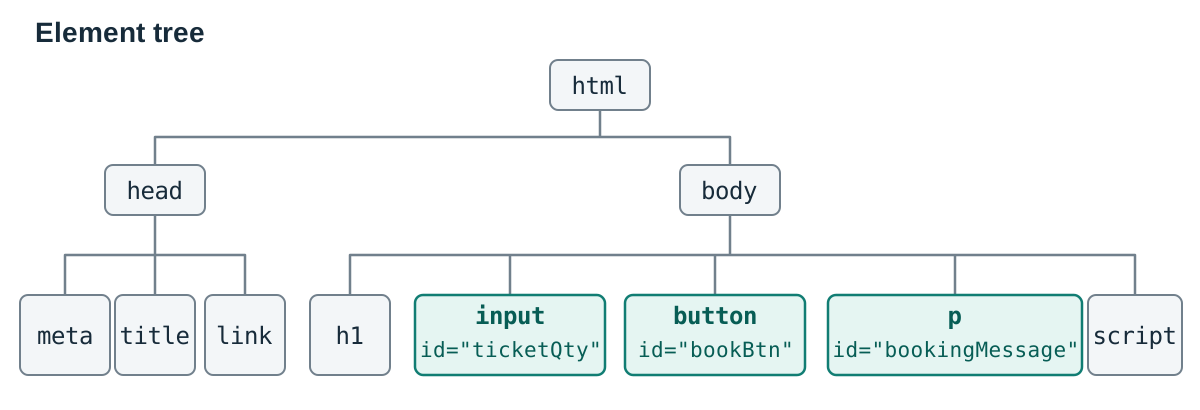
Form values are strings
Reading .value always returns a string. If the user types 5, .value is "5". Using + directly produces string concatenation ("5" + 3 = "53"). Explicitly convert with Number() before arithmetic.
Function references in event listeners
An event listener attaches an action to an event. In addEventListener("click", handleCalculation), pass the function identifier without parentheses. Writing handleCalculation() runs the function at once when the line is reached and hands its return value (undefined) to the listener, meaning nothing happens when the user clicks.
Database Integration: JSON and Dynamic Record Rendering
Applied Learning Task 1 (LO 3.3) requires displaying information from a database. Data with several fields per record is typically stored as an array of objects, where each object represents a row and each property represents a column.
let clubs = [
  { name: "Athletics", day: "Monday",  places: 12 },
  { name: "Coding",    day: "Tuesday", places: 0  },
  { name: "Debating",  day: "Friday",  places: 5  }
];

function showClubs() {
  let output = "";
  for (let i = 0; i < clubs.length; i++) {
    output += "<li>" + clubs[i].name + " (" + clubs[i].day + ") - "
            + clubs[i].places + " places left</li>";
  }
  document.getElementById("clubList").innerHTML = "<ul>" + output + "</ul>";
}
Where the Database Sits (LO 2.15)
A script executing in the browser cannot connect directly to a database:
- The browser sends an HTTP request to a web server (client–server model).
- The server-side script queries the relational database (using SQL) and returns results, typically formatted as JSON (JavaScript Object Notation).
- The browser's JavaScript parses the JSON into an array of objects and renders it into the DOM.
In coursework projects, you can simplify steps 1 and 2 by reading a local JSON file or defining a structured array, provided your written report documents this design decision clearly.
Testing Stages, Error Categories, and Test Data
Software testing verifies that an application functions correctly and satisfies user requirements (LO 2.19–2.22).
The Stages of Software Testing
Testing happens across three formal levels:
- Unit test: Testing a single module or function in isolation. Example: calling
calculateTotal(3, 8)directly to verify it returns24before wiring up HTML elements. - Function test: Testing an integrated feature end to end. Example: typing
3into the input, clicking the button, and confirming the correct message appears in the DOM paragraph. - System test: Testing the complete application against original requirements, including server communication and multi-browser compatibility.
In coursework reports, students often record user acceptance testing, where end users test the artefact against the initial requirements list (LO 3.1).
Error Categories
- Syntax error: Breaks language grammar rules (e.g. missing bracket). The program will not run at all.
- Runtime error: Code is syntactically legal, but crashes during execution. Examples include reading properties of
nullor calling non-existent functions. - Logic error: The script runs to completion without crashing, but computes the wrong result (e.g. incorrect operators, overwriting variables).
console.log() writes only to the browser's developer console, which the user never sees. It does not change the web page itself.
Test Data Selection
- Normal data: Typical expected inputs (e.g. mark = 65).
- Boundary data: Values at the edges of conditional thresholds (e.g. 39, 40, 79, 80 for grade boundaries 40 and 80). These test for
<versus<=bugs. - Invalid data: Out-of-bounds or unexpected entries (e.g.
"abc", empty inputs, negative numbers) to check validation handling.
Key terms
- JavaScript
- A high-level, interpreted, event-driven programming language that enables dynamic logic, calculations, and interactivity in web applications.
- Client-Side Execution
- The running of program code locally on the user's computer inside their web browser rather than remotely on a web server.
- DOM (Document Object Model)
- The browser's tree-structured object representation of an HTML document, allowing scripts to read, alter, add, or delete elements and content dynamically.
- Event Listener
- A procedure in JavaScript that waits for a specified event to occur (such as a click or keypress) and then triggers a designated callback function.
- Strict Equality (===)
- A comparison operator that evaluates whether two operands have identical values and identical data types without performing implicit type conversion.
- Modulo Operator (%)
- An arithmetic operator that returns the remainder left after dividing the left operand by the right, e.g. 17 % 5 is 2 and 2 % 5 is 2.
- console.log()
- A JavaScript command that prints messages or variable values directly to the browser's developer console for testing and debugging.
- Separation of Concerns
- A software design principle that divides a computer program into distinct sections, such as isolating HTML for structure, CSS for presentation, and JavaScript for computation.
- Recursive Function
- A function that solves a problem by calling itself with a smaller input, requiring a base case to terminate and a recursive case to make progress.
- JSON
- JavaScript Object Notation, a lightweight, text-based data interchange format commonly used to transmit structured data between servers and web applications.
- Unit Test
- The testing of individual software units or functions in complete isolation to verify that each operates correctly.
- Runtime Error
- An error that occurs while a syntactically legal program is executing, causing program execution to halt abruptly.
Check yourself
What are the distinct roles of HTML, CSS, and JavaScript on a web page?
HTML provides structure and content, CSS controls visual presentation and layout, and JavaScript provides programming logic, dynamic calculations, and interactivity.
Why does client-side JavaScript execution make web applications faster?
It runs locally on the user's device inside their browser, allowing immediate responses to clicks, typing, and validation without waiting for network communication with a server.
What is the result of evaluating 2 % 5 in JavaScript, and why?
2. The modulo operator returns the integer remainder after division. Five divides into 2 zero times, leaving the entire 2 as the remainder.
If let a = 4, what do ++a and a++ evaluate to when executed?
++a (pre-increment) increments first and evaluates to 5. In contrast, a++ (post-increment) evaluates to the current value 4 first, then increments a to 5.
Trace the output: let n = 10; while (n > 4) { console.log(n); n = n - 3; }
It prints 10 and 7. After logging 7, n becomes 4 (7 - 3). The condition 4 > 4 evaluates to false, so the loop terminates without printing 4 or entering another pass.
Write a JavaScript function isPass(mark) that returns true if the mark is 40 or higher, and false otherwise.
function isPass(mark) { return mark >= 40; } — comparison operators already produce Boolean values, so no conditional if statement is necessary.
Name the three stages of software testing in order and give one example of each.
Unit test (testing an isolated function like calculateTotal), function test (testing an entire feature end to end, such as button click to DOM display), and system test (evaluating the complete finished application against all user requirements).