
Design and graphics covers the systematic process of turning an initial brief into a finished product using sketches, working drawings, models, and prototypes. The Junior Cycle exam tests your ability to interpret dimensions, understand 2D and 3D drawings, and explain design factors like ergonomics and material choice.
The Engineering Design Process
Engineering design is a problem-solving loop where testing continually informs improvements.
- Design brief: clearly states the problem to be solved and outlines user needs.
- Research: gathers information to understand requirements and constraints.
- Design specification: lists the exact measurable requirements the product must meet.
- Brainstorming and sketching: generates creative solutions quickly using freehand sketches.
- Modelling: explores ideas and shapes at any scale using simple materials.
- Prototyping: produces the first full-size working version to test function.
- Working drawings: gives all views, dimensions, materials, and notes needed for manufacture.
- Project management: plans the task sequence, time estimates, and required tools.
- Testing and evaluation: checks performance against the specification to identify necessary modifications.
Factors Influencing Design and Materials
Every engineering product balances multiple design factors to achieve success.
- Design factors: products must balance function, appearance, cost, safety, ergonomics, manufacturing ease, and environmental impact.
- Material selection: choose materials by matching their properties and cost to the manufacturing method and product purpose.
- Material examples: aluminium is lightweight and corrosion-resistant, while mild steel provides structural strength.
- Sustainability: choose recyclable materials, reduce waste, and design parts for easy disassembly and repair.
- Justifying features: connect each design feature to a functional benefit, such as holes reducing weight or dissipating heat.
Ergonomics and Human Factors
Ergonomics is the study of designing products so they fit the user well, making them comfortable, efficient, and safe to use.
- Anthropometry: collection and use of human body measurements to determine product sizes, seat heights, and reach distances.
- Grip design: thick foam handles increase friction, prevent slipping, and spread pressure comfortably across the palm.
- User comfort: soft, non-slip grips assist users with limited dexterity or reduced hand strength.
- Accessibility: designs adapt products so children, older adults, and people with disabilities can use them safely.
Technical Drawing and CAD/CAM
Engineers communicate shapes and dimensions using standardised graphic conventions.
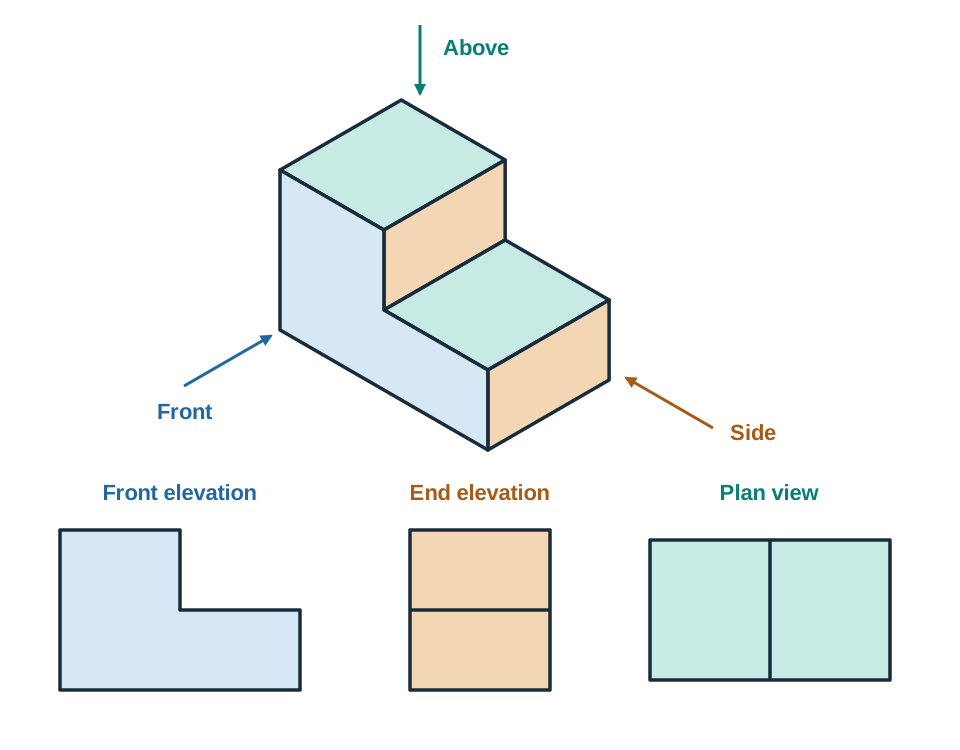
- Orthographic projection shows an object using separate flat, 2D views without perspective distortion.
| Orthographic View | Direction |
|---|---|
| Front elevation | View from the front |
| End elevation | View from the side |
| Plan view | View from directly above |
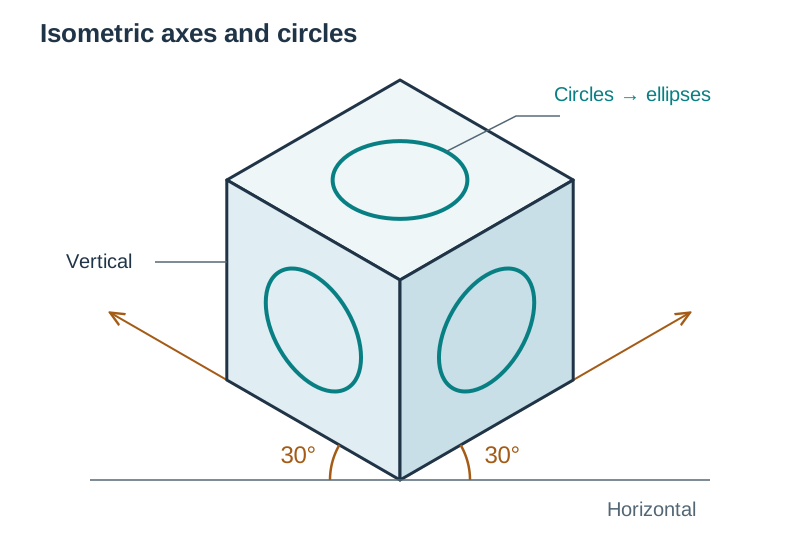
- Isometric projection uses vertical lines and axes drawn at to the horizontal.
- Circles on a rectangular block’s front, top and side faces appear as ellipses in an isometric drawing.
- Drawing dimensions always state true full-size measurements in millimetres.
| Line / Symbol | Meaning |
|---|---|
| Thick continuous line | Visible outline |
| Dashed line | Hidden detail |
| Thin chain line | Centreline |
| Diameter | |
| Radius |
- CAD software designs digital models that CAM machines manufacture using processes like 3D printing and laser cutting.
Key terms
- Design Brief
- A clear statement outlining the problem or user need that a design must solve.
- Design Specification
- A detailed list of measurable requirements and limits that the final product must meet.
- Prototype
- The first full-size, complete working item of a product used for testing and refinement before production.
- Model
- A representation of an idea or concept, often made from simple materials where scale is arbitrary.
- Working Drawing
- A technical drawing providing all dimensions, views, materials, and notes required to manufacture a part.
- Orthographic Projection
- A 2D drawing system representing an object using separate front elevation, end elevation, and plan views.
- Ergonomics
- The study of designing products to fit the user's physical capabilities, safety, and comfort.
- CAD
- Computer-Aided Design; software used to create, modify, and optimise precision 2D drawings and 3D models.
Check yourself
Which orthographic view represents an object when viewed from directly above?
The plan view.
At what angle to the horizontal are receding axes drawn in an isometric projection?
30 degrees.
Why is prototyping an important early step in the design process?
It identifies faults early and allows refinement of ideas, saving time and money before full manufacture.
What is the standard meaning of a thin chain line on a working drawing?
It represents a centreline or an axis of symmetry.
What branch of ergonomics deals with the measurement of human body dimensions?
Anthropometry.