
Information and Communication Technology (ICT) covers the digital tools you use to research, model, program, and communicate design work in Applied Technology. The Junior Cycle exam tests how you plan control sequences, test systems with simulation, and handle data responsibly.
Digital Research and Learning Logs
Digital tools let you gather dependable project information and share your progress across CBA 1, CBA 2, and the SEC project. Choose primary research, secondary research, or both to suit your question, and record your sources.
- Primary research gathers original data yourself through interviews, user questionnaires, or measuring real items.
- Secondary research collects existing facts from verified websites, textbooks, and manufacturer component catalogues.
- Always evaluate online information for bias, author credentials, and publication date before using it.
- You can present your CBA learning logs digitally as slide decks, recorded video clips, or audio podcasts.
- Respect copyright by crediting creators whenever you include downloaded circuit diagrams or technical images.
Modelling and Simulation
Simulation imitates a situation or process through mechanical, electrical or digital modelling. It helps test and refine designs during development. Testing your ideas on screen prevents wasted materials, flags dimension errors, and speeds up design refinement.
- CAD software lets you model parts in 2D or 3D to check that joints align before cutting acrylic, timber, or sheet metal.
- Circuit simulators check voltages and component ratings without frying real microcontrollers or LEDs.
- Digital models reveal collision problems early, such as a servo arm striking an enclosure wall.
- Simulation may miss real-world effects such as friction, loose joints or material flex, so check the design physically.
- A prototype is the first full-size, complete version of a product, used to test and refine its design.
Control Logic and Flowcharts
A controlled system is one whose components modify its behaviour so it behaves in a specified way. Every system relies on three linked stages: input, process, and output.
- In a programmable electronic example, inputs convert real-world changes into electrical signals using sensors like LDRs or switches.
- Process decisions happen inside a microcontroller programmed with step-by-step instructions.
- Outputs produce a physical action, such as a spinning motor, an illuminated LED, or a buzzing sounder.
- Put instructions in logical order. Include decisions and loops when the task requires them.
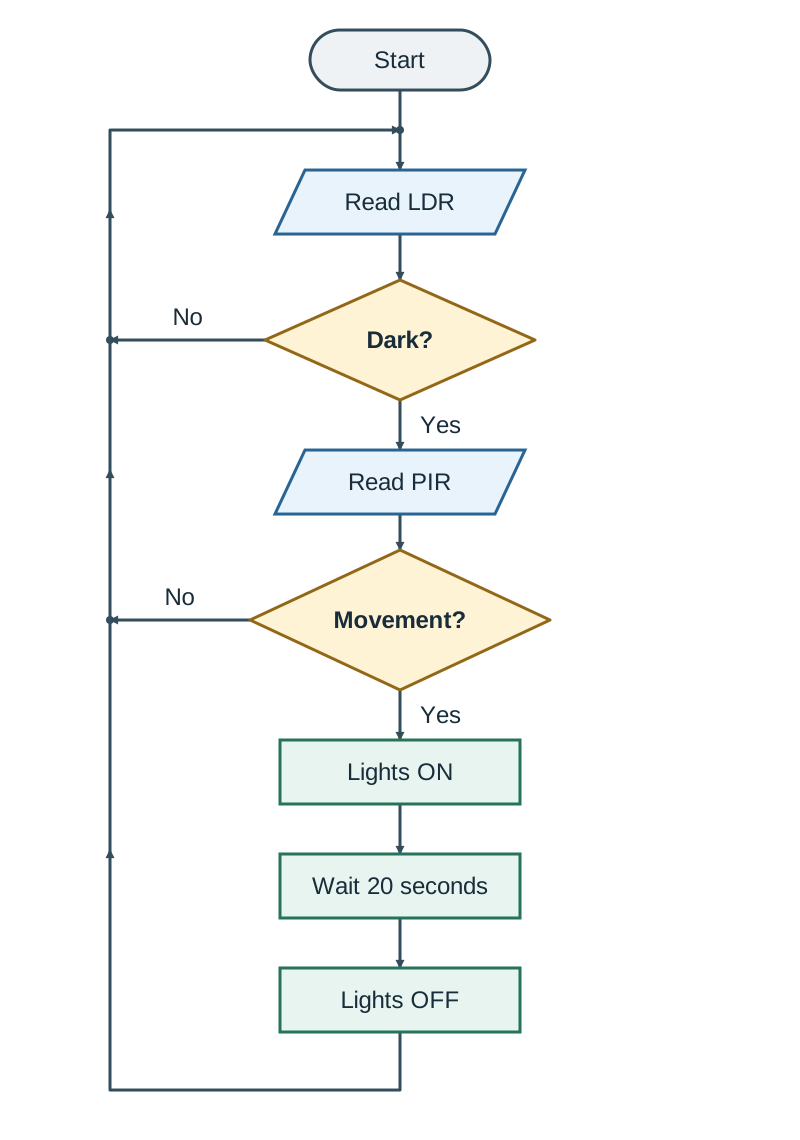
- Flowchart decision diamonds branch into paths where each branch must lead to a valid next step or end.
Emerging Tech and Data Security
Modern tools like 3D printing and smart sensors transform workshop projects, but they create new practical and ethical demands. When asked to discuss or evaluate a technology, weigh its benefits against its drawbacks.
- 3D printing produces intricate custom housings with minimal scrap, but failed prints create plastic waste, which can be difficult to recycle.
- Smart sensors cut electricity use by turning systems off automatically, yet replacing broken hardware adds to electronic waste.
- Cloud storage lets project partners share files anywhere, but weak passwords risk file loss or theft.
- Personal data covers any detail that identifies a living classmate, such as survey names, email addresses, or clear workshop photos.
- Protect user privacy by gathering only necessary survey details, storing files securely, and asking permission before filming.
Key terms
- Controlled system
- A system whose components modify its behaviour so it behaves in a specified way.
- Simulation
- The imitation of a process or mechanism using mechanical, electrical, or digital modelling.
- Prototype
- A prototype is the first full-size, complete version of a product, used to test and refine its design.
- Flowchart
- A diagram using standardised symbols to map out the logical sequence of control instructions.
- Microcontroller
- A small programmable integrated circuit that processes sensor inputs and triggers outputs.
- Personal data
- Any information that can identify an individual person, including names, contact details, and photographs.
Check yourself
What are the three main stages of any electronic control system?
Input, process, and output.
Which flowchart shape represents a question with Yes and No branches?
A diamond.
Why is a physical prototype tested after completing a 3D CAD simulation?
To test real-world material stiffness, weight, and friction that CAD tools can overlook.
Give one functional benefit and one environmental drawback of 3D printing.
It builds complex custom components rapidly, but misprints generate non-biodegradable plastic waste.