

Analogue vs Digital Data and Why Computers Use Binary
Physical phenomena in the natural world are continuous. Sound waves, ambient temperature and light levels change smoothly across an infinite range of values. In contrast, digital computer systems work with discrete values.
Continuous vs Discrete Data
- Continuous data can take any real numerical value within a given range and cannot be counted as separate individual steps (for example, the exact temperature of a room over time).
- Discrete data consists of distinct, separate, countable values with clear gaps between them (for example, the number of students in a classroom or the count of goals in a match).
Hardware Inputs
- Analogue inputs: Sensors such as a Light Dependent Resistor (LDR) or a thermistor produce a continuously varying electrical voltage.
- Digital inputs: Devices like push buttons or toggle switches produce only two distinct electrical states: open (0 V, logic 0) or closed (3.3 V or 5 V, logic 1).
Analogue-to-Digital Conversion (ADC)
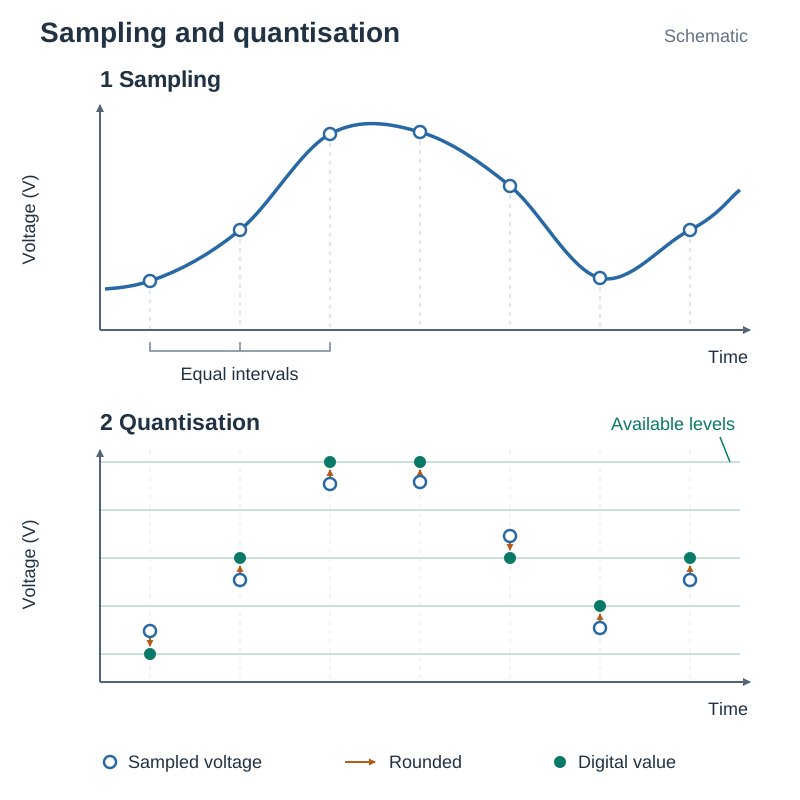
Computers cannot store continuous voltages directly. An Analogue-to-Digital Converter (ADC) measures a varying voltage and turns it into a discrete digital number using two steps:
- Sampling: The ADC reads the analogue signal at regular, fixed time intervals (for example, 100 times per second).
- Quantisation: The measured voltage is rounded to the nearest available digital step. Because values between steps are rounded, a tiny amount of precision is lost.
The number of discrete levels depends on the ADC resolution in bits. An ADC with bits provides unique values, from up to . For example, a 10-bit ADC (such as the analogue pins on a BBC micro:bit) yields possible integers, ranging from 0 to 1023. If a 10-bit pin runs on a 3.3 V supply and returns a reading of 512, the measured input voltage is approximately half the maximum: .
Why Computers Use Binary
Processors are built from millions of microscopic transistors that function as electronic switches. Each switch operates reliably in one of two physical states: on (conducting current at high voltage) or off (blocking current at low voltage). We label these states with the binary digits 1 and 0.
Using binary provides three key hardware benefits:
- Reliability and noise tolerance: Distinguishing between two widely separated voltage levels is simple and dependable. Small fluctuations in voltage or electrical noise do not alter a 1 to a 0 unless they cross a wide threshold.
- Hardware simplicity: Designing circuits and logic gates that check for two states requires far fewer components than building circuits that distinguish between ten distinct voltage levels.
- Flawless duplication: Binary data can be read, copied and transmitted across long distances without cumulative signal degradation.
Number Bases and Conversions
The base (radix) of a positional number system tells us how many unique symbols it uses. Digit values are determined by place-value columns that increase by powers of the base from right to left.
- Decimal (Base 10): Uses digits 0–9. Column weights are powers of 10 (, etc.).
- Binary (Base 2): Uses digits 0 and 1. Column weights are powers of 2 ().
- Hexadecimal (Base 16): Uses 16 symbols: 0–9 and A–F (where ). Column weights are powers of 16 ().
The Bits and Values Rule
A sequence of bits can represent unique values, from up to .
- 1 nibble (4 bits) gives values ().
- 1 byte (8 bits) gives values ().
Binary to Decimal
Multiply each bit by its column place value and sum the products. For the byte 10110100:
Decimal to Binary
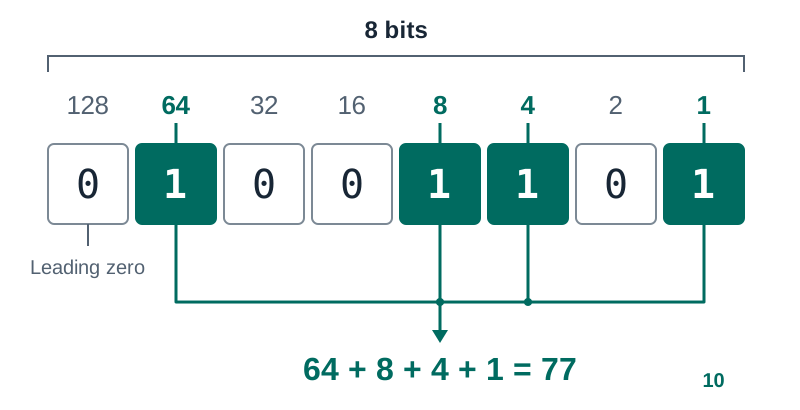
Method 1: Place-value subtraction. Compare the decimal value against descending powers of 2 (128 down to 1). If the number is greater than or equal to the column weight, record a 1 and subtract the weight; otherwise, record a 0.
Converting into an 8-bit byte:
- (leaves )
- (leaves )
- (leaves )
- (leaves )
Filling all 8 columns: .
Method 2: Repeated division by 2. Divide the number by 2 repeatedly, recording the integer quotient and the remainder. Read the remainders from bottom to top.
Converting to binary:
| Division | Quotient | Remainder |
|---|---|---|
| 60 | 1 | |
| 30 | 0 | |
| 15 | 0 | |
| 7 | 1 | |
| 3 | 1 | |
| 1 | 1 | |
| 0 | 1 |
Reading bottom to top gives 1111001. This is 7 bits long. Pad with a leading zero to form the full 8-bit byte: 01111001. Check: ✓
Quick try: Convert 45 to 8-bit binary. Answer: .
Python Implementation and Trace
We can write this division algorithm in Python:
def to_binary(n):
    bits = ""
    while n > 0:
        bits = str(n % 2) + bits
        n = n // 2
    return bits.zfill(8)
Here % computes the remainder, // performs integer division, and .zfill(8) pads the string with leading zeros.
Tracing to_binary(77):
| Iteration | n before | n % 2 | bits after prepend | n // 2 |
|---|---|---|---|---|
| 1 | 77 | 1 | "1" | 38 |
| 2 | 38 | 0 | "01" | 19 |
| 3 | 19 | 1 | "101" | 9 |
| 4 | 9 | 1 | "1101" | 4 |
| 5 | 4 | 0 | "01101" | 2 |
| 6 | 2 | 0 | "001101" | 1 |
| 7 | 1 | 1 | "1001101" | 0 |
The loop terminates. .zfill(8) prepends one leading zero to return "01001101".
Decimal to Hexadecimal
Method 1: Repeated division by 16. Divide the number by 16 and write down the remainder. Keep dividing the quotient by 16 until the quotient is 0. Read the remainders from bottom to top, writing 10–15 as A–F. (For numbers up to 255 this takes just one division: the quotient is the first digit and the remainder is the second.)
Convert to hexadecimal:
- remainder
- In hex, and
- Result:
Quick try: Convert 250 to hexadecimal. remainder . Since and , the answer is . Check: ✓
Method 2: Convert via binary. Convert the decimal number into binary first, split it into 4-bit nibbles, then convert each nibble to hex.
Hexadecimal to Decimal
Multiply each digit by its power of 16. For :
Quick try: Convert to decimal. .
Hexadecimal and Binary Relationships
Because , each hexadecimal digit corresponds to exactly four binary bits (one nibble). Hexadecimal is human-friendly shorthand that makes long strings of 1s and 0s easier to read, write and debug. The computer hardware always executes code in pure binary.
Hexadecimal Reference Table
| Hex | Binary | Decimal | Hex | Binary | Decimal |
|---|---|---|---|---|---|
| 0 | 0000 | 0 | 8 | 1000 | 8 |
| 1 | 0001 | 1 | 9 | 1001 | 9 |
| 2 | 0010 | 2 | A | 1010 | 10 |
| 3 | 0011 | 3 | B | 1011 | 11 |
| 4 | 0100 | 4 | C | 1100 | 12 |
| 5 | 0101 | 5 | D | 1101 | 13 |
| 6 | 0110 | 6 | E | 1110 | 14 |
| 7 | 0111 | 7 | F | 1111 | 15 |
Converting Between Hex and Binary
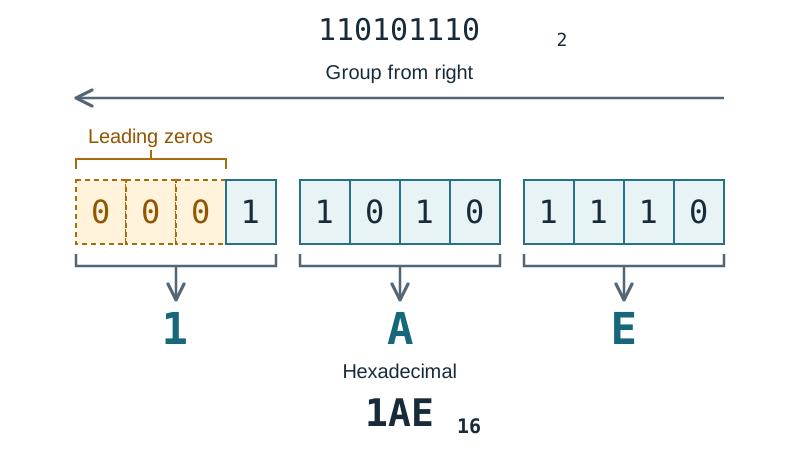
- Binary to Hexadecimal: Group bits into sets of 4 starting from the right (the least significant bit). Pad the leftmost group with leading zeros if it has fewer than 4 bits. Then replace each nibble with its hex symbol.
Example: 110101110 groups into 0001 1010 1110, which converts to .
- Hexadecimal to Binary: Replace each hex digit with its 4-bit binary equivalent.
Example: becomes 1100 0111 in binary.
Common Uses of Hexadecimal
- Web colours (RGB): 24-bit colours are written in CSS as
#RRGGBB. Each two-digit hex pair represents an 8-bit channel (). In#0A33F0, Red is , Green is , and Blue is . - Memory addresses: RAM locations (such as
0x7FFE04A2) are displayed in hex to keep diagnostic logs and memory dumps compact. - MAC addresses: Network cards carry permanent 48-bit hardware addresses written as six hex pairs (such as
00:1A:2B:3C:4D:5E).
Binary Addition and Overflow Error
Binary addition follows five basic rules, working right to left from the least significant bit:
- , carry into the next column (since )
- , carry into the next column (since )
Traced Addition:
In 8-bit binary: and .
| Column Weight | 128 | 64 | 32 | 16 | 8 | 4 | 2 | 1 |
|---|---|---|---|---|---|---|---|---|
| Carries | 1 | 1 | 1 | |||||
| Operand 1 (58) | 0 | 0 | 1 | 1 | 1 | 0 | 1 | 0 |
| Operand 2 (29) | 0 | 0 | 0 | 1 | 1 | 1 | 0 | 1 |
| Sum (87) | 0 | 1 | 0 | 1 | 0 | 1 | 1 | 1 |
Summing the active columns: ✓
Overflow Error
An overflow error occurs when the result of an arithmetic operation exceeds the maximum value that the allocated bit-width can store. For an 8-bit unsigned byte, the largest possible value is .
For example, adding and in an 8-bit system:
\begin{array}{r@{\quad}l@{}l} & 11001000_2 & (200_{10}) \\ + & 01100100_2 & (100_{10}) \\ \hline 1 & 00101100_2 & (300_{10}) \end{array}Because the byte can hold only 8 bits, the 9th bit (the carry out of the column) is discarded. The stored byte reads 00101100, which equals 44 instead of 300.
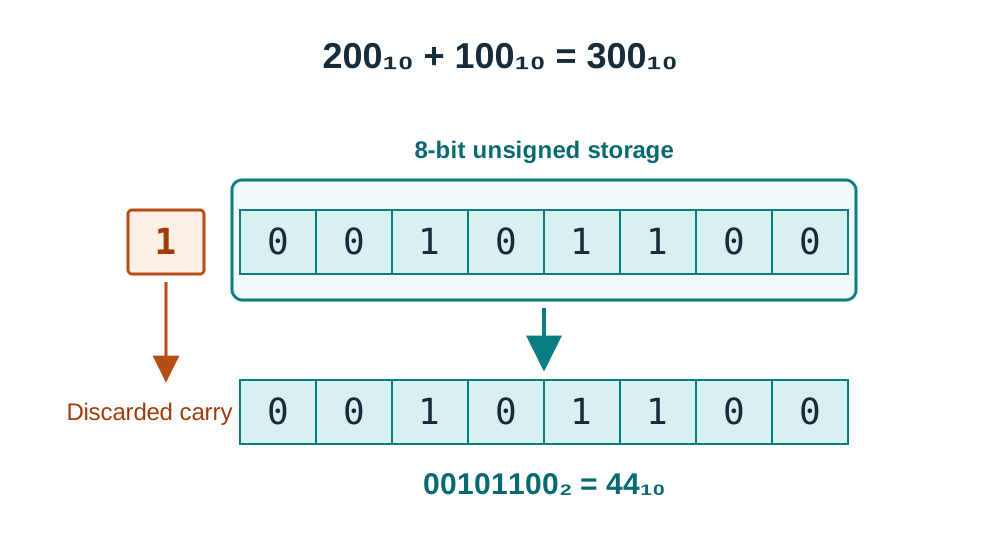
In Python, integers have arbitrary precision and expand automatically, so 200 + 100 correctly evaluates to 300. Overflow occurs in environments where the bit-width is fixed by hardware, such as microcontroller registers, C variables, or fixed sensor buffers.
Character Encoding Standards: ASCII and Unicode
Computers store characters as numbers. A character encoding standard maps each character to an agreed numeric code.
Why Character Standards Matter
- Interoperability: Text created on one computer must appear identically on any other device, operating system or software program. This requires universal agreement on which number represents which character.
- Preventing corrupted text: When sender and receiver use different encodings, characters display as garbled symbols (known as mojibake, such as
áreplacingá). - Global communication: A shared worldwide standard allows software to display multiple languages (Irish, Arabic, Chinese) and modern symbols in the same document.
ASCII (American Standard Code for Information Interchange)
Standard ASCII uses 7 bits to represent 128 characters (codes 0 to 127):
- Uppercase letters:
'A'= 65 through'Z'= 90 - Lowercase letters:
'a'= 97 through'z'= 122 - Digit characters:
'0'= 48 through'9'= 57 (the character'7'is code 55, not value 7) - Control characters: Enter (13), Backspace (8), Escape (27)
ASCII characters are stored inside an 8-bit byte with the most significant bit set to 0. A lowercase letter's code is always 32 higher than its capital ('a' - 'A' = 97 - 65 = 32).
Extended ASCII uses all 8 bits ( characters). Codes 128–255 include accented vowels (like Irish fadas: á, é, í, ó, ú). However, different countries used conflicting extended code pages, making international file sharing unreliable.
Decoding an ASCII Message
To decode a binary ASCII stream, split the bits into 8-bit bytes, convert each byte to decimal, and look up the character.
Decode 01001000 01101001:
- First byte:
01001000 - Second byte:
01101001 - Result:
"Hi"
Unicode and UTF-8
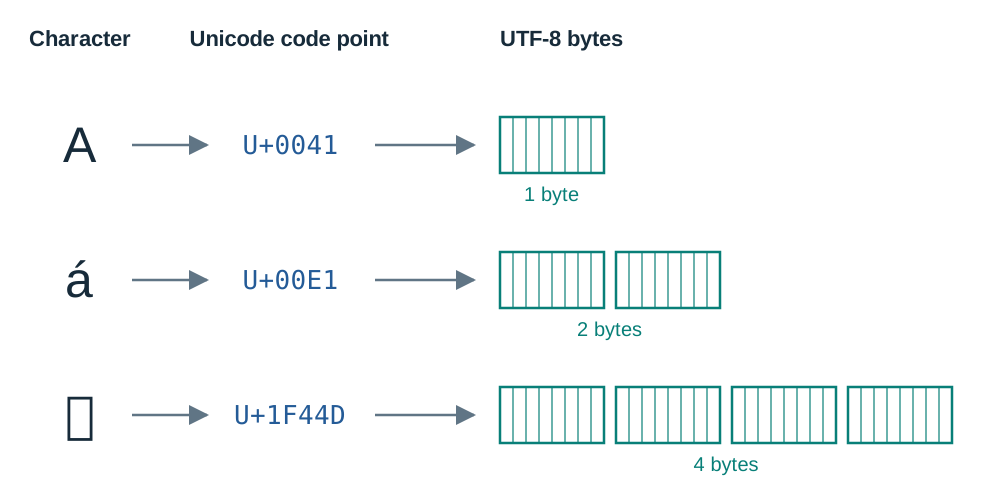
Unicode is a character set that assigns every character across every human writing system a unique identification number called a code point. Code points are written in hexadecimal prefixed by U+:
'A'=U+0041(, identical to ASCII)'á'=U+00E1()- 👍 =
U+1F44D()
UTF-8 is the variable-length encoding format used to store those code points in memory as bytes:
| Character Type | UTF-8 Storage Size |
|---|---|
Standard English letters (e.g. 'A') | 1 byte |
Accented Latin letters and scripts such as Greek, Cyrillic and Arabic (e.g. 'á') | 2 bytes |
| Most Chinese and Japanese characters (e.g. 中) | 3 bytes |
| Emojis (e.g. 👍) | 4 bytes |
Exam Comparison: ASCII vs Unicode
- Memory Usage: ASCII uses a fixed 7 or 8 bits per character, making it compact but limited to 128 (or 256) characters. Unicode (UTF-8) uses a variable width of 1 to 4 bytes per character. English text uses the same memory as ASCII (1 byte), but other languages and emojis consume more memory (2–4 bytes per character).
- Compatibility: Unicode is backward-compatible with ASCII because its first 128 characters are identical to ASCII. A plain ASCII file is directly readable as UTF-8. Unicode provides global compatibility by supporting all writing systems.
Data Types and Practical Python Operations
High-level programming languages provide abstract data types so programmers do not have to manage raw memory bits directly.
Standard Data Types and Python Equivalents
| Syllabus Data Type | Description | Python Equivalent | Example |
|---|---|---|---|
| Boolean | Truth value: True or False | bool | is_active = True |
| Integer | Whole number without fraction | int | count = 42 |
| Real | Number with fractional parts | float | price = 19.99 |
| Char | Single character | No separate type: str of length 1 | grade = 'A' |
| String | Ordered text sequence | str | name = "Leaving Cert" |
| Array | Ordered indexed collection | list | scores = [10, 20, 30] |
| Date | Calendar date representation | datetime.date | date(2027, 6, 4) |
Type Conversion (Casting) in Python
In Python, the input() function always returns a string. Mixing raw input with a number, such as age_text + 1, causes a TypeError. Adding two raw inputs does not cause an error: it joins them as text ('5' + '3' gives '53'). Convert with int() or float() before doing arithmetic. Variables must be explicitly cast to the appropriate type:
age_text = input("Enter your age: ")
age = int(age_text)  # explicit casting to integer
next_year = age + 1
Storing values in the wrong data type (such as recording a price as '€10' instead of a numeric float 10.00) causes data inconsistencies and stops algorithms from performing calculations.
Built-in Python Conversion Tools
ord('A')returns65(gets the integer code for a character).chr(97)returns'a'(gets the character for an integer code).bin(77)returns'0b1001101'(converts decimal integer to binary string).hex(201)returns'0xc9'(converts decimal integer to hexadecimal string).int('C9', 16)returns201(converts a hex string to base 10).int('01111001', 2)returns121(converts a binary string to base 10).format(121, '08b')returns'01111001'(formats an integer as an 8-bit binary string padded with leading zeros).
Number Systems: Binary, Decimal, and Hexadecimal Conversions
While computers store and compute entirely in binary, programmers often write values in hexadecimal (base 16) because it is much more compact. One hexadecimal digit represents a 4-bit binary group (a nibble). This makes values easier to read, quicker to write, and less prone to manual transcription errors. Hexadecimal is widely used for RGB colour codes (such as #FF0000 for red), MAC addresses, and memory locations.
Hexadecimal uses digits 0–9 and letters A–F, where .
1. Decimal to Binary
Repeatedly divide the decimal number by 2 and note the integer remainders. Read the remainders from bottom to top (most significant bit to least significant bit).
Example: Convert to binary:
Reading bottom to top gives (or padded to an 8-bit byte: 00110101).
2. Binary to Hexadecimal
Group the bits into sets of four starting from the right (least significant bit). Pad the leftmost group with leading zeros if it has fewer than four bits. Convert each nibble into its hexadecimal character.
Example: Convert to hexadecimal:
- Split into nibbles:
1101and1011 - Left nibble:
- Right nibble:
- Result:
3. Hexadecimal to Binary
Replace each hexadecimal character with its direct 4-bit binary equivalent.
Example: Convert to binary:
- Combine the nibbles:
4. Hexadecimal to Decimal
Multiply each digit by its power of 16 () from right to left and add the products.
Example: Convert to decimal:
5. Decimal to Hexadecimal
Divide the decimal number by 16 repeatedly, writing remainders in hex notation from bottom to top.
Example: Convert to hexadecimal:
- remainder ()
- remainder ()
- Result:
Key terms
- Bit
- The smallest unit of data in computing, holding a single binary state of 0 or 1.
- Byte
- A group of 8 bits capable of representing 256 distinct values ().
- Nibble
- A group of 4 binary bits, which corresponds to exactly one hexadecimal digit.
- Hexadecimal
- A base-16 positional number system using digits 0–9 and letters A–F, used as a human-readable shorthand for binary.
- Overflow Error
- An error that occurs when an arithmetic calculation produces a result exceeding the maximum value that the allocated bit-width can hold.
- ASCII
- A 7-bit character encoding system assigning numbers from 0 to 127 to English letters, digits, punctuation and control codes.
- Unicode
- A universal character set that assigns a unique hexadecimal code point to every character across all human writing systems and emojis.
- UTF-8
- A variable-length encoding format using 1 to 4 bytes per character to store Unicode code points, fully backward-compatible with ASCII.
- Continuous Data
- Data that can take any real value within a continuous range, such as temperature, sound or analogue voltage.
- Discrete Data
- Data that consists of separate, distinct, countable values with clear steps between them.
- Analogue-to-Digital Converter (ADC)
- A hardware component that samples a continuously varying analogue voltage and converts it into a discrete digital number.
Check yourself
How many bits are needed to give 200 students each a unique binary ID?
8 bits. 7 bits can only represent 2^7 = 128 values, which is too few. 8 bits represent 2^8 = 256 values, which is sufficient for 200 students.
Convert the hexadecimal number 1F44D into binary, and identify its significance in character encoding.
0001 1111 0100 0100 1101. (1 = 0001, F = 1111, 4 = 0100, 4 = 0100, D = 1101). In Unicode, U+1F44D is the code point for the thumbs-up emoji (👍).
Why does adding 200 and 100 in an 8-bit unsigned hardware register cause an overflow error?
An 8-bit unsigned register can only hold values from 0 up to 2^8 - 1 = 255. The sum 300 produces a 9-bit binary result (100101100_2); the 9th bit is lost, leaving the register with the incorrect truncated value 44.
Why is UTF-8 described as being backward-compatible with ASCII?
The first 128 character codes in UTF-8 (values 0 to 127) are identical to 7-bit ASCII, meaning any existing ASCII file is already a valid UTF-8 file.
What is the reading range of a 10-bit ADC, and what voltage does a reading of 512 represent on a 3.3 V reference pin?
A 10-bit ADC provides 2^10 = 1024 discrete steps, ranging from 0 to 1023. A reading of 512 represents approximately half the reference voltage: 3.3 V * (512 / 1023) ≈ 1.65 V.